


Written by Mo Kahn on
March 12, 2026


Transform your existing photos into fresh, captivating masterpieces using the power of AI image remix for free. The digital landscape in 2026 demands constant visual innovation. Creators, marketers, and artists often find themselves needing fresh visuals but lack the time or resources to shoot new photos or paint new concepts from scratch. This is where an AI image remix changes the game. By leveraging the advanced capabilities of starryai, you can take a single input image and reimagine it in infinite ways. Whether you want to completely overhaul the art style or just tweak a few details, starryai makes the process seamless, intuitive, and accessible to everyone. \
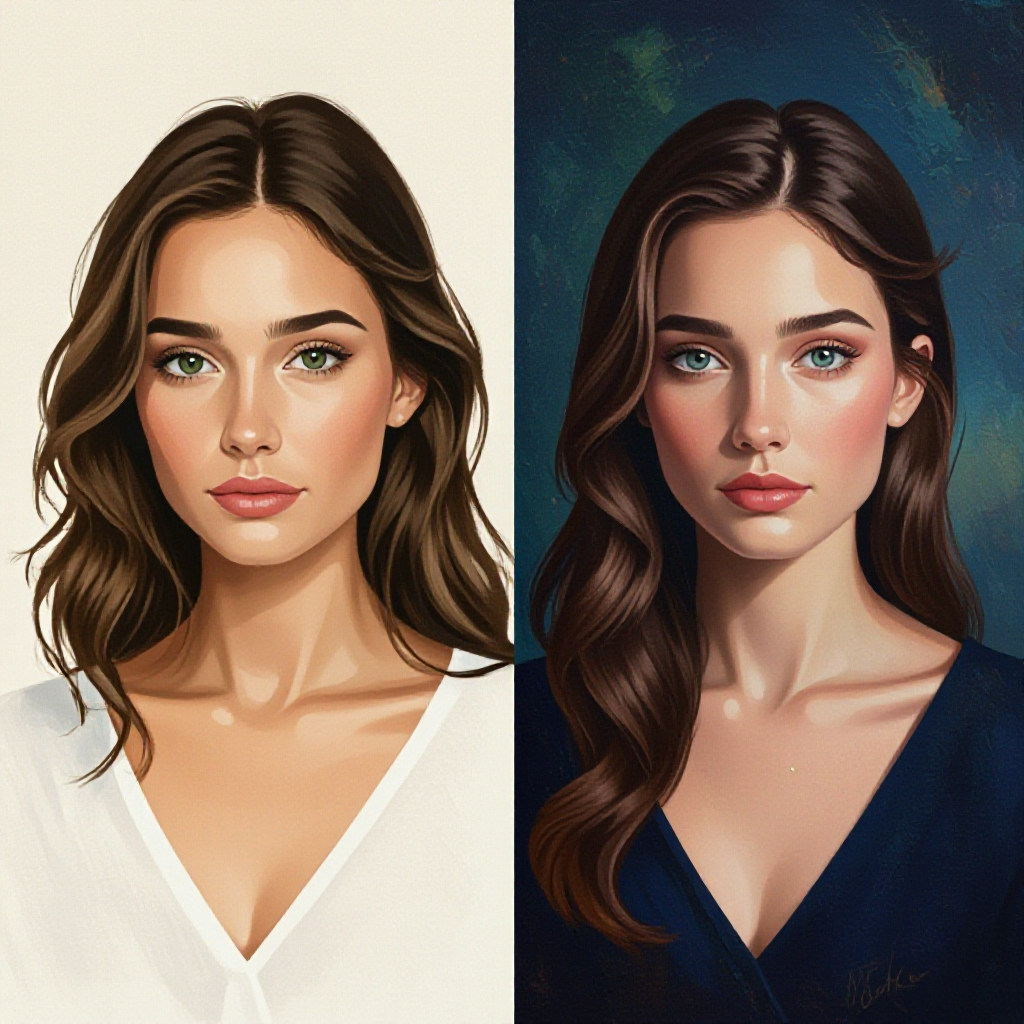
At its core, an AI image remix is the process of using artificial intelligence to alter, enhance, or completely transform an existing image based on specific parameters or text prompts. Unlike standard text-to-image generation, which starts from a blank canvas, remixing uses an initial picture as a foundational blueprint. The AI analyzes the composition, the subject matter, the lighting, and the depth of your original file, and then applies new styles or elements while preserving the core structure. In 2026, the technology behind AI image remix tools has reached unprecedented levels of sophistication. In the past, altering an image meant spending hours in complex photo editing software, carefully masking out subjects, adjusting color balances, and painting in new elements by hand. Today, starryai condenses that entire workflow into a few simple clicks. You can turn a basic pencil sketch into a photorealistic architectural render, or transform a mundane smartphone photo of a pet into a majestic oil painting. The beauty of an AI image remix lies in its versatility. It bridges the gap between raw photography and imaginative digital art. It empowers users who might not have formal artistic training to execute complex visual ideas. For professionals, it acts as a rapid prototyping tool, allowing them to visualize different directions for a project before committing to a final path. With starryai, this entire universe of creative potential is available for free, giving you the freedom to experiment without financial barriers. \
To truly master the art of the AI image remix, it is essential to understand the underlying mechanics of how starryai processes your requests. There are four main pillars that dictate the success and direction of your remixed creations: variations, style transfer, prompt-based reinterpretation, and safe workflows.
Exploring Variations
The concept of variations is fundamental to the AI image remix. When you feed an image into starryai, the platform does not just give you one rigid output. Instead, it offers the ability to generate multiple interpretations of your original concept. This is incredibly useful when you have a clear subject but are unsure of the exact mood or atmosphere you want to achieve. For instance, if you upload a picture of a cozy cabin in the woods, requesting variations might yield one image where the cabin is bathed in golden hour sunlight, another where it is surrounded by a gentle winter snowfall, and a third featuring a moody, overcast autumn sky. Variations allow you to explore the latent space of your image. You are not changing the core identity of the cabin; you are simply exploring different aesthetic possibilities within the same conceptual framework. starryai excels at providing these subtle yet impactful variations, giving you a wealth of options to choose from.
The Magic of Style Transfer
Style transfer is perhaps the most visually striking aspect of an AI image remix. This process involves taking the structural elements of your input image and completely redrawing them in a different artistic style. starryai offers a vast library of styles to choose from, ranging from classic art movements to modern digital aesthetics. You can take a standard portrait photograph and apply a cyberpunk style transfer, turning the subject into a futuristic cyborg surrounded by neon lights. Alternatively, you could apply a watercolor style to a landscape photo, giving it a soft, painterly feel. The strength of starryai lies in its ability to understand the content of the original image and apply the new style intelligently. It knows that a face is a face, a tree is a tree, and it alters the textures and colors while maintaining the recognizable shapes. This makes style transfer an incredibly powerful tool for breathing new life into old or generic images.
Prompt-Based Reinterpretation
While styles and variations are powerful, prompt-based reinterpretation is where you take full control of the AI image remix process. starryai allows you to pair your input image with a detailed text prompt. This tells the AI exactly how you want the image to be altered. If you upload a photo of a plain sports car and add the prompt "a futuristic hover car flying through a cyberpunk city, neon glowing lights, cinematic lighting," starryai will use the shape and perspective of the original car as a guide, but will actively change the details to match your words. It will remove the wheels, add glowing thrusters, and replace the background with a sprawling metropolis. Prompt-based reinterpretation is what makes the AI image remix truly interactive. It is a collaborative process between your imagination and the neural network of starryai.
Establishing Safe Workflows
In 2026, as AI tools become more integrated into professional pipelines, establishing safe workflows for your AI image remix projects is crucial. A safe workflow ensures that you are protecting your original assets, maintaining brand consistency, and avoiding common pitfalls like over-processing. When using starryai, a safe workflow begins with always keeping an unaltered backup of your original input image. As you experiment with different prompts and styles, it is easy to stray far from your initial vision. Having the original file allows you to start fresh if needed. Additionally, a safe workflow involves iterative testing. Instead of pushing the remix strength to the maximum immediately, make gradual adjustments. This allows you to monitor how the AI is interpreting your image and make course corrections before the final output becomes unrecognizable. starryai is designed to support these safe workflows by providing clear controls and consistent results. \

Getting started with your first AI image remix is a straightforward process. starryai has streamlined the user interface to ensure that you can go from concept to creation in minutes. Here is a detailed, step-by-step guide to transforming your images.
Step 1: Upload Your Base Image
The journey begins by selecting the image you want to transform. Log into starryai and navigate to the creation dashboard. Locate the option to upload an initial image. This image will serve as the foundation for your remix. Choose a high-quality file with clear subjects and distinct lighting, as this will give the AI the best possible data to work with.
Step 2: Choose Your Style or Model
Once your image is uploaded, you have the option to select an overarching style or AI model. starryai provides a diverse range of options, including hyper-realistic, anime, fantasy art, and 3D render styles. Selecting a style gives the AI a general direction for the aesthetic of your remix. If you prefer to rely entirely on your text prompt, you can choose a neutral or standard model.
Step 3: Craft Your Remix Prompt
This is the most critical step in the AI image remix process. In the text prompt box, describe exactly what you want to see in the final image. Be specific about the subject, the environment, the lighting, and the mood. Remember that the AI will try to blend your prompt with the visual information from your uploaded image. For example, if you uploaded a photo of a dog and want to turn it into an astronaut, your prompt should clearly state "a dog wearing a detailed astronaut suit, floating in outer space, stars in the background."
Step 4: Adjust Strength and Settings
starryai gives you control over how heavily the AI should remix your original image. This is often referred to as image strength or init strength. A high strength means the final output will closely resemble your uploaded photo, with only minor stylistic changes. A low strength gives the AI more freedom to deviate from the original and rely more heavily on your text prompt. Finding the right balance is key to a successful AI image remix. Take the time to tweak these settings to match your specific goals.
Step 5: Generate and Download for Free
After you have finalized your prompt and settings, click the generate button. starryai will process your request and produce your new, remixed artwork. Within moments, you will be presented with a stunning transformation. From there, you can easily download your creation in high resolution for free, ready to be shared or used in your projects. \
The applications for an AI image remix are vast and varied. Individuals and businesses across numerous industries are leveraging starryai to streamline their creative processes and produce compelling visuals. Here are some of the most popular and effective use cases.
Content Refresh for Blogs and Social Media
Content creators are constantly under pressure to produce fresh visuals for their blogs and social media channels. Reusing the same stock photos or product shots can quickly lead to audience fatigue. An AI image remix offers a perfect solution for a content refresh. You can take an older, successful image from a past campaign and run it through starryai to give it a completely new aesthetic. A standard flat-lay photo of a coffee cup can be remixed into a vibrant, pop-art illustration for an Instagram post, or a moody, cinematic shot for a blog header. This allows you to recycle your best assets while keeping your visual feed dynamic and engaging. The ability to do this for free with starryai makes it an invaluable tool for independent creators and small businesses.
Developing High-Converting Ad Creatives
In the world of digital marketing in 2026, A/B testing different visual creatives is essential for optimizing ad campaigns. However, organizing multiple photoshoots to test different concepts is expensive and time-consuming. The AI image remix allows marketers to generate dozens of ad variations from a single base photo. If you are advertising a new pair of sneakers, you can take one clear product photo and use starryai to remix it into various environments. You can generate one version where the sneakers are on a slick, neon-lit city street, another where they are on a rugged mountain trail, and a third in a pristine, futuristic studio setting. By testing these different AI image remix variations, marketers can quickly identify which aesthetic resonates most with their target audience, leading to higher conversion rates and a better return on investment.
Accelerating Concept Art Iterations
For concept artists working in the entertainment or gaming industries, iterating on designs is a core part of the job. An art director might like the general shape of a character sketch but want to see it in different armor styles or lighting scenarios. Traditionally, this would require the artist to redraw the character multiple times. With starryai, the artist can upload their initial sketch and use an AI image remix to instantly generate iterations. They can prompt the AI to apply "heavy sci-fi mech armor" or "traditional fantasy leather gear" to the base sketch. This rapid prototyping allows the art team to explore a wider range of ideas in a fraction of the time. It does not replace the artist; rather, it acts as a powerful assistant that speeds up the brainstorming and iteration phases of production.
Elevating Personal Branding
Personal branding has never been more important. Whether you are a freelancer, an executive, or an influencer, having a standout profile picture can make a significant difference in how you are perceived online. Standard headshots can sometimes feel stiff or generic. An AI image remix allows individuals to inject personality into their professional portraits. You can take a standard headshot and use starryai to apply a subtle painted effect, a striking duo-tone color palette, or even place yourself in an abstract, creative environment. This helps your profile stand out on platforms like LinkedIn or Twitter while still maintaining a professional appearance. \
While starryai makes the process incredibly user-friendly, there are several advanced techniques you can use to elevate your AI image remix results from good to exceptional.
Keeping Aspect Ratios Consistent
One of the most important factors in a successful remix is managing your aspect ratios. If you upload a wide, panoramic landscape photo and attempt to remix it into a tall, vertical portrait format without cropping it first, the AI may struggle to interpret the space correctly, leading to distorted or stretched results. Always ensure that the output settings in starryai match the aspect ratio of your input image, or crop your input image beforehand to match your desired final format.
Balancing Prompt Weight Versus Image Weight
Understanding the delicate balance between your text prompt and your base image is the secret to a perfect AI image remix. If you want the final result to look very similar to your uploaded photo, you need to decrease the prompt weight and increase the image strength. Conversely, if you want the AI to take massive creative liberties based on your text, you must lower the image strength. Do not be afraid to run multiple generations, tweaking these sliders slightly each time, until you find the exact balance that brings your vision to life.
Utilizing Negative Prompts for Cleaner Results
Negative prompts are just as important as positive ones when using starryai. A negative prompt tells the AI exactly what you do not want to see in the final image. When doing an AI image remix, the AI might sometimes introduce unwanted artifacts or misinterpret parts of the original image. For example, if you are remixing a portrait and the AI keeps adding strange hats, you can add "hats, headwear, distorted faces, blurry details" to the negative prompt section. This forces the AI to avoid those elements, resulting in a much cleaner and more accurate final image.
Even with the best tools, it is easy to fall into certain traps when experimenting with an AI image remix. Being aware of these common mistakes will save you time and frustration.
The Danger of Over-Remixing
The most frequent mistake users make is over-remixing their images. This happens when the image strength is set too low and the prompt is too aggressive, causing the AI to completely overwrite the original input. The result is an image that has lost all connection to the base file and often looks chaotic or deep-fried. The goal of a remix is transformation, not obliteration. Always start with a moderate image strength and only lower it if you specifically need more deviation from the source.
Using Conflicting Prompts and Base Images
Another common issue arises when the text prompt directly contradicts the fundamental structure of the base image. If you upload a tight close-up of an apple and use the prompt "a sprawling, vast mountain range at sunset," the AI will struggle to reconcile the round shape of the apple with the vast landscape you requested. The best AI image remix results occur when your prompt works in harmony with the existing composition, enhancing or altering it rather than fighting against it.
Ignoring Resolution and Quality Settings
Never underestimate the importance of input quality. If you feed starryai a low-resolution, heavily compressed JPEG, the resulting AI image remix will likely amplify those flaws. The AI needs clear pixel data to understand the shapes and textures it is supposed to be transforming. Always start with the highest quality original image you have available. Similarly, ensure you are utilizing the high-resolution output options within starryai to get crisp, professional-grade results. \
Navigating the world of AI art can sometimes be confusing. Here are answers to some of the most frequently asked questions about the AI image remix process using starryai.
1. What exactly is an AI image remix?
An AI image remix is a process where you upload an existing photo or drawing into an AI tool like starryai, and the AI transforms it into a new piece of art based on your selected styles or text prompts. It uses your original image as a structural guide rather than starting from scratch.
2. Is the starryai image remix feature really free?
Yes, starryai allows users to experience the power of the AI image remix for free. You can upload your images, experiment with different styles and prompts, and generate high-quality transformations without needing an immediate subscription, making it highly accessible for everyone.
3. Do I need to be an artist to use the AI image remix tool?
Absolutely not. The intuitive design of starryai in 2026 means that anyone, regardless of their artistic background, can create stunning visuals. The AI handles all the complex rendering and styling; you simply provide the vision through your base image and text prompts.
4. Can I use an AI image remix for commercial purposes?
Yes, you can use your remixed images for commercial projects such as ad creatives, blog posts, and marketing materials. starryai is designed to support creators and businesses in producing high-quality assets for their professional needs.
5. Why does my remixed image look distorted or blurry?
Distorted results usually occur when the input image is of very low quality, or when there is a severe conflict between the base image and the text prompt. Ensure you are using high-resolution base images and that your prompts complement the existing structure of the photo. Also, check that your aspect ratios align correctly.
6. How do I keep my original subject recognizable during a remix?
To keep your subject recognizable, you need to maintain a high image strength setting in starryai. This tells the AI to prioritize the visual data from your uploaded photo over the text prompt, ensuring that the core identity of the subject remains intact while the style changes.
7. What is the difference between an AI image remix and standard photo editing?
Standard photo editing involves manually altering specific pixels, adjusting color curves, or patching out blemishes. An AI image remix is a generative process where the AI completely redraws the image based on its understanding of your prompt and the original file, allowing for massive stylistic transformations that would take hours to do manually.
8. Can I remix an image multiple times?
Yes, iterative remixing is a fantastic technique. You can take an image generated by starryai, download it, upload it again as a new base image, and remix it further. This allows you to refine specific details or layer multiple styles to achieve a truly unique final result.

The ability to execute an AI image remix effortlessly is one of the most exciting developments in digital creativity for 2026. It democratizes the artistic process, allowing anyone to turn a simple photograph into a captivating work of art. By understanding the mechanics of variations, style transfers, and prompt weighting, you can unlock infinite creative possibilities. starryai provides the perfect, free platform to explore these tools safely and efficiently. Whether you are refreshing old blog content, iterating on ad creatives, or simply having fun exploring new aesthetics, the power to transform your visual world is now at your fingertips. Dive in, upload an image, and start remixing today.








.svg)