


Written by Mo Kahn on
August 1, 2026


Generative art is art where the artist sets the rules or parameters, and a system, often a computer or AI model, carries out the creative decisions. That's why a single prompt, a seed, or a code script can produce many different outcomes, yet still feel like one artistic family.
You might be looking at an AI image on your phone right now and wondering why it feels different from a hand-drawn illustration. The short answer is that generative art hands part of the making process to a system, while the artist shapes the system's behavior.
A creator opens a tool, types a prompt, nudges a few settings, and gets back something surprising. That surprise is the point. Generative art is what happens when the artist designs the rules, then lets a system make some of the choices.
Think of it as a collaboration between human intention and machine execution. The artist decides the frame, such as a prompt, a color rule, a geometry system, or a model input, and the system generates the result inside those boundaries. That's why a generative piece can feel consistent in style while still producing variations every time you run it.
A useful example is the familiar starryai-style workflow, where a creator starts with text, a selfie, or an emoji, chooses a style, and lets the model generate options. The artist isn't drawing each line by hand. The artist is directing the system, then selecting from what it produces.
Practical rule: if the creator sets the logic and the system fills in the decisions, you're in generative art territory.
That distinction matters because people often use “AI art” and “generative art” as if they're the same thing. They're related, but not identical. You'll leave this guide with a clear mental model, a short history, the main technical methods, examples of where the approach shows up in real work, and a practical way to start making pieces yourself.
Generative art feels modern because people meet it through apps, but its logic is much older than screens. One early anchor comes from Blombos Cave in South Africa, where engraved ochre stones dated to at least 70,000 BCE show repeated crosshatch designs that point to rule-based mark-making long before digital tools existed, according to a historical overview of the field. That matters because it frames generative thinking as a human habit, not a software trend.
The modern art-historical branch sharpened in the 1950s and 1960s, when thinkers like Max Bense treated art as a system of ordered variation, and artists such as Georg Nees and Frieder Nake began exploring computer-assisted drawing and plotter output. In this lineage, the artist still makes the aesthetic decisions, but the machine handles execution and variation.
A widely recognized public milestone arrived in February 1965, when Georg Nees staged what is described as the first public exhibition of computer-generated art in Stuttgart, and another account places the first curated generative-art exhibition there in the same year. A few years later, Cybernetic Serendipity at the Institute of Contemporary Arts in London brought the work to a much wider audience, with 130+ contributors and a reported 40,000–60,000 visitors. For a field that had lived in labs and specialist circles, that was a decisive public moment, as documented in the historical record of generative art's rise to visibility. A whirlwind history of generative art
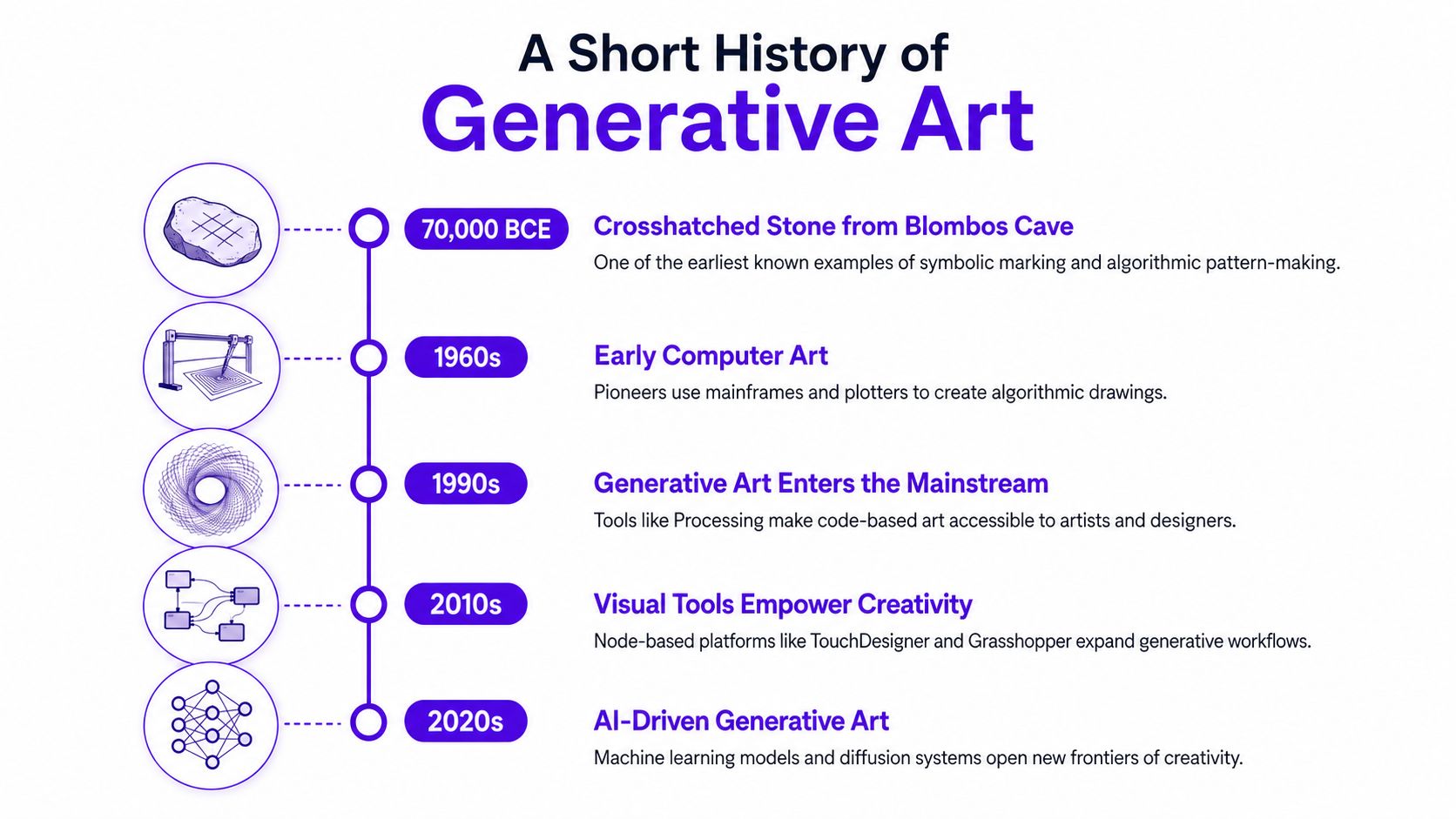
The point of this timeline is simple. Generative art didn't begin with chatbots or image models. It began with systems, rules, and controlled randomness, then moved from physical marks to plotters, software, and now AI image tools. That's why today's diffusion-model apps sit on the same family tree rather than replacing it.
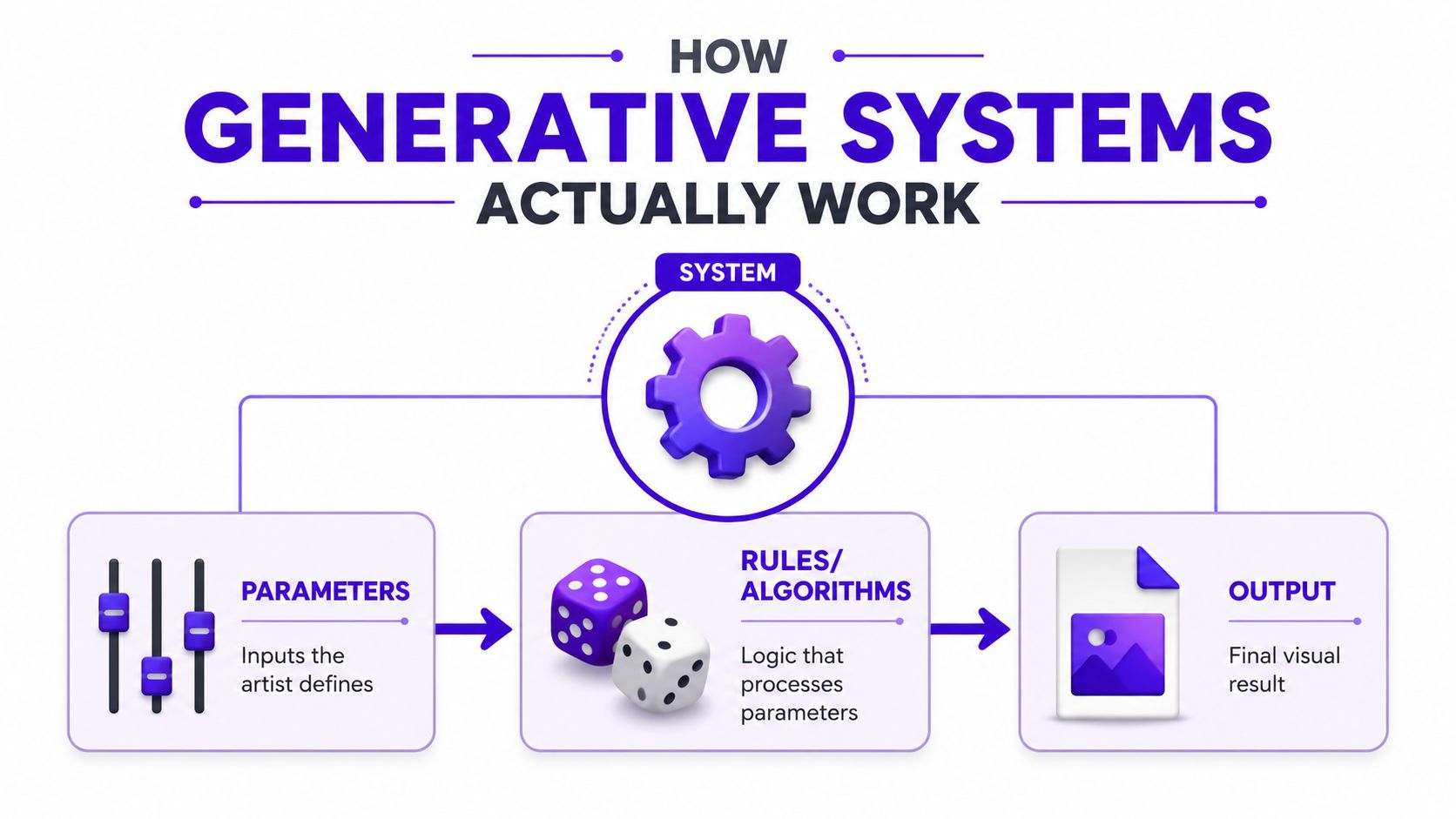
Every generative piece, whether it's a plotter drawing or an AI image, depends on the same three ingredients: parameters, randomness, and rules. Parameters are the knobs the artist controls. Randomness introduces variation. Rules turn the inputs into output.
A cookie recipe helps here. The recipe is the rule set, the flour ratio and flavor choices are the parameters, and a bit of chance in oven timing or ingredient spread changes how each batch looks. You still know it's the same recipe, but no two trays come out identical.
That's why one script can produce a huge range of works while still feeling coherent. If the rule system stays the same and the parameters shift, you get variation within a recognizable style. If the randomness changes too, you get a fresh result each run.
Practical rule: when you see a generative piece, ask three questions, what did the artist choose, what did the system decide, and what was left to chance?
The same logic also explains reproducibility. In many systems, a saved seed and logged settings let you regenerate the exact same result later. Open-source tooling often records the file name, seed, and formula so a piece can be recreated precisely, which is why generative artists care about documenting settings as much as they care about the final image. That reproducibility pattern is part of what makes generative work feel more like a designed system than a one-off accident. Getting started with generative art
For readers who want a deeper technical bridge, the model logic behind modern tools is unpacked well in a guide to generative AI models, especially if you're trying to separate prompt design from the engine that produces the image.
People often use these terms interchangeably, but that creates confusion. Generative art is the umbrella term for art made through autonomous systems that carry out some of the decision-making. Generative AI art is the newer subset that uses model-based systems trained on large datasets to create images, text, or sound.
A simple cooking analogy works again. Generative art is like cooking with a recipe and some improvisation. Generative AI art is like cooking with a chef who has studied a million cookbooks and improvises from that training. Both can produce something original, but the mechanism is different.
This distinction matters when you're deciding how to describe your own work. If you made a piece with code, randomization, and a plotter, that's generative art even if no AI was involved. If you made an image with a diffusion model after writing a prompt, that's generative AI art, which sits inside the larger generative-art umbrella.
Here's the cleanest way to frame it:
| Generative Art | Generative AI Art |
|---|---|
| The system makes decisions | The AI model generates content |
| The artist sets rules | The artist prompts or steers the model |
| Works can span many mediums | Most visible in image and video tools |
| It has a long art-historical lineage | It's the recent model-driven subset |
That spectrum view is useful because current discourse has moved toward human-machine collaboration, not a hard binary. If you're comparing social visuals or portfolio treatments, the article on which social content wins gives a helpful outside perspective on how audiences react to different production methods, even when the final image looks polished either way.
For a practical creative comparison, the distinction also matters when you're evaluating tooling choices. A prompt-first app, a code-based sketch, and a model-assisted workflow all live in the same broad family, but they hand different amounts of control to the system.
A generative art tool is easier to understand if you ask one question first. Does the system follow rules you set, learn patterns from examples, or combine both? The creator's role shifts depending on which of those is doing the heavy lifting.
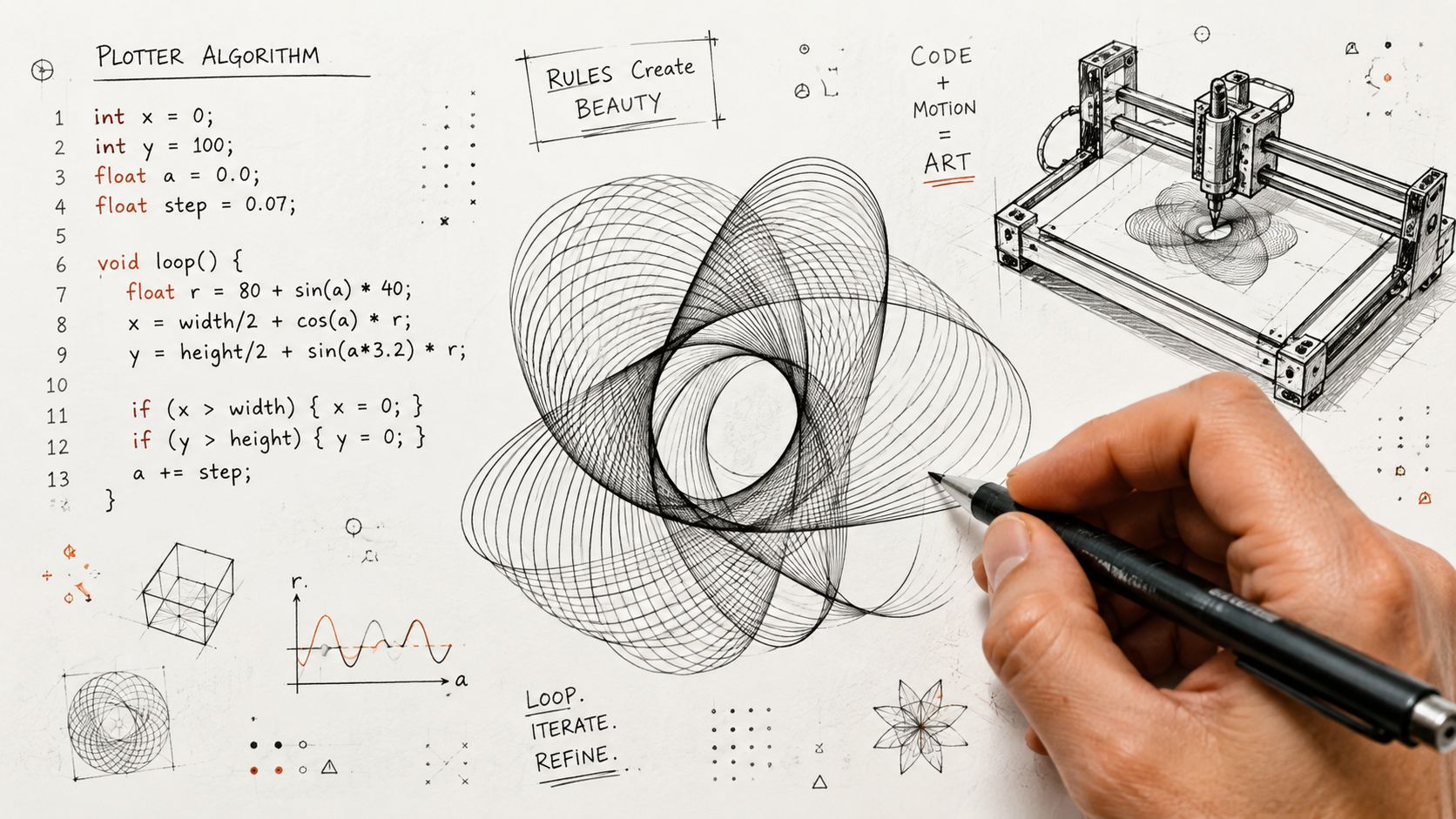
Rule-based generative art begins with explicit instructions. Tools like Processing, p5.js, and pen plotter workflows let the artist write the logic, then let the computer carry it out. If you tell the system to draw 200 circles with random positions inside a frame, it will do exactly that, and the variation comes from the rules you wrote.
This is the clearest version of “set the rules, let the machine handle the details.” It also shows why one script can produce many distinct works without losing its structure.
GANs is short for “generative adversarial networks,” a setup where two networks compete, one generates and one judges. They became a major reference point for AI art because they could produce convincing synthetic images and helped define a whole era of image generation.
Diffusion models are the current default behind most modern AI image tools. The simplest way to understand them is as image de-noising in reverse. The system starts from noise and gradually shapes it into a picture that matches the prompt and the patterns it learned.
The most interesting creator workflows are often hybrids. A person might upload a selfie, use a text prompt to steer style, then refine the result by editing selected areas. That is where apps like starryai fit naturally, as tools that mix user input with model output rather than replacing the creative process.
Practical rule: ask whether you are controlling the subject, the style, the composition, or only the final selection. The answer shows how much authorship you still have.
If you are comparing tools in the wider market, it helps to see how AI visuals sit alongside other production methods. That broader context also shows why automated image workflows are discussed in the same conversation as motion graphics companies, even though the final outputs and production pipelines can be very different.
Generative art sounds abstract until you watch it solve a very ordinary problem. Creators use it when they need something fast, flexible, and visually distinct without starting from a blank canvas every time. The best examples are less about theory and more about getting work out the door.
A TikTok creator might turn a selfie into a surreal aesthetic for a post that needs to feel current and shareable. The pain point is speed, because trends move fast and manual retouching can't always keep up. A model-driven tool solves that by generating multiple looks from one source image, then letting the creator pick the version that fits the moment.
An indie author uses the same logic for book covers and character concepts. The problem there is budget and iteration. Instead of commissioning every early idea, the author can test visual directions quickly, then refine the best candidates before paying for final production.
Etsy sellers need products that look original enough to stand out, but consistent enough to support a store brand. Generative tools help them produce prints, patterns, and merch-ready concepts without redrawing every variation by hand.
Tabletop RPG players want custom character art that matches a campaign world, not a generic fantasy portrait. Here, the value is personalization. The tool lets them mix outfit details, mood, and setting in a way that feels specific to one character, one table, one story.
Social media managers care about consistency under deadline pressure. They need visuals that match a campaign voice while still changing enough to avoid repetition. For teams that need that kind of turnaround, motion graphics companies offer a useful comparison point, because both workflows are built around shipping polished visuals fast.
The common thread across all five use cases is the same: the creator sets a direction, the system generates variation, and the final choice comes from curation. That's generative art in practice, not as an art-world abstraction.
The hard question isn't whether generative art looks interesting. It's who made it. If the artist sets the rules and the system executes them, authorship becomes a shared job, and the line between art and automation starts to blur.
Some people argue that the artist is still the author because they choose the prompt, frame the system, and select the final output. Others argue that once the system makes major decisions, authorship gets diluted. The strongest reading is usually a spectrum view, where human judgment, curation, and taste remain central even when the machine contributes heavily.
That's why “who made it?” is often the wrong first question. A better one is, “How much of the visual outcome came from human intent, and how much came from the system?”
Generative AI raises an extra layer of concern because the models are trained on large datasets, and those datasets shape what the system can imitate or remix. That matters to living artists, especially when styles, references, and visual patterns become part of a model's learned output.
If you plan to sell prints, merch, or books, the practical issue is the tool's terms of service. Read the commercial-use section carefully, and check whether the platform gives you the rights you need for resale, publication, or client work. The legal question isn't the same as the artistic question, but creators need both answers before they ship work publicly.
For a more direct look at the commercial side, can you sell AI-generated art is a useful companion read because it frames the issue from the creator's point of view rather than as a vague policy debate.
Practical rule: if you can't explain your process clearly in a caption, portfolio note, or client handoff, you probably haven't defined your authorship well enough yet.
The cleanest vocabulary is still the most honest one. Generative art works best when creators describe it as a collaboration between human direction and system output, because that matches how the work is made.
Start with one input, not ten. In starryai, try a text prompt, a selfie upload, or even an emoji, then pick a style preset and run a few generations so you can see how parameters and randomness change the results. Save the strongest output, keep the seed or settings if the tool exposes them, and use Edit to sharpen the version that feels closest to your intent.
The most common beginner mistake is chasing one perfect image instead of curating from a batch. A second mistake is writing a vague prompt and expecting precision. A third is forgetting to save the settings that made a good result possible.
If you want a quick prompt-writing refresher, prompt engineering for beginners is a solid next step. The habit that separates dabbling from real practice is simple, iterate, save seeds, keep a swipe file, and treat the system like a collaborator, not a vending machine.
If you want to turn this idea into actual images, starryai gives you a simple way to explore generative art through text prompts, selfies, and style-driven creation. It's a practical place to test the balance between your direction and the system's output, then build a repeatable creative process from there.


.svg)