

Written by Mo Kahn on


Your ranger finally has a portrait you like, but the token has different hair, the full-body version carries the wrong weapon, and nobody recognizes the winter-cloak image as the same person. Meanwhile, the game master needs a usable file before tonight's session, not another folder of almost-right faces.
A tabletop RPG character creator becomes more useful when you treat the character sheet as a continuity system. Record what makes the person recognizable, translate their abilities into readable visual cues, and keep scene changes separate from identity. You're building art the party can reuse, not just a portrait that looks impressive once.
Fill out a six-line visual brief before opening starryai, then save it beside your character sheet. Keep the language concrete enough that another player could sketch the essentials without asking what mysterious, heroic, or compelling means.
Start with these lines:
Your art description isn't a replacement for the rules. Confirm the legal build on the sheet, then extract the parts someone can see. A portrait can communicate a scout's readiness, but it can't validate their proficiencies or equipment permissions.
Sheet lines that belong in every prompt
| Brief line | Copy this | Stays locked |
|---|---|---|
| Role | Name plus party job, such as scout or healer | Yes |
| Ancestry cue | One player-chosen trait, not a stereotype list | Yes |
| Class cue | Main tool, weapon, or stance | Yes, until gear changes |
| Face and body | Three markers: scar or mark, hair, build | Yes |
| Palette | Three plain color words | Yes |
| Mood | One emotion and lighting mood | Negotiable by scene |
For a coastal ranger, write weathered olive skin, a silver streak at the left temple, calm watchful eyes, an oilskin cloak, and a shortbow at rest. Sea-glass green and storm grey establish the main clothing colors; brown can cover leather straps and boots. Add the player's chosen build and scar placement before treating the description as complete.
Keep canon, negotiable, and hidden details separate. Facial structure, palette, and the chosen species trait stay canon. Cloak wetness, the visibility of healed injuries, and whether a hood conceals the face can change with the scene, while a secret brand might remain outside shared artwork entirely.
Show competence through posture and equipment instead of literalizing every score. A high-Dexterity scout can have a balanced stance and light gear, while a Wisdom-leaning healer can have steady hands and an attentive posture. Neither needs an exaggerated body type to explain a number.
If the player wants a visual shorthand for darkvision, reflective eyes in low light can work as an artistic choice. They aren't a universal rules requirement. Likewise, ancestry can read through ear shape, a scale pattern, or height against a doorway without changing every facial feature.
Use specific combinations that leave room for a person:
Put a mobility aid in the same sentence as class competence: a veteran healer using a forearm crutch steadies a medicine case with their free hand. That gives the aid a practical place in the composition instead of presenting disability as a separate spectacle.
Let the player supply the words for gender, culture, scars, disability, and age. Don't infer sexuality from clothing or replace a cultural description with exotic. Skip beautiful and other generic attractiveness language when it overrides the features the player chose.
An Archivist AI survey announcement published by The News-Press reported that, among 400 usable Dungeons & Dragons survey responses in 2025, 83% of characters shared their player's gender and 67% shared their player's sexuality. Treat that as a reminder to ask, not permission to assume that a fictional character reproduces their player's identity.
Player approval comes first: A recognizable class is useful, but a recognizable person must reflect choices the player confirmed.
Ask what the party should understand at a glance. A scout's resting bow says something different from a drawn arrow; a healer's open medicine case suggests readiness rather than threat. Choose the moment that introduces the character accurately.
For ideas about connecting objects, choices, and atmosphere to story, Chronos One's guide to narrative adventures from Chronos One Escape Rooms Eltham offers a useful adjacent resource. Apply that perspective to props: the salt-stained cloak should support the ranger's coastal history, not merely fill empty space.
The DIVA-hosted academic discussion of character customization provides context for treating appearance choices as part of character expression. For campaign art, turn that freedom into a saved profile rather than an ever-expanding list of unrelated alternatives.
Keep the scope proportional to play. A one-shot can stop at a useful bust; a long campaign benefits from a reusable face description for new equipment and seasons. Use the prompt optimization guide to tighten ambiguous wording, then ask another player to identify the picture's class and mood before you approve the brief.
Use a controlled sequence so you can tell which choice produced a useful result. This visual guide summarizes the workflow.
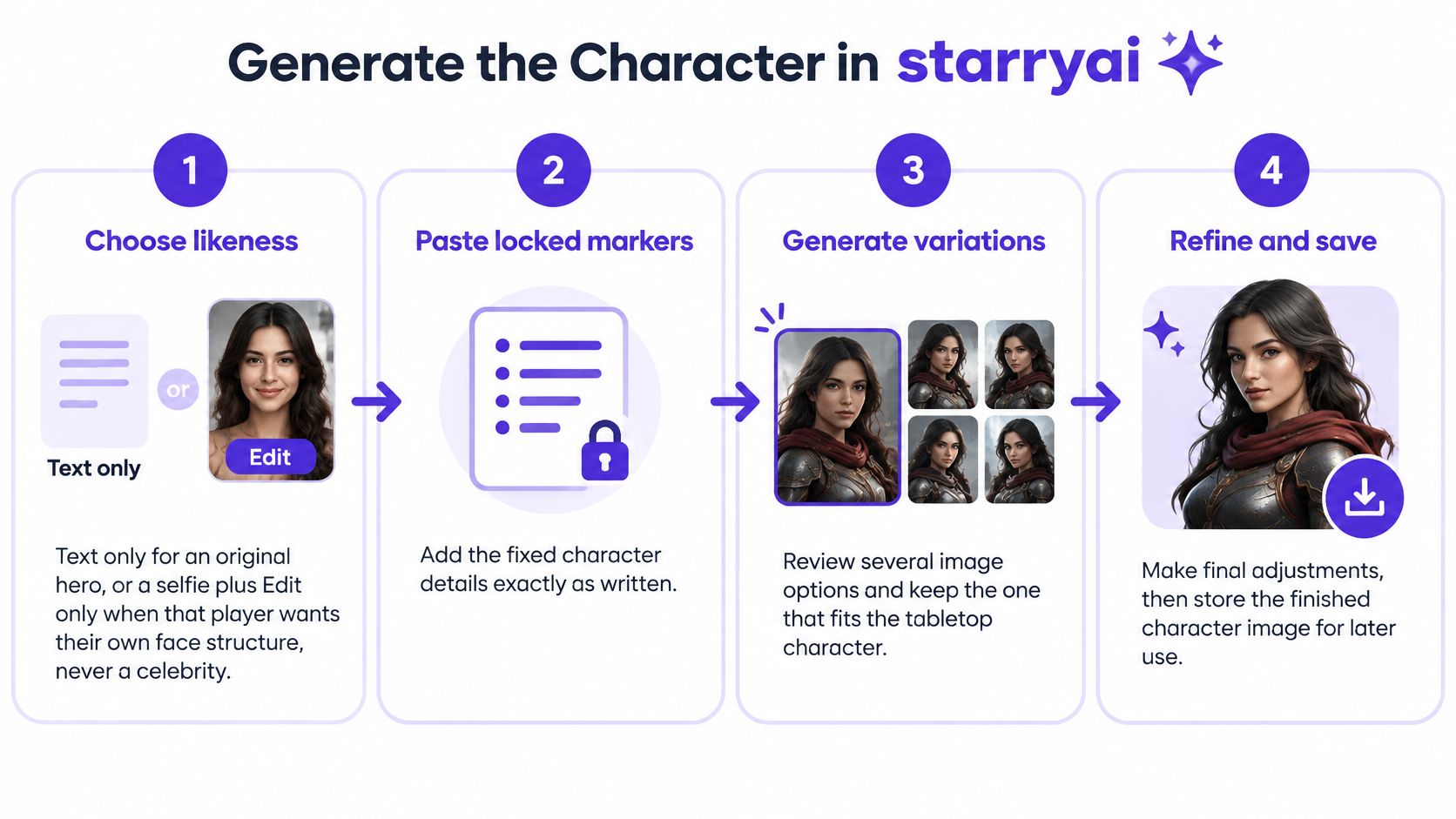
Choose likeness deliberately. Use text only for an original hero. Use a selfie plus Edit only when that player wants their own facial structure represented and has agreed to the upload, never substitute a celebrity's face.
Paste the locked markers first. Place the face, body, ancestry cue, and palette before style words so you can inspect the important information without searching through decorative language. Copy the saved wording rather than inventing a more poetic version.
Add a readable composition. Include one class prop, the setting, and one clear pose. For a sheet portrait, a plain backdrop and a resting weapon are easier to judge than a crowded tavern with moving hands.
Finish with a restrained style clause. Try painterly tabletop illustration, soft rim light, plain backdrop. Keep the description focused, because piling styles, party members, and spell effects into one prompt gives you more competing details to inspect and can muddy faces and weapons.
Use this bust prompt as the coastal ranger's starting point:
weathered olive skin, silver streak at the left temple, calm watchful eyes, oilskin cloak, shortbow at rest, sea-glass green and storm grey, painterly fantasy portrait, plain backdrop
Add any approved build, scar, and ancestry markers to the saved production version. The example establishes the core appearance, but your character's confirmed details take priority.
Generate a small batch and reject continuity breaks. Compare each candidate with the sheet, not with the most dramatic image beside it. Reject a misplaced silver streak, changed build, or missing ancestry cue even when the lighting is appealing.
Pick one anchor and save its exact prompt. An anchor image is the approved visual reference for later assets. Store the image and full prompt together so you don't have to reconstruct your decisions from memory.
Change one variable for the next image. Restate the anchor description and change only the pose, crop, or one item. Use Edit when you want to preserve a region while changing the background, then inspect the retained area rather than assuming it stayed untouched.
For the lantern version, change only the prop:
weathered olive skin, silver streak at the left temple, calm watchful eyes, oilskin cloak, storm lantern at rest, sea-glass green and storm grey, painterly fantasy portrait, plain backdrop
The lantern swap tests whether you can vary the equipment without replacing the ranger. Don't add a storm, a shipwreck, and a new painting style to the same attempt, or you won't know which change caused an unwanted result.
For an additional walkthrough, use the video alongside your saved prompt.
Stop this pass when you have one approved anchor image and the exact prompt text saved beside the sheet. More candidates aren't useful if you haven't decided which face belongs to the character.
A ranger in practical leather with a shortbow reads differently from a front-liner in plate carrying a hammer. A caster in cloth with a focus needs a different hand arrangement again. Choose costume logic before choosing output files, and use equipment the character carries.
Keep materials inside the established palette. Brown leather, storm-grey cloth, and sea-glass green trim can look distinct without introducing a new signature color for every buckle. Describe metal by finish when you don't want it to compete with the clothing.
Campaign art variants and what changes
| Asset | Crop | Prompt change | Use |
|---|---|---|---|
| Bust portrait | 2:3 head and shoulders | Plain backdrop, eye contact | Character sheet |
| VTT token | 1:1, face large | Simple background, no tiny props | Map token |
| Full body | 2:3 or 3:4 standing | Whole figure, weapon at rest | Print or miniature reference |
| Gear variant | Same as the bust | Swap one item or season only | Injury, weather, or level-up |
Treat those aspect ratios as practical composition choices, not universal platform requirements. The bust introduces the person, while the token prioritizes identification at map scale. A full-body reference explains the silhouette, clothing layers, and equipment placement that a close portrait can't show.
Check hand occupancy before approving the costume. A shield, hammer, lantern, and open spellbook can't all occupy the same hands. Give the character a sensible way to carry unused equipment, such as a belt hook, scabbard, or shoulder strap.
A closed helm may suit the front-liner, but it hides the features everyone uses to recognize them. Keep an open-face companion image so the armored figure and map token remain connected. For a hooded ranger, preserve enough of the face or silver streak to make the identity readable.
A level-up changes the prop line, not the scar placement, hair, or established palette.
Make the bust, token, and standing full-body reference first. Those assets answer the immediate table questions: who is speaking, where are they on the map, and what are they wearing? Leave expression sheets until you're satisfied that the anchor face survives ordinary changes.
Every variant should repeat the locked face line and alter only the intended crop, pose, or item. For an injury version, distinguish a temporary bandage from a permanent scar. For a winter version, replace the outer garment without redesigning the body beneath it.
Action scenes are optional because they introduce more difficult relationships between limbs, props, and effects. A spell burst combined with a weapon swing gives you more opportunities for extra limbs, unclear grips, or an unreadable silhouette. Start with a simple stance if you need combat art, then add effects only after the body and weapon look coherent.
Your game master needs files that work at the table, not just attractive previews. Open each approved image at the size players will see it, then decide whether the face, silhouette, and equipment still communicate clearly.
Use this checklist while preparing the map asset.
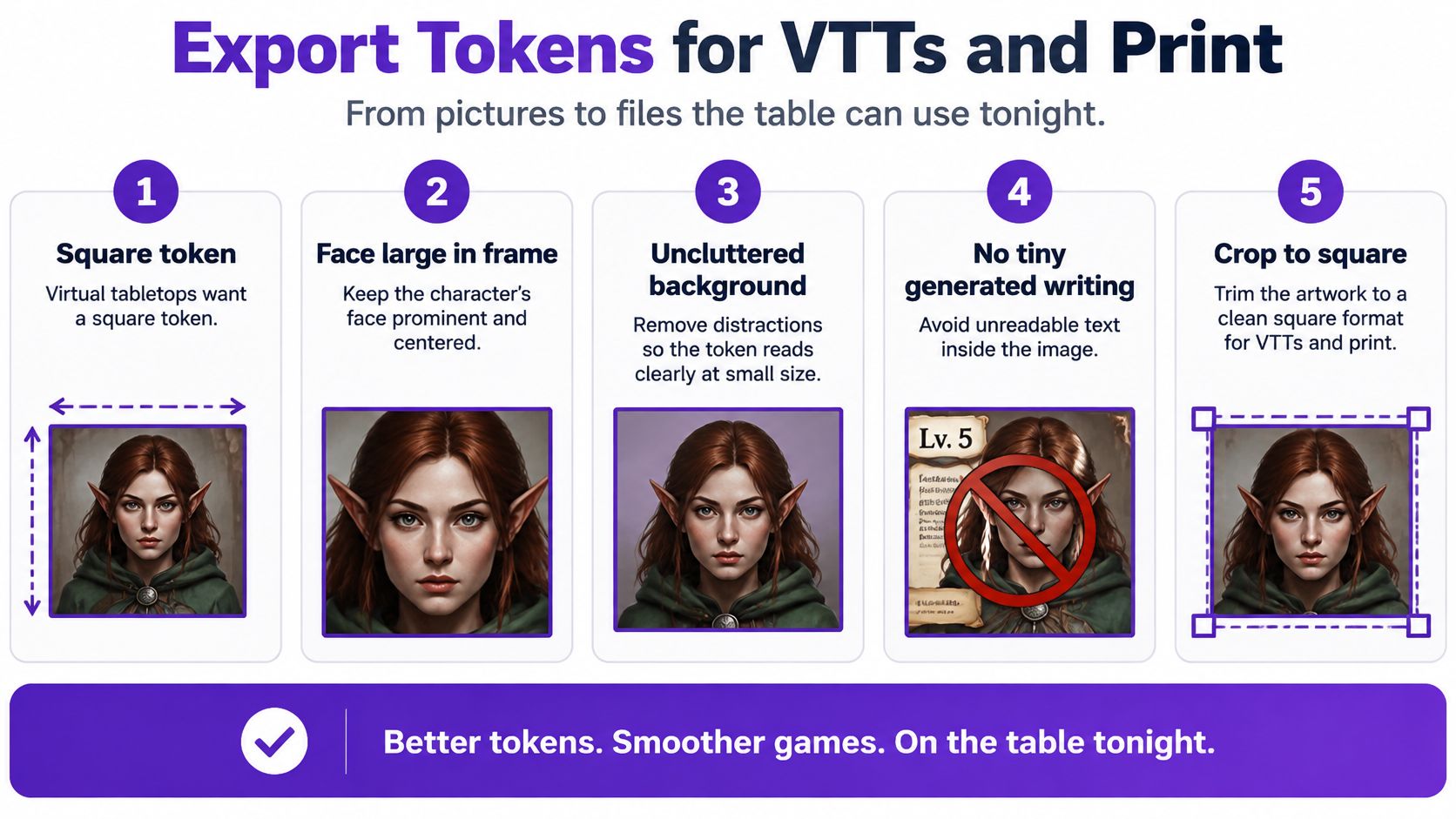
Crop the VTT token to a square, with the face large and the background uncluttered. Leave breathing room around horns, ears, and hair so a circular token frame won't remove the character's identifying feature. Check the destination VTT's upload requirements before final export.
As a working choice, keep a source around 512 or 1024 pixels on a side for the token, then test it on your battle map. Those are preparation suggestions, not a guarantee for every platform. Don't enlarge a tiny crop and assume the missing facial detail will return.
Leave character-sheet art in portrait orientation. Remove tiny generated writing from either asset, because a decorative mark that resembles a name isn't reliable lettering. Add actual names with a text tool outside the illustration if your layout needs them.
Use the clean full-body reference for print planning, with important details away from the edges. Check the intended physical dimensions before ordering, and use the image resolution for printing guide to plan an appropriate export. A token file and a print master serve different purposes, so don't overwrite the larger original.
A full-body image is also a visual reference, not a printable miniature model. If you're curious about the separate fabrication workflow, American Additive Manufacturing's page on custom tooling for aerospace manufacturers offers an industrial comparison, not a tabletop miniature specification. For a miniature commission, ask the sculptor what views and dimensions they need.
Before selling prints or merchandise, read the license shown in your starryai account and check any separate rights affecting uploaded references or recognizable material. Don't assume that exporting an image settles every commercial-use question.
Save sortable filenames such as CharacterName_bust, CharacterName_token, and CharacterName_full. Share those files with the game master before the session instead of dropping a dozen near-duplicates into chat.
Export takeaway: Keep the face line identical, and give each export one specific change and one clear job.
Before play, send the approved files and check the set:
A nearly usable image needs a diagnosis, not a longer pile of adjectives. Identify the visible failure, make the smallest relevant correction, and compare the result against the approved character rather than against a vague idea of better art.
| Visible failure | Focused prompt fix |
|---|---|
| Extra fingers or melted weapon | Ask for one visible hand and a sheathed or resting weapon |
| Face drift | Paste the locked markers verbatim and change a single variable |
| Sneakers, modern jacket, or studio flash | Restate painterly illustration and period cloth, leather, or metal |
| Every ancestry resembles the same human face | Restore the player-chosen species trait and remove generic beauty wording |
| Unwanted logos or fake inscriptions | Add an explicit no text, no logos line |
| A sensitive trait becomes a caricature | Return to the player's own description and remove embellishing assumptions |
Face drift can happen even when you reuse a prompt, so don't treat exact wording as a guarantee. First check whether you accidentally paraphrased the markers, then inspect eye shape, hair placement, and build against the anchor. The character consistency guide offers additional ways to structure that comparison.
For hand problems, simplify the physical task instead of repeatedly requesting perfect anatomy. A resting shortbow with a relaxed visible hand is easier to assess than fingers drawing a string through rain and magical light. Preserve the successful face while repairing the troublesome area when your editing workflow allows it.
Don't try to fix a caricature by adding more identity adjectives. Ask the player which visible detail feels wrong, replace it with their own wording, and get approval before sharing the result. A respectful correction may mean removing an unnecessary cue entirely.
Call the anchor campaign-ready only when the class, mood, and three face markers survive a second image. That test matters more than whether the first portrait has spectacular lighting.
Generate the bust, token, and one equipment variant from that anchor in starryai, then place them beside the sheet. Ask the table for targeted changes only after the set is coherent, so feedback concerns the character rather than a collection of unrelated faces.
starryai offers text-to-image character creation and image editing for turning a saved visual brief into campaign art. Visit starryai, create your anchor bust, and use its exact description to prepare a recognizable token and equipment variant before your next session.


.svg)