

Written by Mo Kahn on
October 16, 2026


In Adobe's 2025 creator study, 55% of creators used generative AI for editing, upscaling, and enhancement, compared with 52% for generating new assets. An image editor AI uses generative AI to transform, retouch, or extend an existing image from a prompt, so you can turn an ordinary selfie or photo into a clean, share-ready result without rebuilding the scene from scratch.
You might have a decent selfie on your phone, but the background is distracting, the lighting feels flat, or the image doesn't match the visual style currently moving through TikTok. You want a cinematic glow-up, a fantasy character version, or a polished profile image, yet you don't want to spend an evening learning Photoshop.
That's where this category fits. The technology sits between classic manual editing and prompt-only image generation. It changes the photo you already have, while still using generative AI to invent missing pixels, replace objects, extend the frame, or apply a new visual direction. starryai's Edit tool follows that same practical idea by turning an uploaded image and a short description into a social-ready variation.
You have a usable selfie, but the background is cluttered and the lighting feels flat. An image editor AI helps turn that existing photo into a clean, share-ready result by following a written instruction, rather than asking you to rebuild the image from scratch.
The software reads the uploaded image, identifies relationships between the subject and its surroundings, and generates a modified version. You might request a soft sunset background, a retro film look, or a fantasy costume. Instead of applying one preset across every pixel, it changes the areas connected to your request. The output still deserves a careful check, especially around faces, hands, text, and fine details.
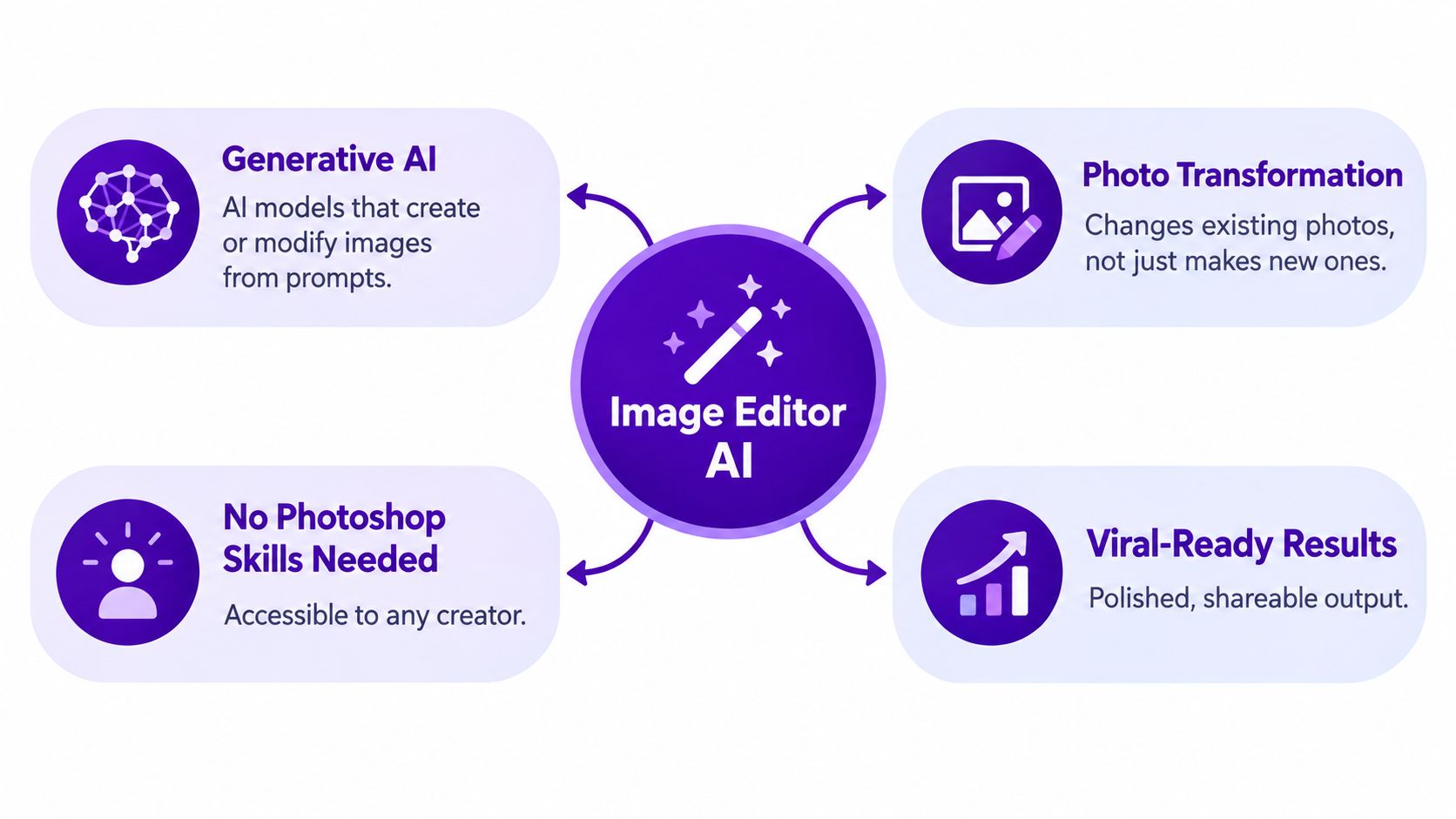
In practice, you supply the original photograph and describe the intended change in words. The system handles much of the masking, blending, and fill work. “Remove the people behind me” requests object removal. “Make this portrait look like a warm editorial photo” requests a style change. “Extend the image upward for a vertical post” requests generative expansion.
That makes the category different from both classic editors and pure image generators. Traditional software gives you direct control over layers, masks, curves, and individual pixels. A pure generator begins with a prompt and creates a new composition. An image editor AI starts with your photograph, then invents or adjusts only the requested parts, while preserving enough of the original subject to remain recognizable.
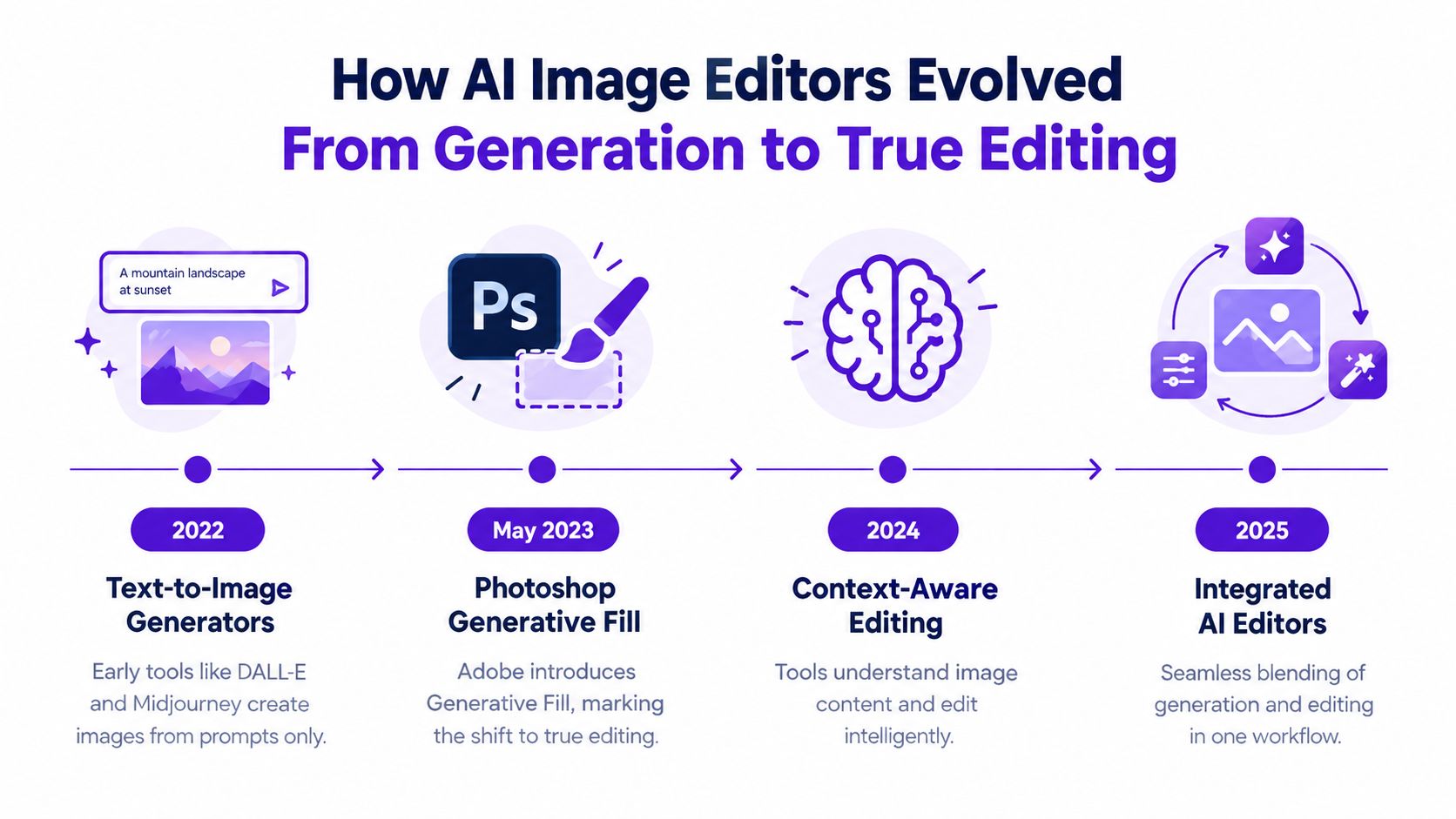
A notable milestone arrived in May 2023, when Adobe introduced Generative Fill in Photoshop. The feature let users select an area and describe additions, removals, or extensions with natural-language prompts, bringing generative editing into an established workflow.
For a trend-driven creator, the practical goal is straightforward: upload a recognizable selfie, preserve what makes it yours, and change the visual idea around it. starryai's Edit tool follows this model by combining an uploaded image with a short description, while commercial use, consent, and copyright still require your own judgment.
An AI image editor usually combines several distinct functions. Knowing what each one does helps you describe a job clearly, especially when the goal is to turn a selfie or product photo into a clean, share-ready image quickly.
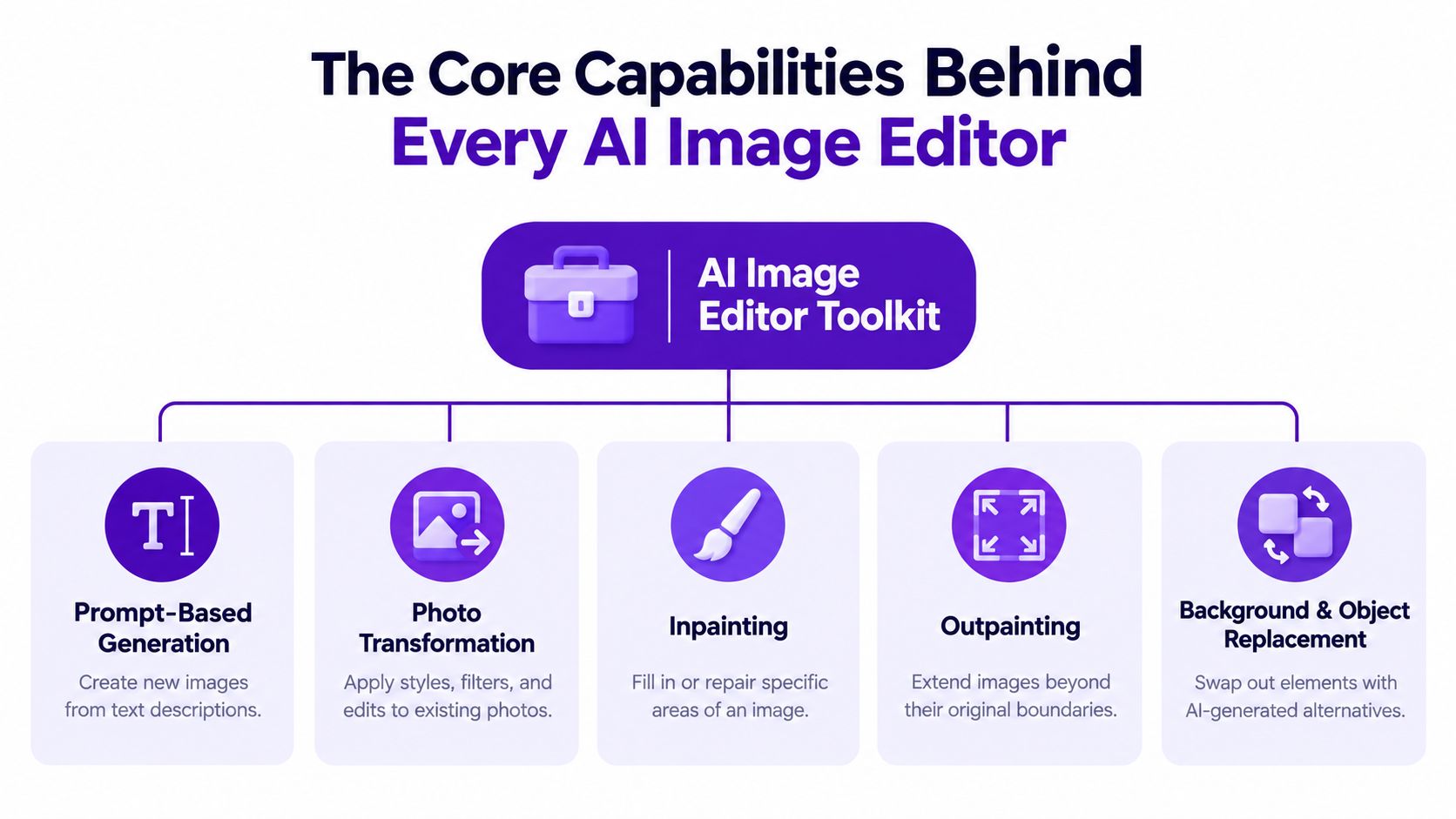
Prompt-based generation creates an image from a text description. It suits a fresh scene, such as “a moonlit castle above a misty forest,” without requiring an original photograph.
Photo transformation starts with an uploaded asset. It can adjust color, lighting, atmosphere, clothing, or overall style while keeping the original image as the visual reference. The process resembles changing an existing outfit while keeping the same person, rather than designing a new person from scratch.
That distinction matters for creators who need a recognizable result. A selfie can receive a new visual treatment while retaining the face and subject that make it usable for a profile image, post, or author identity.
Inpainting changes a selected or described area. It works like a smart clone stamp: remove a sign, repair a damaged patch, replace an object, or add a detail without rebuilding the entire composition.
Outpainting, also called generative expansion, extends the canvas beyond the original edges. A horizontal travel photograph can become a vertical social post, with the system creating plausible surroundings outside the original frame.
Background and object replacement combines selection with generation. You can isolate a person, remove the room behind them, and place them in a studio, garden, or stylized setting. The editor must identify where the subject ends and the background begins, which is why hair, hands, and fine edges can reveal weak results.
Enhancement and upscaling serve a different purpose. They improve clarity, lighting, color balance, or apparent resolution without changing the image's central idea. A blurry product photo may become more usable, though invented detail may not accurately match the object.
Practical rule: Describe the subject, the requested change, and what must remain untouched. “Change the jacket of the person on the left, preserve the face, pose, lighting, and background” gives the editor clearer boundaries than a long paragraph about mood.
A visually attractive result can still fail its assignment. Evaluate an AI image editor through instruction following, identity preservation, and perceptual quality, because an edit may look polished while distorting a face or changing details you meant to keep. Complex-Edit benchmark context provides context for treating these capabilities separately.
For a selfie, ask three questions:
The same checklist works for a logo mockup, character sheet, or Etsy product image. starryai's editing workflow can support these jobs, but you still need to inspect the final file before sharing or using it commercially.
A selfie can be perfectly usable yet still need a cleaner background, a different crop, or a format suitable for a post. Early prompt-to-image tools started with words and produced a new composition. That opened creative possibilities, but it did not match workflows built around an existing asset, such as a selfie, product photograph, book-cover sketch, or screenshot.
The turning point was distribution. Generative editing appeared inside Photoshop, where designers, photographers, marketers, and other visual professionals already worked. Adobe's account of the Photoshop milestone](https://blog.adobe.com/en/publish/2023/05/23/photoshop-new-features-ai-contextual-presets) shows how placing AI inside a familiar workflow helped move image generation toward everyday editing.
Adobe reported that its Firefly beta had launched six weeks earlier and had produced more than 100 million assets, calling it one of the company's most successful beta launches. By October 2023, Adobe said creators had generated more than 3 billion images using Firefly-powered innovations since the May launch. These figures describe adoption around an established creative tool, rather than proving that every generated result is ready to publish.
Editing an existing asset suits social posts, product listings, and cover concepts because the creator can retain a real face, physical product, or recognizable composition while changing its presentation. That matters for a side-hustle seller or indie author who needs a share-ready image quickly, but still needs to check whether a person consented to the edit and whether the final asset is suitable for commercial use.
The process also becomes iterative. You can reduce background clutter, try a warmer color treatment, extend the crop, and compare versions without rebuilding the image each time. For a plain-language comparison of related tools and workflows, this guide to Stable Diffusion image editors offers useful context, including how editing differs from creating an image from scratch.
The boundary between generation and editing is now less distinct. An editor can generate a replacement background in response to an existing photograph. A generator can create a new character, while an editor can place that character into a chosen composition or adapt it for another channel. The practical test is simple: does the tool help you transform the asset you already have without losing the details that make it yours?
Choosing a tool becomes easier when you separate the starting point from the desired control. Classic editors excel at precise manual decisions. Pure generators excel at creating new concepts quickly. AI image editors combine an uploaded asset with natural-language instructions.
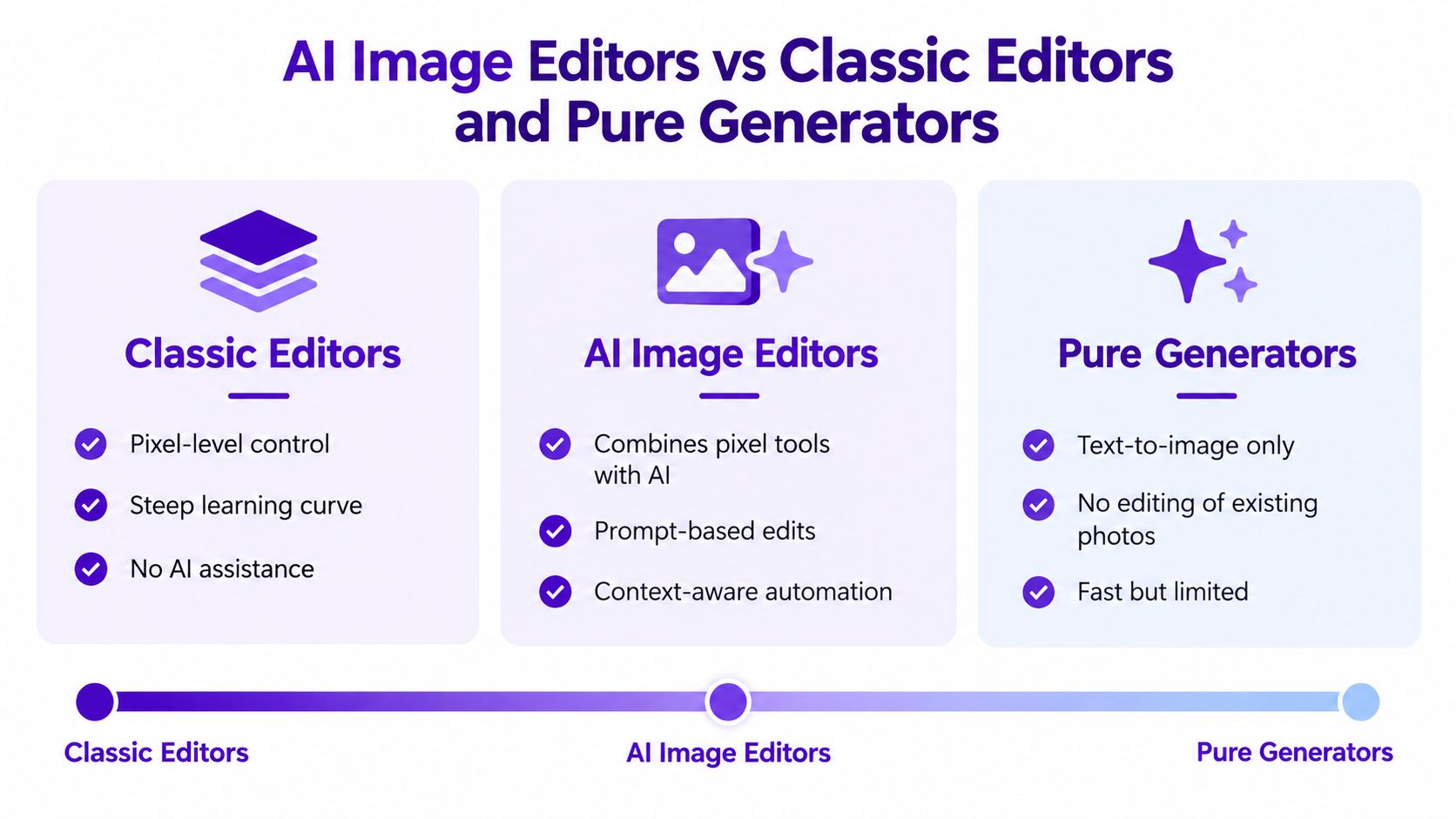
| Tool type | Starts from | Best at | Weakness | Best fit |
|---|---|---|---|---|
| Classic editors | An image, layer, or blank canvas | Pixel-level control and detailed manual work | Requires more time and technical knowledge | Designers who need exact control |
| Generative editors | An uploaded image plus a prompt | Context-aware changes, retouching, replacement, and expansion | Results may alter unintended details | Creators who want fast variations |
| Pure generators | A text prompt or reference concept | New scenes, characters, and visual ideas | Doesn't directly preserve an existing photo | Ideation and original concepts |
The middle category earns its place when the source image matters. A creator may need the same face in several settings, an Etsy seller may want multiple backgrounds for one product, or a marketer may need a square version and a vertical version of one campaign image.
Adobe's 2025 Creators' Toolkit study surveyed more than 16,000 creators across eight markets. It found that 55% used creative generative AI for editing, upscaling, and enhancement, while 52% used it to generate new image or video assets. The full Adobe Creators' Toolkit report also reported that 86% of creators were actively using creative generative AI and 60% had used more than one creative generative-AI tool during the previous three months.
That pattern suggests creators choose tools by task. They may use a generator for a first concept, an AI editor for variations, and a manual editor for final alignment or typography. No single tool has to do every job.
Start with a selfie that already has the right expression and framing. It doesn't need to be perfect. The aim is to make a focused transformation without losing the person people recognize.
Open the Edit tool, upload the photo, and write a short prompt. A useful first instruction might be: “Transform this selfie into a warm cinematic sunset portrait, keep my face and expression unchanged, add soft golden light, and replace the background with a city rooftop.”
The prompt contains three useful parts:
Short prompts are easier to revise. Instruction-based editing remains difficult when a prompt refers to regions indirectly, and RefEdit-Bench research indicates that precise training examples and clearly specified regions can matter more than just having a larger training set. In practice, “the person on the left” is clearer than “change the person over there.”
Check the face first. Then inspect hair edges, hands, clothing, jewelry, and the transition between the subject and the new background. If the result looks polished but changes the person too much, tighten the constraint: “preserve facial features, skin tone, hairstyle, and expression.”
If the background is right but the lighting is too strong, don't rewrite the whole prompt. Adjust one variable: “keep the same composition, reduce the sunset glow, and use natural skin tones.” Small changes make it easier to understand what caused an improvement or a failure.
A TikTok creator might make several variations from the same selfie, each with a different seasonal or cinematic treatment. An indie author could adapt a character reference into a moodier cover concept. An Etsy seller might remove a distracting background and create a cleaner product presentation. A gamer could turn a portrait into a character avatar, while a social media manager could produce several on-brand visual directions.
The workflow stays the same: upload, describe, inspect, refine, and export. It's designed for quick creative experimentation, not for replacing every professional retouching or design task.
A visually convincing result isn't automatically ready for sale. Before an Etsy seller prints an image on merchandise or an indie author places it on a cover, the creator needs to separate several questions: who owns the source photo, whose likeness appears, whether a trademark is visible, what the platform permits, and what human creative work went into the final composition.
The U.S. Copyright Office's January 2025 guidance says purely AI-generated material isn't protected by copyright when there isn't enough human control over the expressive elements. It also says prompts alone generally don't provide sufficient control because the prompt communicates an idea while the AI system determines how that idea becomes an expressive image. The Copyright Office's January 2025 statement explains why entering a clever description isn't the same as authoring every visual choice.
A creator may own the original selfie but still need permission from another person whose face appears in an edited image. A generated character may avoid one issue but create another if the result resembles a recognizable person, protected logo, or distinctive branded asset. Copyright and likeness rights aren't interchangeable.
The Copyright Office also reported that the D.C. Circuit unanimously upheld the human-authorship requirement in March 2025. Visual quality, realism, and technical complexity don't establish copyright ownership by themselves. Human selection, arrangement, editing, and substantial modification can matter when assessing the protectable parts of a finished work. Creators who want a deeper explanation of the report can see SourceX's AI training guide, then check the rules that apply to their country, platform, and contract.
Face transformation deserves extra care, especially when the subject is a friend, child, client, customer, or public figure. A 2025 FAccT study identified almost 35,000 publicly downloadable deepfake model variants targeting identifiable people, and reported nearly 15 million downloads since November 2022, including models targeting ordinary Instagram users with fewer than 10,000 followers. The FAccT study on deepfake model access shows why consent and provenance can't be treated as optional extras.
Before publishing, ask:
Don't use face editing to deceive, impersonate, defame, or create sexualized material without consent. Labels can help, but metadata may disappear when an image is reposted, so keeping your own records remains important. For a practical overview of commercial-use questions, starryai's guide to commercial use rights can sit alongside legal advice for higher-risk projects.
The right edit depends on what must stay recognizable and where the finished image will appear. A creator chasing a trend values speed and variation. An author needs a coherent character. A seller needs a product to remain accurate enough for a buyer to understand what they're seeing.
TikTok's 2025 What's Next Trend Report names Brand Fusion, Identity Osmosis, and Creative Catalysts as major trend signals. It also describes an audience preference for a less-over-edited aesthetic and connects rapid adaptation of ideas into multiple variations with participatory platform culture. TikTok's 2025 trend report supports a practical approach: test several focused variations instead of polishing one image in isolation.
The common mistake is asking for a completely new image when the actual job is adaptation. Start from the asset that already has the right subject, then change only what the audience needs to see.
Use four questions before choosing a tool:
This framework keeps you from judging an editor only by its most impressive demo. A tool that creates beautiful fantasy scenes may be a poor choice for preserving a real product. A tool that handles background replacement well may still need manual design work for typography and final layout.
Before publishing, check the source rights, obtain consent for identifiable people, review trademarks and recognizable styles, keep the original and edit history, and disclose a materially altered portrait when that context matters. If you're exploring visual planning beyond portraits, AI garden design is an example of how the same prompt-based approach can help turn an existing idea into a more concrete visual concept.
For a broader comparison of current options, this guide to the best AI photo editors in 2026 can help you match features to the job. The strongest choice is the one that preserves the details you care about while making responsible variation quick enough to use in your real workflow.
starryai lets you upload an existing image, describe changes, and create fast variations for selfies, character concepts, product visuals, and social content. Try the starryai Edit tool with one photo, one clear transformation, and one constraint about what must stay the same.


.svg)