

Written by Mo Kahn on


You've got a finished design sitting in a folder, maybe a character illustration, a funny phrase with perfect lettering, or artwork you generated last night that looks too good to stay digital. You can picture it on a black tee. What you can't picture is the middle part, the file settings, the fabric choice, the press settings, and whether it'll crack after three washes. That's normal. Learning how to print designs on shirts isn't really about mastering one machine. It's about matching artwork, fabric, and quantity before you spend money on blanks or transfers.
Most first prints go wrong before ink touches fabric. Someone falls in love with a design, orders the cheapest shirts they can find, picks whichever printing method a shop pushes first, and only then discovers the artwork has tiny lettering, a busy background, or colors that disappear on a dark garment. The print itself might be technically fine. The decisions leading into it weren't.
Work backward from the shirt you want someone to wear. Artwork complexity comes first. A bold two color logo behaves nothing like a painterly illustration full of gradients and transparent edges, and each one points toward a different method. Fabric comes second, because cotton, polyester, and blends accept ink and heat differently, and a setting that bonds beautifully to one can scorch or bleed on another.
Quantity is the third decision, and it's the one beginners underestimate. Making one personalized shirt for a friend, testing a design for an Etsy listing, and outfitting a whole team are three different jobs. On demand digital methods exist for the first two. In fact, direct-to-fabric and direct-to-garment technologies represented about 33% of digital textile printing in 2025, driven by rapid customization and production efficiency. Bulk repeat orders reward a completely different setup.
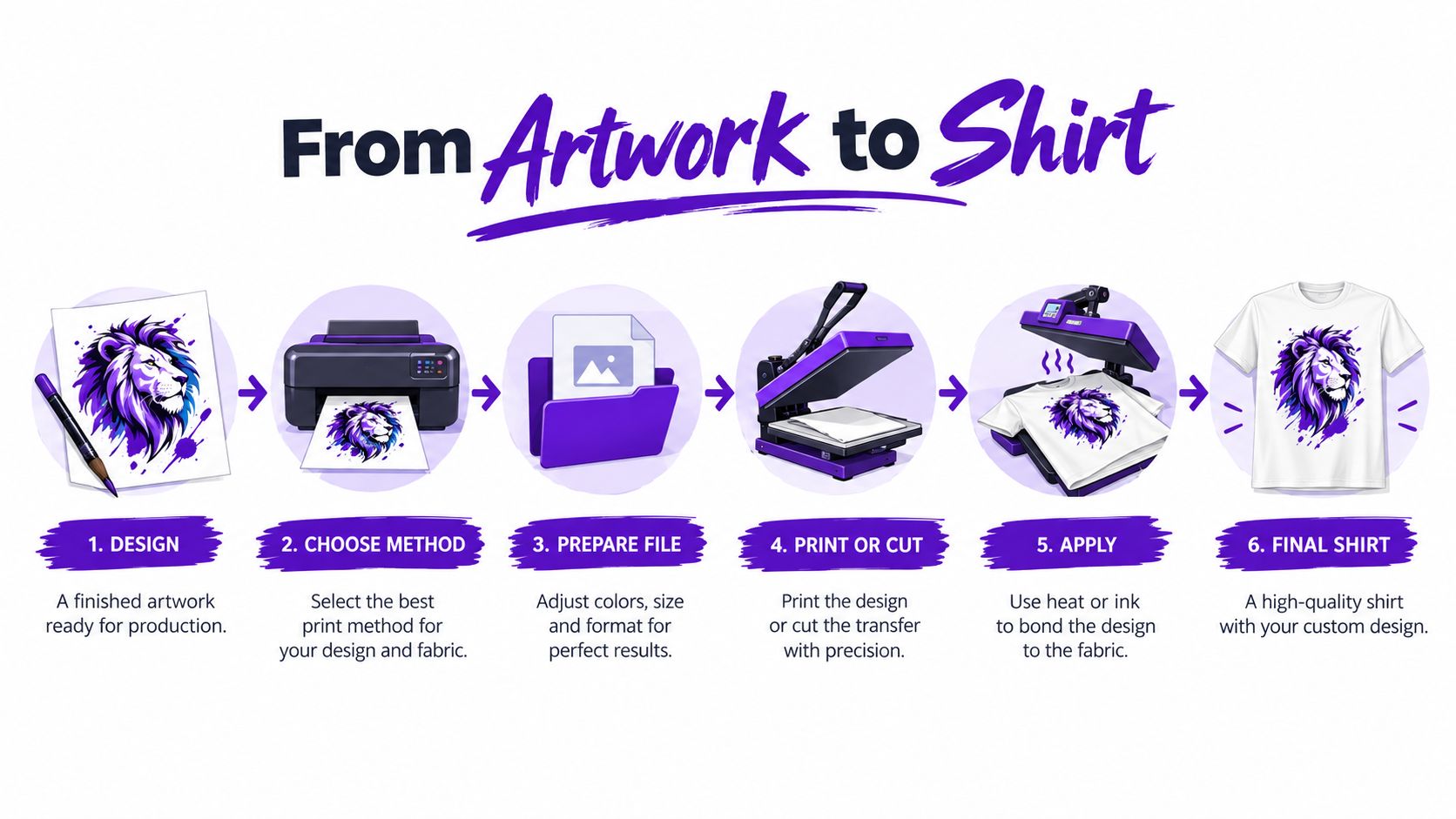
The map below shows the full journey your design takes, from finished artwork to a shirt someone can pull over their head.
Before you look at any printer or press, answer these for your specific design.
If you're generating artwork specifically for merchandise, it helps to think about these constraints at the prompt stage rather than after export. There's a useful walkthrough of that mindset in this guide to AI art generation for print on demand creators, and it's worth reading before you finalize a design you plan to sell. A design created with fabric in mind needs far less rescue work later.
There's no universal best printing method. There's only the right method for one design, on one fabric, in one quantity.
Fabric is an unforgiving canvas. It stretches, it has texture, and it soaks up ink in ways a screen never shows you. Artwork that looks crisp on your monitor can print muddy, jagged, or dull if the file wasn't built for the method you've chosen. File preparation is where you find that out for free, instead of on a paid sample.
Start with size and resolution. Build or export your artwork at the actual physical size you want it printed, not smaller with a plan to scale it up later. Upscaling a small file doesn't add detail, it just makes the blur bigger. If you're unsure how pixel dimensions translate to printed inches, this breakdown of image resolution requirements for printing explains the relationship in practical terms. Zoom in to full print size on screen and look at edges and lettering. Whatever softness you see there will be more visible on cloth.
Different methods read color differently. Screen printing doesn't print your file as one image at all. A printer separates it so that screen printing splits artwork into individual color layers, converts fine detail into halftones, and typically uses mesh around 110 lpi for discharge work, while DTG applies water-based ink directly to a finished garment. That means every extra color in a screen printed design is extra setup, and smooth gradients become dot patterns that need enough physical space to read well.
For DTG and DTF, you'll usually send one full color raster file, most often a PNG. Ask your printer whether they want RGB or CMYK, because shops differ, and a file converted carelessly can shift bright blues and greens toward dull. Spot color thinking still helps even for digital methods. If one exact brand color matters, flag it rather than assuming the screen value survives.
Export with a transparent background unless a solid background block is part of your design. A white rectangle baked into the file will print as a white rectangle, and on anything but a white shirt it looks like a sticker you forgot to peel. Check semi-transparent edges too. Soft glows and feathered shadows can print as a visible halo on dark garments, where the printer lays a white underbase beneath your artwork so colors stay visible. That underbase needs a clean, deliberate edge to hide behind.
Then hunt for detail that's too small to survive. Tiny lettering, hairline strokes, and fine texture often fill in, break up, or vanish depending on the method. Enlarge small text, thicken thin lines, and simplify fussy areas before you export. Vector files are the safer choice for logos and lettering destined for screen printing or vinyl cutting, since they scale without losing edge quality. The same discipline applies outside apparel, too. Anyone preparing large format art can learn from this guide for touring bands' drum heads, because artwork that must read clearly at physical scale follows the same rules whatever it lands on.
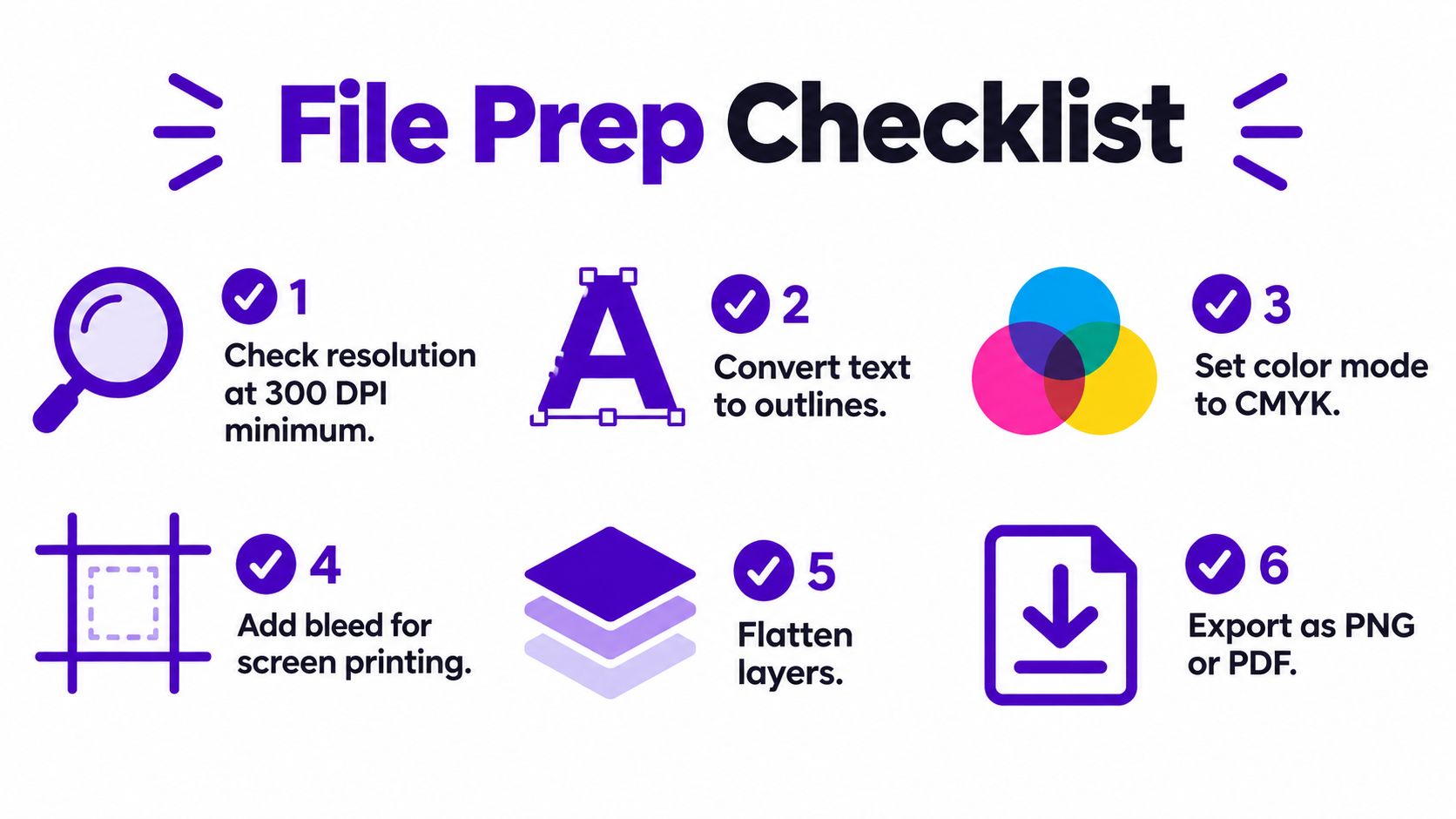
Run through the checklist below before any file leaves your computer.
Five methods cover nearly everything a creator will realistically use, and each one fails in a predictable way when it's matched to the wrong job. Compare them against your artwork, your fabric, and your run size, not against each other's marketing claims.
Screen printing forces ink through a prepared stencil, with a separate screen for each color. That preparation costs time and money up front, so the method only makes sense when the cost spreads across many identical shirts. Once a press is running, though, it's remarkably fast, since modern automatic presses can reportedly produce as many as 1,800 shirts per hour. Simple, bold, few color artwork in a repeat run is exactly what this process was built for, and the ink coverage on dark garments is opaque and durable.
DTG printing works more like an inkjet printer for clothing, applying ink directly to a finished garment. There's no screen to build, so every shirt in a batch can carry a different image, which is why print on demand sellers lean on it. The feel on cotton is soft because the ink sits in the fabric rather than on top of it. The trade-offs are fabric sensitivity and pretreatment, especially on dark garments, and per shirt cost that doesn't drop the way screen printing does at volume.
DTF printing prints your design onto film first, then transfers it to the shirt with heat and pressure. It handles detailed full color artwork across cotton and blends, and transfers can be prepared in advance and pressed as orders come in. The print sits slightly on the surface, so the hand feel is less integrated than DTG, and your result depends heavily on press settings and film quality.
Heat transfer vinyl, or HTV, cuts your design from colored vinyl sheets that get pressed onto the garment. It's the most accessible at home method for names, numbers, and single color graphics, and it's satisfying for personalization. It doesn't do photographic detail or gradients at all, and multicolor work means layering separate cuts, which gets fiddly fast. Sublimation dyes the fabric itself and produces prints that can't crack or peel, but it only works properly on light colored polyester, which rules out the classic cotton tee entirely.
| Method | Best artwork | Best fabric | Best run size | Feel |
|---|---|---|---|---|
| Screen printing | Simple, few color, bold | Cotton and blends, light or dark | Large repeat runs | Smooth, slightly raised ink |
| DTG | Detailed, full color, gradients | Cotton, especially light colors | One-offs and short runs | Soft, part of the fabric |
| DTF | Detailed, full color | Cotton and blends | Short to medium runs | Light surface transfer |
| HTV | Single color shapes and lettering | Most fabrics, per vinyl type | Singles and personalization | Noticeable vinyl layer |
| Sublimation | Full color, all over coverage | Light polyester only | Short runs | No feel, dyed into fabric |
Decision rule: Few colors plus many shirts points to screen printing. Detailed art plus few shirts points to DTG or DTF. One name or number points to HTV. Light polyester opens sublimation.
AI generated artwork deserves one extra consideration. Generated images often arrive with fine gradients, complex backgrounds, transparency quirks, and detail at a scale that flatters a monitor. Those qualities push you toward DTG or DTF, and they push back hard against screen printing, where every color separation and halftone conversion is a chance for the image to lose what made it good. Newer isn't automatically cheaper, though. A proven design reordered in bulk will usually cost less per shirt screen printed, because that setup you paid for once keeps working across the whole run.
Two paths cover most first shirts. You'll either press vinyl at home, or you'll send a file to a shop or print on demand service and let their equipment do the work. Understanding both makes you better at each, because you'll know what you're paying for when you outsource, and what shortcuts you can't take when you don't.
The home setup below is where many creators start, with a laptop, a cutter, and a press sharing one workspace.

Mirror your artwork before cutting, because the design gets flipped when it's pressed face down onto the shirt. Forgetting this step is the classic beginner rite of passage, and mirrored text is unfixable. Cut with the blade depth set for your specific vinyl so the blade scores the vinyl layer without slicing through the carrier sheet beneath it.
Weed the excess by picking away every piece of vinyl that isn't part of the design, including the insides of letters. Then preheat the garment briefly in the press to drive out moisture and wrinkles, which are silent adhesion killers. Position the design carrier side up, cover it with parchment or a protective sheet, and press at the temperature, time, and pressure your vinyl manufacturer specifies. Peel the carrier hot, warm, or cold exactly as directed, because peeling at the wrong moment can lift edges that looked perfectly bonded.
When you send a file out for DTG, the printer pretreats the garment, loads it flat, and prints directly onto the fabric. On dark shirts, the machine lays down a white underbase first, then prints your colors on top. That capability exists because DTG began in the United States in 1996 with Matthew Rhome's Revolution printer, and white ink arrived in 2005, letting colored artwork show up on black fabric instead of sinking into it. If a shop's dark garment samples look washed out, their underbase or pretreatment process is the first thing to question.
Screen printing outsourced to a local shop follows its own sequence. The shop exposes one screen per color, registers them so layers align, prints each color in turn, flashes the ink briefly between colors so they don't smear together, and cures the finished print. You're paying for that setup whether you order a handful of shirts or a pallet, which is the whole economics of the method in one sentence.
Watching a full print run once does more for your instincts than reading about ten of them, so take a few minutes with the process below before your first order.
One honest note. Not every design should be printed at all. Small chest logos, monograms, and premium uniform marks often look better stitched, and this custom embroidery clothing guide is a good reference if your artwork is simple, small, and meant to read as high end rather than graphic. Knowing when to switch crafts is part of knowing how to print designs on shirts well.
Settings are where amateur results separate from professional ones, and they're also where generic advice does the most damage. A number that works for one vinyl, film, or fabric can ruin another. Treat every figure here as a documented starting point, then defer to your specific product's instructions and your own test press.
Use a calibrated heat press rather than a household iron. A press holds a set temperature across the whole platen and applies even, repeatable pressure. An iron does neither, and the uneven contact shows up weeks later as one corner of your design lifting in the wash. Pressure isn't a vibe, either. It's a measurable variable, and fabric changes what it should be.
The three variables interact constantly, which is why the graphic below treats them as one system rather than separate dials.

Dye migration is the polyester trap worth understanding. Too much heat lets the garment's own dye bleed up into your print, tinting white and light areas with the shirt color, and bright or high visibility fabrics are the worst offenders. Lower temperature and shorter dwell time are your defense, not extra pressure. On the screen printing side, the equivalent trap is under curing. A print that feels dry can still fail in the wash if the ink film never reached full cure temperature, so verify the actual garment or ink temperature instead of trusting the number glowing on the dryer display.
Press one sacrificial shirt first, on the exact blank you'll sell, and write down what you used. A settings notebook beats a good memory every single run.
Pre-press the garment for a few seconds before any transfer goes on. It removes trapped moisture and gives you a flat surface, and skipping it causes more adhesion failures than most beginners ever trace back to. Then check orientation before the platen comes down. On a DTF transfer, the artwork faces up and the white adhesive side faces the fabric. Thirty seconds of attention there saves an entire blank.
Ask how long a print lasts and most sellers answer with a shrug dressed up as a promise. Put numbers on it instead. Recent industry reporting puts properly executed screen printing at roughly 50 to 100+ washes, DTF at 40 to 60+ washes, and DTG at 30 to 50 washes, with actual results depending on application quality and how the shirt gets laundered. Those ranges describe good work. A poorly cured screen print or a badly pressed transfer won't reach the bottom of its range.
Longest lasting isn't the same as best, though. A soft, breathable DTG print that moves with the fabric can be the shirt someone reaches for weekly, while a thicker, more abrasion resistant transfer can feel like wearing a label on your chest. Feel is a product decision. Match it to what the shirt is for, workwear that gets punished, or a retail style tee that sells on comfort.
Before any design goes on sale, wash your sample the way you plan to instruct customers to wash it. Turn it inside out, use cold water, dry on low heat, and inspect after each cycle. You're looking for cracking, peeling, fading, and edge lift, plus any change in hand feel or color accuracy compared with the fresh print. Photograph the sample under the same light each time so you're comparing evidence, not impressions.
The same bonding discipline applies to anything heat applied to a garment. If you ever add patches to uniforms or work shirts, these name patch bonding steps for uniforms show the same principles of clean surfaces, firm even pressure, and testing adhesion after cooling. Heat applied products succeed or fail on preparation, whatever form they take.
Sustainability claims deserve the same skepticism as durability claims. Digital printing can reduce water consumption compared with traditional dye baths, but it still consumes films, inks, packaging, and the rejected samples you're bound to produce. A durable print on an overproduced blank that never sells is waste with good wash fastness. Printing on demand, testing before committing, and choosing a blank people genuinely want to wear does more for your footprint than chasing a method label.
Finish the job with care instructions your buyer can follow. Print or include wording along these lines. Wash inside out in cold water. Use low heat or hang dry. Don't iron directly on the print. That one small insert protects the print, reduces complaints, and signals that you made the shirt deliberately.
Everything above compresses into one routine you run before a design earns a listing. Tape it above your press or pin it in your project folder, and don't skip steps because a design looks good on screen.
The traps that catch first time sellers are consistent. Skipping a white underbase on dark garments and wondering why colors look muddy. Running cotton settings on polyester and watching dye migrate into the artwork. Listing a design for sale before a single sample has survived a wash. Each one costs more to fix after a customer finds it than before.
So order or press exactly one sample next. Wear it, wash it, photograph it flat and on a person, and only then list it on Etsy or post it to your socials. A design that survives that sequence isn't a hope anymore. It's a product, and you know precisely how to print designs on shirts that deserve to be sold.
Ready to create the artwork itself? starryai turns text prompts and uploaded images into high resolution shirt designs you can refine, upscale, and export with transparent backgrounds for DTG, DTF, screen printing, or heat transfer. Generate your first design, run it through the preflight and wash test above, and press a sample you can vouch for.


.svg)