


Written by Mo Kahn on
August 27, 2026


More than 150 million people use AI image generators at least monthly, while daily production is estimated near 80 million images and cumulative creation has passed 30 billion since 2022, according to industry estimates on AI image generation. That scale changes the question. Learning how to make viral AI photos isn't mainly about finding a magical prompt. It's about building a recognizable visual system that gives people a reason to stop, save, share, and come back for the next image.
A single polished portrait can get attention, but a repeatable series builds memory. The strongest creators combine a consistent subject, a narrow style vocabulary, platform-ready dimensions, trend-aware packaging, and enough imperfection to keep the result from feeling disposable. The workflow below treats every generation as part of a content identity rather than an isolated experiment.
A polished AI portrait can still disappear in minutes. The image may have clean lighting, sharp details, and a convincing face, yet offer no reason to pause or remember the account. Native image generation inside GPT-4o in March 2025 made creation more conversational, while DALL-E 3 support was scheduled to end on May 12, 2026, according to this history of GPT-4o image generation. The practical result is a lower barrier to producing and publishing visual ideas.
More creators can now make competent images without learning a traditional editor. Your post therefore competes with a constant stream of portraits using similar lighting, face treatment, palettes, and cinematic wording. Industry estimates place daily AI-image output at roughly 80 million images in 2026, compared with an estimated 34 million new images per day in 2024.
Weak AI-photo posts usually fail in one of three places:
A viewer needs a reason to pause before the image earns a second look. Give the first frame a visual question, such as a dramatic transformation, an unusual setting, or a returning character whose next version people want to see. The strongest series make the format recognizable before the username is visible.
Practical rule: Build the account around a format people can recognize before they read the username.
Set a stable subject and visual language before chasing new prompts. Keep the face, lens feel, lighting direction, and core palette consistent, then vary one high-impact element at a time. This makes the series identifiable while giving each post a clear point of difference.
Package related images together instead of publishing every generation as a disconnected portrait. For example, test whether a carousel showing the same character moving from an ordinary selfie to a finished fantasy scene earns more saves than a single final image. Track the result in your own analytics, then repeat the format only if the audience responds.
The target is a system that makes the next image feel connected, intentional, and worth returning for. A lucky prompt may create one attractive post. A repeatable visual identity gives the account a reason to keep publishing.
The foundation is the reference image. A clever prompt can't fully rescue a selfie with harsh shadows, a busy background, or a face cropped too close to the frame. Before writing anything, prepare a source that gives the generator a clear subject to preserve.
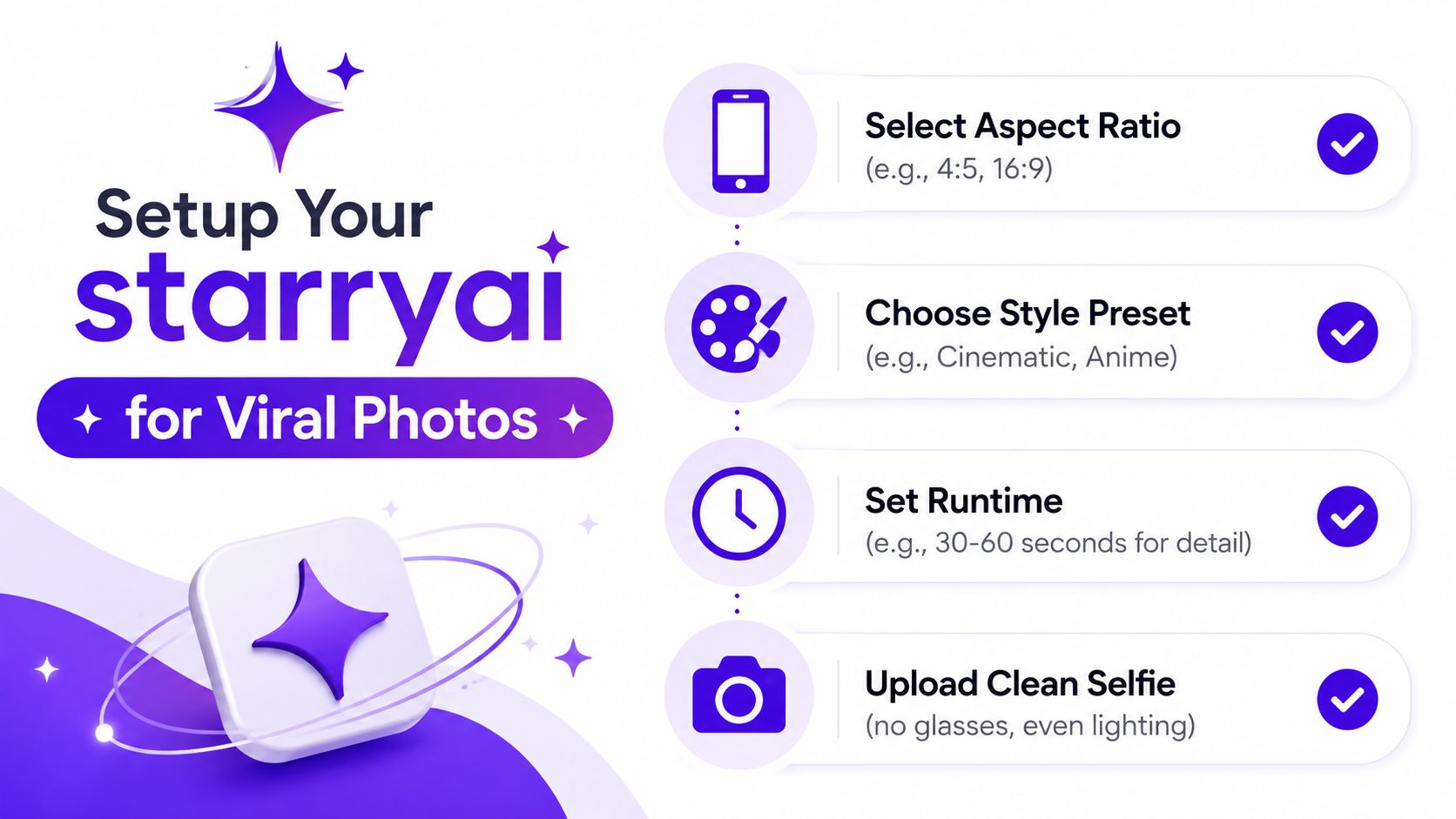
Use a clean, front-facing selfie with even, soft light. Keep facial features visible, avoid heavy beauty filters, remove distracting objects behind you, and leave enough space around the head and shoulders for reframing. A neutral expression gives you a dependable base, while one expressive variation helps when the series depends on emotion.
The crop matters because identity consistency depends on stable visual information. If one reference emphasizes the eyes and another cuts off the jaw, the generated character may drift between posts. Keep the face centered, but don't flatten every image into the same stiff passport pose. Consistency should make the subject recognizable, not lifeless.
Configure the canvas before generation. Use a portrait-friendly frame when the image is designed for a feed or carousel, and choose a wider frame when the concept depends on environment. Independent social-media guidance recommends matching dimensions before generation because resizing afterward can damage composition. Its cited specifications include 1080×1920 for TikTok and Stories-style vertical output and 1080×1350 for an Instagram feed format, as detailed in this guide to AI image prompts for social media.
Choose two or three style presets early. For example, one preset might handle editorial portraits, another nostalgic snapshots, and a third fantasy scenes. Keep the subject, color treatment, and lens language stable while changing the setting or story.
This is also where AI-driven storytelling solutions can help teams think beyond isolated images and plan visual narratives around recurring characters or scenes. For a practical reference-photo workflow, review starryai's guide to creating an AI image of yourself.
Use this quick capture checklist:
A scroll-stopping prompt gives the generator a clear subject, setting, visual identity, and camera behavior. Vague wording leaves those choices open, which often produces generic results. The prompt-engineering research identifies under-specification as a common source of weaker text-to-image outputs and shows how varied prompt language can become.
Use a four-part structure:
“Cool portrait of me” gives the model little to prioritize. A stronger prompt is: “young adult subject, candid rooftop at golden hour, soft film grain editorial style, 85mm f/1.4 shallow depth of field.” It defines the person, location, time, aesthetic, and photographic behavior. Those repeatable choices matter more than adding a new trend word to every image.
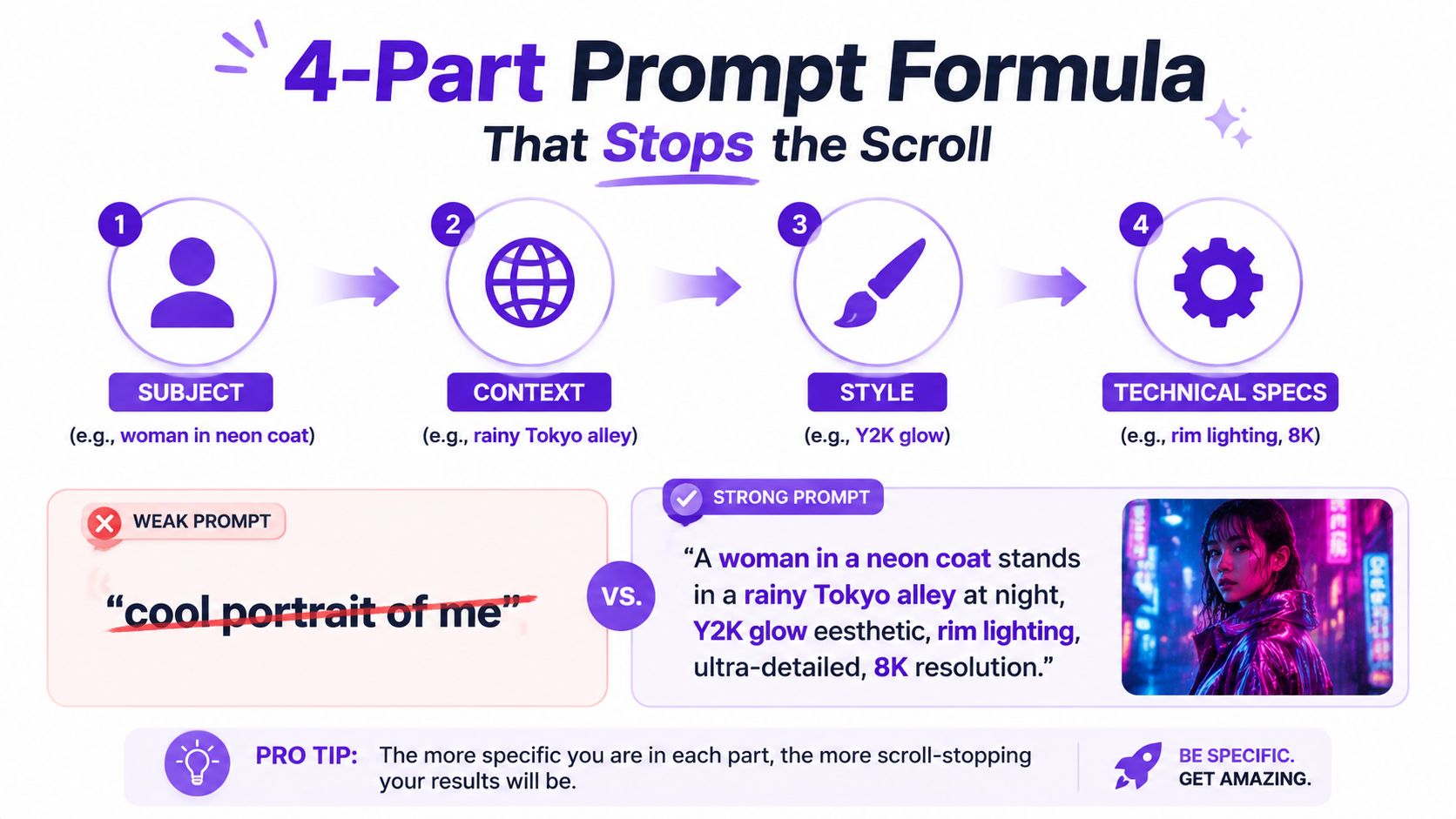
Treat each prompt as a series template. Keep the subject, palette, and core style stable, then change one or two high-impact variables, such as camera angle, lighting direction, background, or expression. Generate 3 to 6 variations per prompt, then choose the composition with the clearest focal point before publishing, following this practical social-media prompting guide.
A starter bank can include:
[subject], [specific location], refined editorial photography, directional window light, controlled shadows, shallow depth of field[subject], [ordinary activity], retro flash snapshot, visible film grain, imperfect framing, faded color[subject], [story moment], cinematic character still, atmospheric backlight, environmental detail, expressive pose[subject], [current trend keyword], recognizable series palette, clean focal framing, platform-native compositionUse negative prompts when the tool supports them. Name unwanted results such as distorted hands, extra fingers, unreadable text, plastic skin, duplicate accessories, or cluttered backgrounds. Weighting modifiers can prioritize a face, outfit, or prop, although excessive weighting often makes the composition stiff.
Keep 3 to 5 prompt patterns per brand and rotate them. The same prompt-engineering principles support that approach. Add a trend keyword only when it fits the image. A label cannot rescue weak composition, while a strong recurring format gives each new post a recognizable entry point. For more examples, see starryai's AI image prompt guide.
Trend formats work best when you borrow their visual grammar without copying a creator's exact image. Current coverage clusters popular AI-photo aesthetics around editorial realism, retro flash snapshots, toy-like 3D portraits, cinematic character stills, clean brand portraits, character-consistency storytelling, mystery carousels, Y2K camcorder revival, and vintage yearbook looks, as described in this 2026 viral AI photo trend roundup.
Cinematic Y2K glow is useful when nostalgia gives the viewer an instant emotional reference. Try “backlit magenta haze, soft halation, 35mm film grain, pastel highlights” and keep one signature accessory across the series. The trend signal is nostalgia marketing, but the repeatable hook is the return of the same character in different imagined moments.
Hyper-real street portraits benefit from restraint. Use “candid pose, urban background, subtle noise, natural expression” rather than stacking every glossy effect. This style connects with the authenticity trend because it resembles an observed moment instead of a studio-perfect render.
Dreamy soft focus supports escapist storytelling. Combine diffused light, a pastel palette, and controlled motion blur with a clear subject silhouette. The scene might be a train platform, a garden, or a bedroom filled with morning light. Keep the face and palette stable so viewers understand that each post belongs to one world.
Cottagecore fantasy works through tactile details: “mossy stone cottage, fog, golden-hour volumetric light, lo-fi color grading.” Add a recurring object, such as a red scarf or an old key, and let each carousel reveal another part of the setting.
Hyper-saturated surrealism creates stronger stopping power when the surreal element has a simple visual rule. “Kaleidoscopic clouds, chrome reflections, clean centered subject” is more usable than an unlimited list of strange objects. The viewer should understand the image quickly, then notice the unusual detail on a second look.
A clean minimalist studio series can anchor the feed between louder concepts. Use generous negative space, one prop, and a consistent background color. That first image can function as the carousel hook, while later frames reveal variations, close-ups, or a transformation.
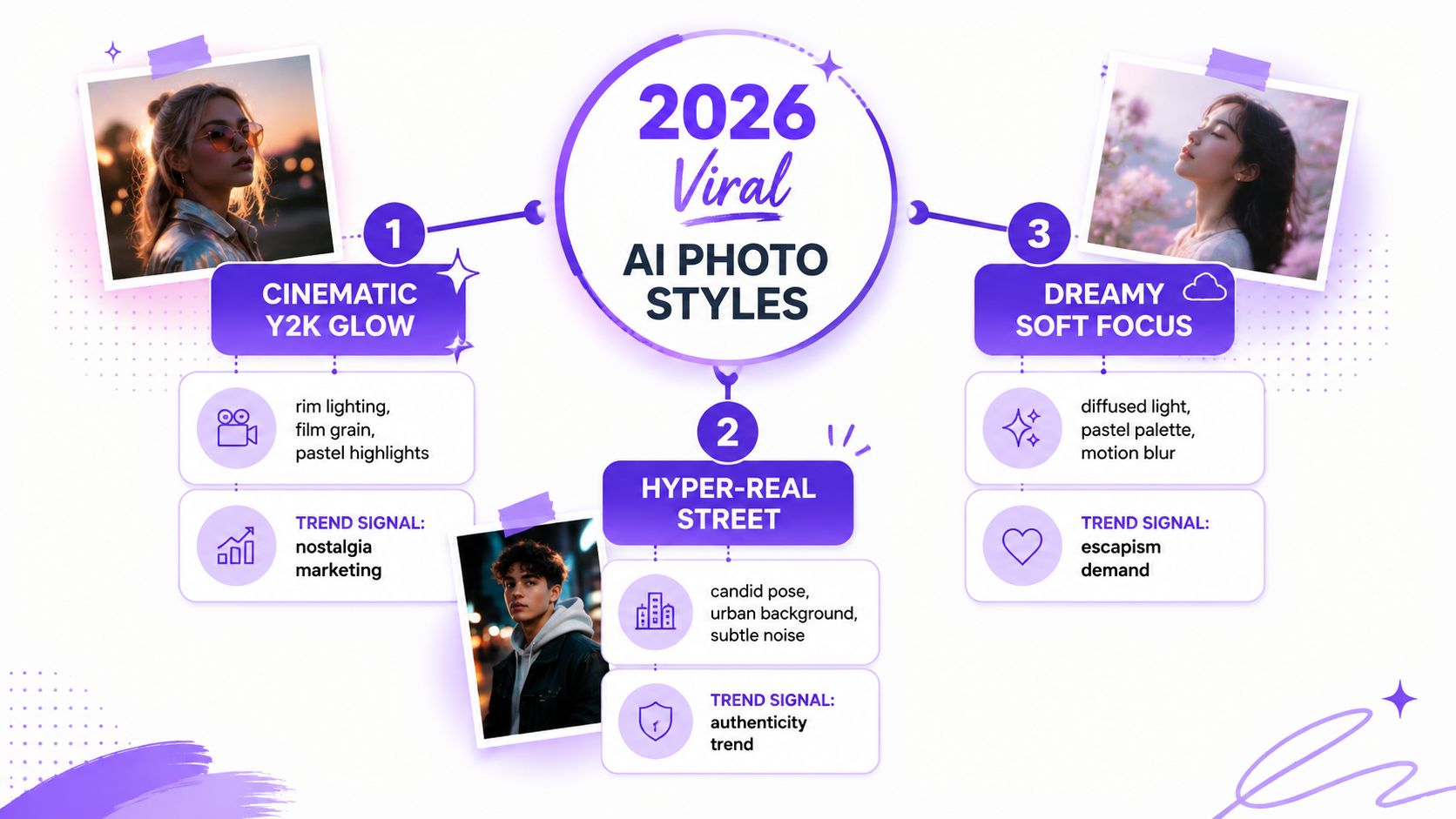
These styles become more durable when they support character consistency, mystery, or nostalgia instead of functioning as decorative presets. A good test is simple: can you name the next five posts without abandoning the visual identity?
Generate for the destination, not for a generic gallery. A wide scene can crop away the eyes, hands, or environmental clue that gives the concept its identity. Set the canvas before generating. 1080×1920 fits TikTok and Stories-style vertical output, while 1080×1350 suits an Instagram feed portrait.
| Platform | Aspect Ratio | Pixel Size | Best Format |
|---|---|---|---|
| TikTok carousel | Vertical | 1080×1920 | Multi-image story or transformation |
| Instagram feed | Portrait | 1080×1350 | Carousel or single portrait |
| Instagram Stories | Vertical | 1080×1920 | Sequential story frames |
| Vertical | Test 2:3 | Pin series | |
| X | Landscape | Test 16:9 | Single image or thread |
Treat these dimensions as starting points, then inspect the exported crop inside the actual app. A prompt can produce a strong image while the platform removes the focal point through automatic cropping. Check the face, hands, text, and recurring series marker before publishing.
TikTok carousel posts deserve serious testing. One 2025 analysis reported 6.46% engagement for images and carousels versus 5.5% for videos, while another summary reported that carousels produced 81% more engagements and 82% more likes than videos, according to this TikTok picture-trends analysis. These figures do not guarantee results for every account, but they support treating photo carousels as a primary format rather than a fallback.
Lead with the strongest frame. Follow with a reveal, detail, variation, or question that makes swiping useful. A recurring border, color grade, signature pose, or character prop turns separate uploads into a recognizable series. That identity matters more than squeezing every trend into one post.
Plan the canvas before batch generation with the starryai guide to social-media aspect ratios. Generate several frames with the same visual identity, then vary the camera distance, gesture, or setting so the carousel feels connected without looking duplicated.
Publish while a trend is gaining attention, then continue with related posts instead of abandoning the format after one upload. Your own saves, shares, comments, and profile visits provide a better posting signal than any universal schedule.
Flawless rendering does not guarantee attention. Current trend reporting points toward film grain, blur, light leaks, faded color, scrapbook textures, consistent characters, and nostalgic edits, as shown in this overview of viral AI photo trends. These cues resemble the irregularities found in phone photos and older cameras, helping a synthetic image feel less generic and more emotionally familiar.
That familiarity should support a repeatable visual identity, not become a random filter applied to every post. Choose two or three imperfections that belong to the series, then keep them consistent across prompts, covers, and carousel frames. A recurring grain profile, muted palette, or off-center composition can make separate uploads look like part of the same world.
Use prompt language such as “Ilford HP5 grain, soft motion blur, analog warmth, slight lens flare, off-center framing.” You can request natural skin texture, stray hairs, asymmetrical lighting, or a mildly imperfect phone-camera composition. Each detail should reinforce the image's emotional premise.
A polished fashion campaign benefits from clean edges and controlled reflections. A memory-themed carousel can use faded color and uneven exposure. A lifestyle portrait often feels more familiar when it resembles a moment someone could have captured, rather than a face with mathematically smooth skin and impossible lighting.
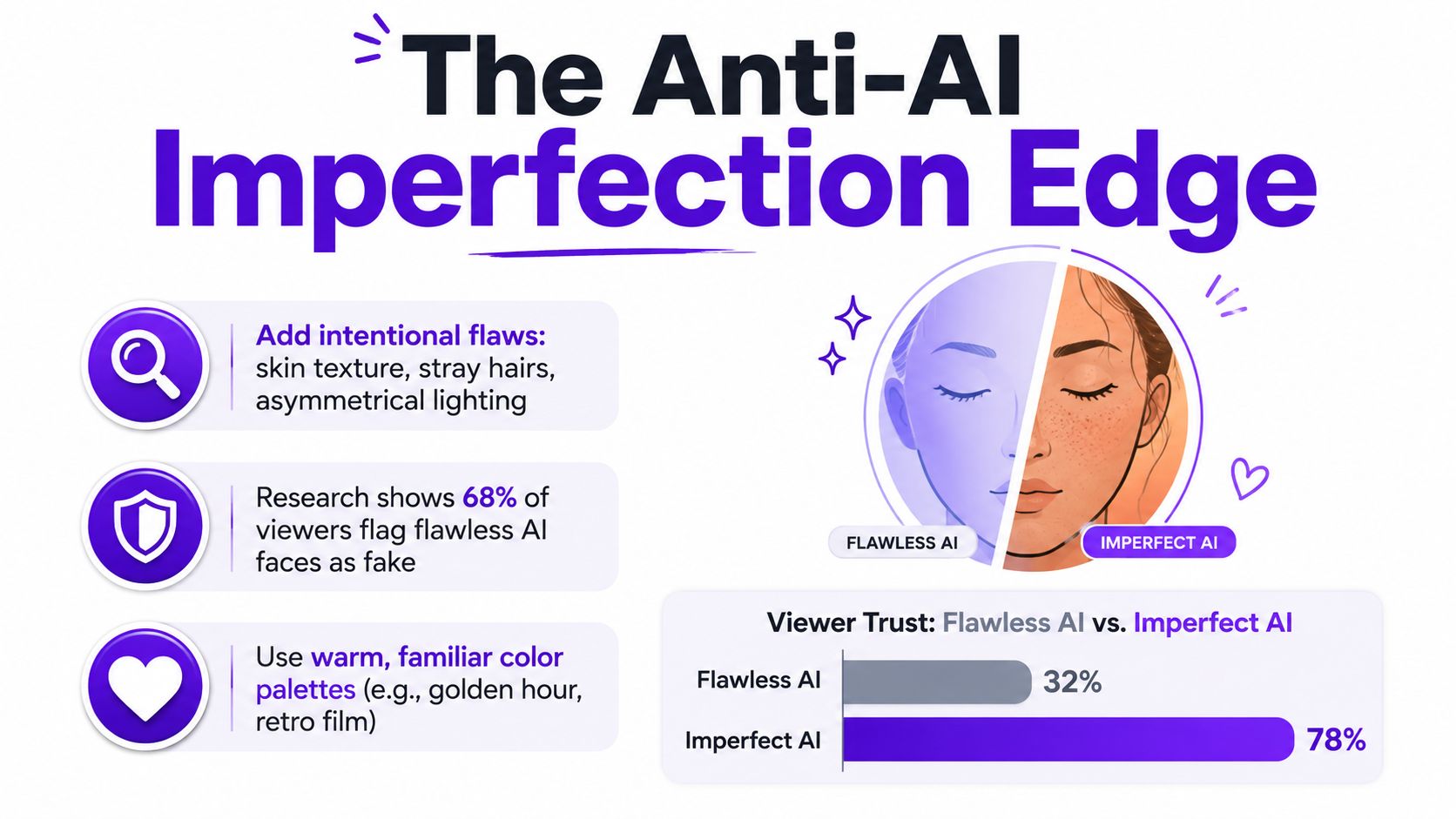
Deliberate imperfection can make a synthetic image feel less generic and easier to place inside a human story. It also creates a useful trade-off: heavier texture may strengthen mood, while excessive blur or grain can weaken facial clarity, reduce thumbnail impact, and make a series look careless. Generate clean and textured versions, compare them at feed size, and keep the treatment that preserves both recognition and atmosphere.
A workable system turns inspiration into scheduled production. Start the week by scanning current visual formats and saving ideas that fit your established identity. Then batch the work instead of asking every post to solve the creative problem from scratch.
One strong render can become multiple deliverables without feeling duplicated. Create a TikTok carousel, a Pinterest pin, an Instagram Reel cover, an X post, and a YouTube thumbnail, then use alternate crops, close-ups, detail frames, and behind-the-scenes prompt cards to extend the idea. Keep the visual motif intact so repurposing strengthens recognition instead of scattering it.
Organize the prompt bank by series, not by random keywords. Give each series a fixed subject description, style rules, negative prompts, color notes, and three rotating scene slots. Rotate content pillars such as selfie transformation, aesthetic portrait, trend remix, and behind-the-scenes process so the account has variety without losing its identity.
Set aside a short weekly review. Track saves, shares, comments, and follow-through from the post to the profile, then retire prompts that repeatedly produce weak compositions. Double down on formats that earn meaningful actions, not merely quick impressions.
Add a disclosure check before publishing. The Partnership on AI's Synthetic Media Framework, developed in 2024, is a voluntary framework that includes recommendations around clear identification, provenance tracking, disclosure, detection, and verification, as described in the framework summary. Apply the relevant platform AI label, disclose generated elements when context requires it, and credit the original photo when you use someone's face or reference material.
The creators who last aren't waiting for one lucky generation. They're building a recognizable character, repeating a visual promise, and shipping enough variations to learn what their audience saves and shares.
starryai lets you turn selfies, text prompts, and emojis into high-quality visuals, then adapt those creations for social content and visual series. Visit starryai to build your first repeatable AI-photo format, test several prompt variations, and start publishing a recognizable identity instead of another one-off image.


.svg)