

Written by Mo Kahn on


Text-to-image AI doesn't fetch a stored photo: a text encoder turns your prompt into numbers, then repeated denoising turns random noise into an image guided by those numbers. Latent diffusion, introduced in influential research in 2022, makes that process more efficient by working with a compressed representation instead of every pixel.
The popular advice to “just write a better prompt” misses part of the picture. Your words steer an iterative guess, not a direct search or a collage, so the result can take time, change between runs, or get hands, object counts, and lettering wrong. Understanding the steps helps you write clearer prompts and decide what to fix when a generation misses.
A text-to-image app doesn't retrieve a finished picture or assemble a collage from your words. It uses your prompt to steer a series of guesses, starting with random noise and gradually shaping it into an image. The 2022 research on latent diffusion and the image-generation process describes how this process moves from noise toward an image that fits the prompt.
| Stage | What the model does | What you see |
|---|---|---|
| Text encoding | A language encoder turns the prompt into numerical embeddings | Nothing visible yet |
| Noise start | Generation begins from random Gaussian noise | Gray static with no objects |
| Early denoising | The first steps set overall shape, objects, and layout | A blurry composition |
| Late denoising | Later steps add color, texture, and fine detail | Sharper surfaces and edges |
| Decode | A decoder turns the latent representation back into pixels | The finished image |
The stages explain why an early preview can look blurry but still show the scene's layout. Text encoding prepares numerical instructions, while the initial noise contains no recognizable objects. Early denoising establishes the broad composition; later steps mainly refine colors, surfaces, and edges.
Text guidance describes how strongly the prompt steers denoising. Some apps expose this as a guidance scale. A higher setting presses the result closer to the wording, though it can make the image look harsh. A lower setting gives the generation more room to drift. The prompt sets the target; the guidance setting affects how firmly the process follows it.
Denoising every pixel directly would require more computation and memory. Latent diffusion first compresses an image into a smaller representation, runs denoising there, then decodes the result back into pixels. This makes it more practical to generate higher-resolution images without refining every pixel throughout the process.
You can read a preview as a work in progress: look for the composition first, then check whether the details arrive as the image sharpens. AI assistance for academic research is another example of AI supporting a step-by-step working process.
Training pairs are lessons, not a shelf of finished pictures waiting for the app to copy. Each pair connects a visual example with words describing it, helping a model learn associations between language and visual patterns. Those associations can include a subject, its attributes, the arrangement of a scene, and a visual style.
The scale of the training data matters, but so does the quality of its captions. LAION-5B, a publicly available dataset used in image-text research, contains roughly 5 billion images, with about 2 billion having corresponding English captions, according to the LAION-5B image-text dataset research. The model learns patterns from these examples; it doesn't use them as a lookup table of finished images.
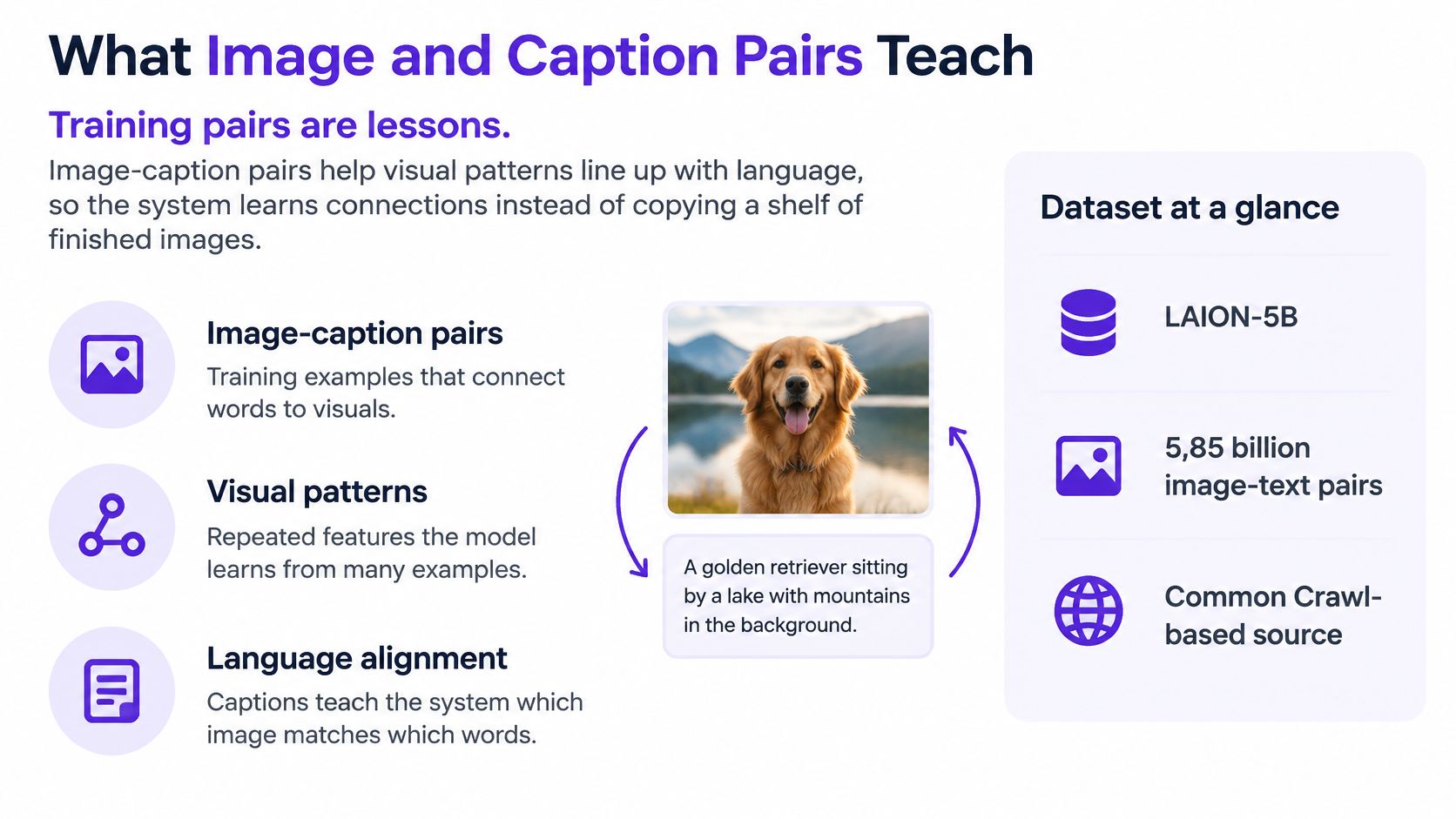
Captions affect what the model can learn to associate with an image. Dense, high-quality captions can improve how well generated pictures follow text. The trade-off is that they can also reduce aesthetic quality and output diversity. A system that learns from more precise descriptions may be better at matching stated details, without producing a wider range of looks.
This helps explain why prompt-following isn't just a matter of making a visual model bigger. The model also depends on whether its training captions described each image clearly enough. If an unusual costume, niche game creature, or distinctive brand appears in few well-described examples, the system may have weaker patterns to draw on.
For an obscure subject, break the idea into visual features the model can express: the shape of a costume, its materials and colors, the creature's body parts, or the position of a logo-like mark. A prompt describing those visible parts gives the system more to work with than an insider name alone.
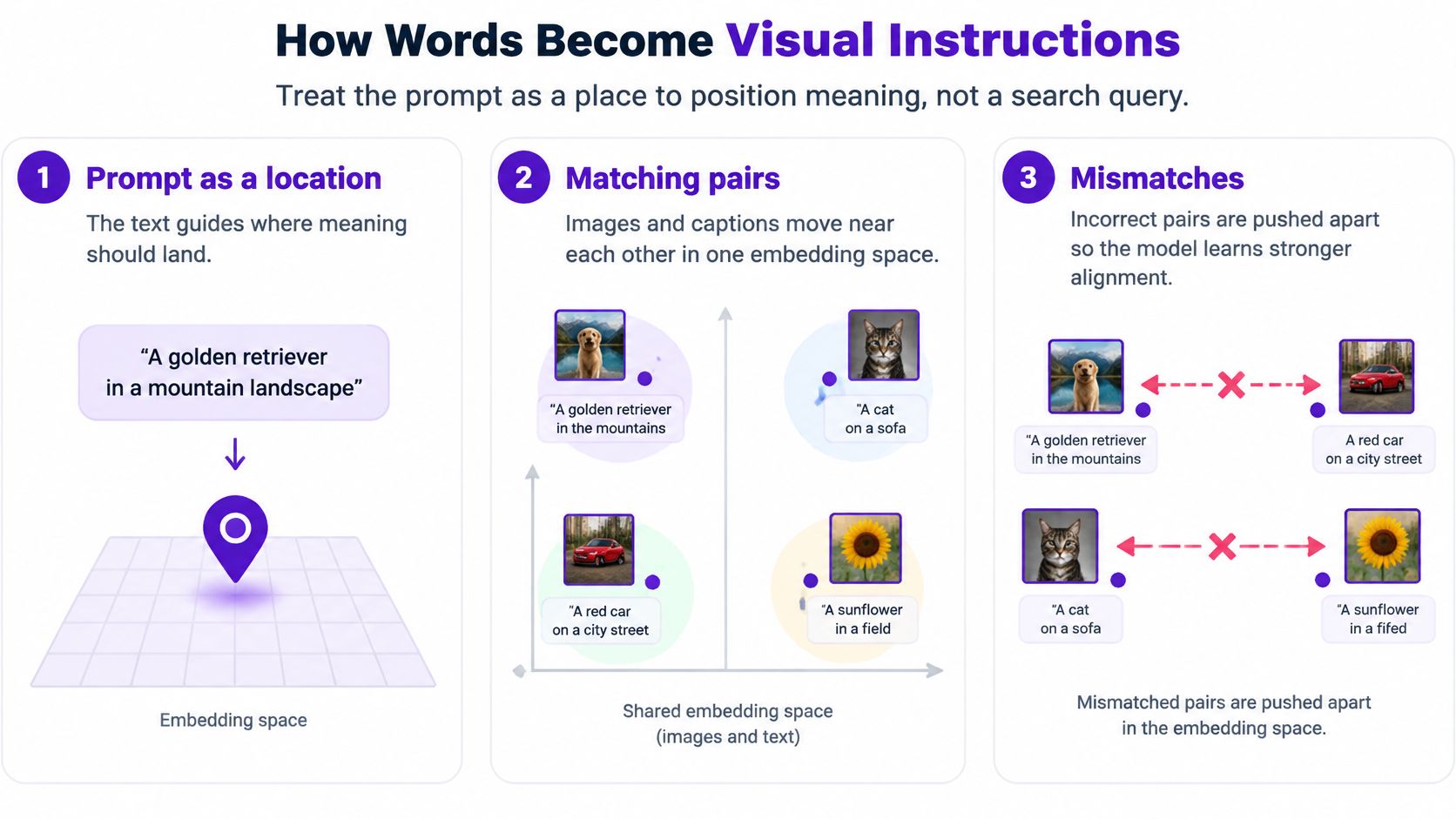
Think of a shared room where images and their captions each have a place. A good caption sits near the photo it describes; an incorrect caption sits farther away. In a CLIP-style approach, matching images and captions are brought close together in a shared embedding space, while mismatched pairs are pushed apart. The account of contrastive learning in text-to-image systems explains how this matching is measured in both directions, image-to-text and text-to-image.
At generation time, the prompt becomes a numerical representation that carries concepts such as subject, attributes, and style. The diffusion model uses that representation to guide image formation, rather than treating the prompt as an unstructured string. In plain terms, the model is trying to keep the named meaning while turning it into visual structure.
Consider two prompts for a coffee image:
“Nice coffee picture.”
“Red enamel mug on a windowsill, morning side light, no text.”
The first gives the model a broad destination, but leaves many choices open. The second names the object, its color and material, its relationship to the windowsill, the lighting, and a constraint. Those details give the prompt representation clearer anchors.
A text-to-image prompt isn't a search query that fetches the closest existing photo. It's a set of instructions that guides the image-making process. Name what should appear, how the elements relate, and which visual choices matter most. A guide to AI prompt optimization can help you develop that habit for image-making.
Text guidance also affects how strongly the prompt pulls at each denoising step. A precise prompt gives the model clearer concepts to preserve; the guidance setting determines how firmly those concepts influence the emerging image. Neither guarantees that every detail will be right.
Try this writing habit: name the subject, one relationship, a viewpoint or light source, and something to leave out. For example, “red mug on a windowsill, eye-level view, soft morning side light, no lettering” is more actionable than a string of general compliments. That clarity doesn't remove uncertainty, but it gives the process a more specific target.
During training, the model sees images deliberately altered with known noise. It learns to predict the noise at different time steps while using the text representation as a condition. Generation reverses that corruption: the model starts from noise and applies its learned denoising operation repeatedly, moving toward an image that fits the prompt.
There's no original photo hidden underneath the random starting point. At inference, the model isn't recovering a particular picture that it has seen before. Each step makes a prediction about what the emerging image should look like, given the current noisy state and the text guidance.
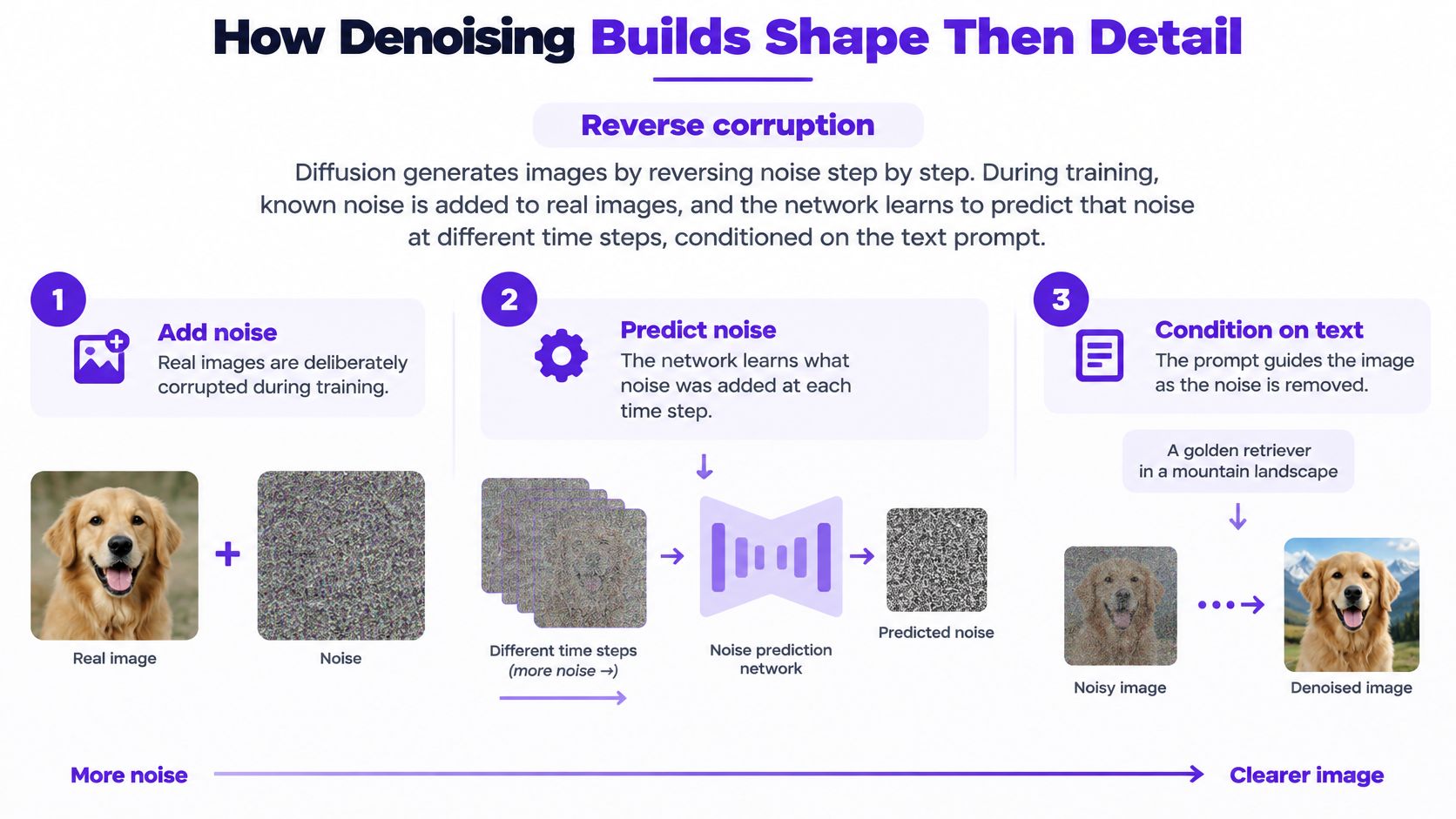
A pixel-based diffusion system works directly on the image's pixels, which can demand substantial computation. Latent diffusion compresses the image first, runs the denoising steps on that smaller representation, then uses a decoder to turn the result into pixels. The 2022 shift to this approach reduced computational and memory requirements while supporting high-resolution synthesis.
The efficiency comes with a trade-off. The model doesn't refine every pixel directly during its main generation loop, and the compression and decoding process can limit the final quality. Latent diffusion makes generation more practical, but it doesn't make every output flawless.
Early denoising steps establish global composition and object geometry. Later ones mainly fill in detail, such as a fabric surface, a highlight, or an edge. A plain-language introduction to Stable Diffusion gives another way to explore a widely used diffusion approach.
This order is useful when you're judging a preview. If a runner's pose or a book-cover character's position looks wrong while the image is still blurry, more texture isn't the fix. The model can refine an incorrect early guess instead of correcting it magically. Think of the visible progress as layout first, surfaces second, pixels last.
A prompt isn't converted directly into pixels in one operation. The model begins with random noise and makes a sequence of predictions, so running the same words again can lead to a different result. Even accelerated diffusion approaches commonly require roughly 20–50 sequential denoising steps per image, according to an analysis of speed, inconsistency, and practical problems in text-to-image generation.
The same iterative process helps explain why a prompt can miss an instruction. A prediction about text alignment, anatomy, or the number of objects can affect later steps. A longer prompt can also make matters worse if it combines competing subjects or styles, leaving the model with a muddled set of directions.
| What you notice | Why the mechanism does it | What to try next |
|---|---|---|
| Same prompt, different image | Each run starts from new random noise and approximates | Name composition and viewpoint, then regenerate |
| Odd hands, limbs, or counts | Errors can compound across about 20 to 50 steps | Use fewer people, simplify the pose, then make an edit pass |
| Broken or extra lettering | Text is hard to keep aligned in pixels | Use very short words or add type outside the model |
| More detail made it worse | Competing concepts pull the embedding apart | Choose one subject, clear relationships, and one style |
| Generation feels slow | Steps run in sequence, not as one pixel write | Plan on several tries instead of one perfect pass |
A compressed latent representation can reduce computation, but it also creates a quality ceiling imposed by the autoencoder. If the compression loses something, later denoising can't always bring it back. That's why an appealing image is evidence of one successful result, not proof that the model will reliably solve every prompt.
Distillation and consistency modeling are developments to watch. They aim to reduce generation to one or two evaluations instead of many diffusion steps, which could make image creation more responsive for mobile and high-volume creative workflows. That direction doesn't mean every current image app already generates in one or two steps.
For creators, the practical response is to specify composition, subject relationships, camera or viewpoint, and output constraints. Then treat a flawed result as a missed inference, not a verdict on the idea: regenerate when the composition is off, or edit the part that failed. When comparing tools, focus on which one handles your recurring task and correction workflow; this overview of text-to-image models provides another starting point.
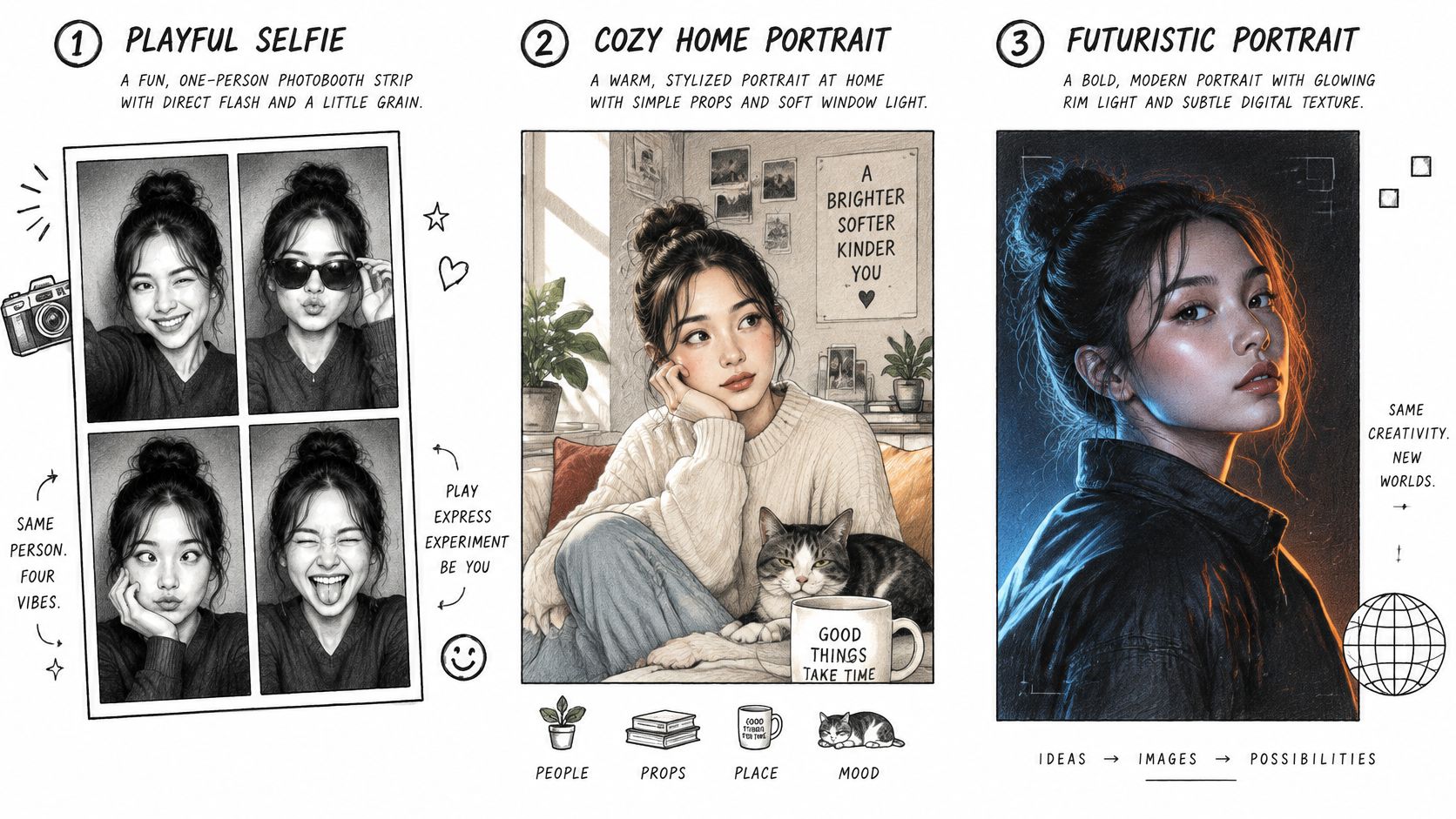
The same prompt-writing habit can serve a selfie transformation, an athletic portrait, or a character concept. In each case, give the model the structural instructions first, then use details that support the intended look. Here are three prompts you can adapt.
Photobooth-style selfie: “One person with a playful expression, direct camera flash, four-frame photo-strip layout, slight film grain.” The words “one person” and “four-frame photo-strip layout” give the model the subject and early composition to establish. “Direct camera flash” defines the lighting; “slight film grain” is a surface detail. Leave out extra style labels that compete with the photo-strip look.
To see the kind of portrait transformations that can prompt new ideas, take a look at the example below.
Athletic portrait: “Runner mid-stride on a track, purposeful posture, simple dark activewear, side light.” “Runner mid-stride” and “purposeful posture” help determine the body position and overall shape. The track and side light place the subject in a clear setting. Don't stack several clothing styles or moods onto a prompt that already needs a legible pose.
Character for a cover or merch: “One fantasy character, forest-green coat and copper scarf, plain cream background, no text.” The subject and clothing details give the generator a concise visual target; the plain background keeps attention on the character. Leaving out the title is deliberate. Add accurate lettering afterward rather than relying on the image model to spell a cover title.
For an everyday workflow, starryai lets you start from a text prompt or selfie, generate image variations, and use Edit when a hand, background, or crop misses the mark. Keep the subject, layout, and background clear in the initial prompt. Then adjust only the failed detail instead of rewriting everything.
A provenance signal can show that an image was generated or processed by AI. It does not establish that you have permission to use every element, that a marketplace allows the image, or that its context is truthful. Content Credentials and invisible watermarks can record or signal an image's history, though cropping, compression, or substantial editing may make a watermark hard to detect. No visible signal does not prove an image is a photograph.
For book covers, merchandise, avatars, and branded posts, save how the image was made and review it before publishing:
A label can explain an image's process, but you still need to judge what it depicts and whether you are entitled to use its ingredients. In starryai, save your prompt beside the generated image, then regenerate or edit faulty anatomy or text. Review the final file before posting or selling it.
starryai offers a free AI image generator and creative suite for turning text prompts, selfies, and emojis into visuals. Try a clear prompt, compare the results, and visit starryai to experiment with the generation-and-editing workflow.


.svg)