

Written by Mo Kahn on
July 22, 2026


You're probably storing more creative data than you think.
A selfie comes in. A prompt gets typed. The model generates four variations. A user saves one, ignores three, shares one to social, then asks support to delete their account two months later. Meanwhile, your team has thumbnails in cloud storage, prompts in logs, output files in a CDN, and support screenshots in a ticketing tool. If nobody decided what stays, what gets archived, and what gets deleted, your platform isn't managing data. It's accumulating it.
Creative teams often understand asset pipelines better than retention rules. That's normal. What gets overlooked is that AI platforms don't just store finished artwork. They often touch inputs like selfies and prompts, outputs like generated images, and supporting records like logs or moderation notes. Those categories don't all deserve the same timeline.
A good data retention policy gives each category an expiration date and a reason. For digital creative platforms, that's the difference between a clean system and a future legal scramble.
A creative platform usually notices retention problems late.
The warning sign often isn't storage cost. It's a support ticket, a legal request, or an internal argument. One teammate says user uploads should be deleted quickly. Another says keep everything in case someone disputes ownership later. Support asks whether deleted means removed from the gallery only, or removed from backups too. Nobody has one answer because nobody wrote one rulebook.
That's where the trouble starts. If your team can't explain why data is still there, you'll struggle to defend keeping it. If you delete too aggressively, you may lose records people need for disputes, moderation, or account support. If you keep everything “just in case,” you expand your risk without a clear business reason.
For AI creative products, the confusion gets sharper because not all files have the same sensitivity. A prompt about “neon cyberpunk city” isn't the same as a selfie containing a face. A generated wallpaper saved for personal fun isn't the same as a commercial book cover an indie author may need later to defend authorship choices or respond to an infringement claim.
Practical rule: The more personal the input, the stronger your reason needs to be for keeping it.
Teams trust systems that behave predictably. Users do too. A data retention policy gives product, engineering, legal, security, and support a shared script. It tells the team what data exists, why it exists, how long it stays, and what event triggers deletion. That's not paperwork. It's operational clarity.
A data retention policy is most easily understood by relating it to library rules.
A library doesn't treat every item the same way. A reference book stays in the building. A novel can be borrowed. A newspaper may be discarded after its useful life. The rule isn't random. It reflects purpose, value, and risk. Your platform's data should work the same way.
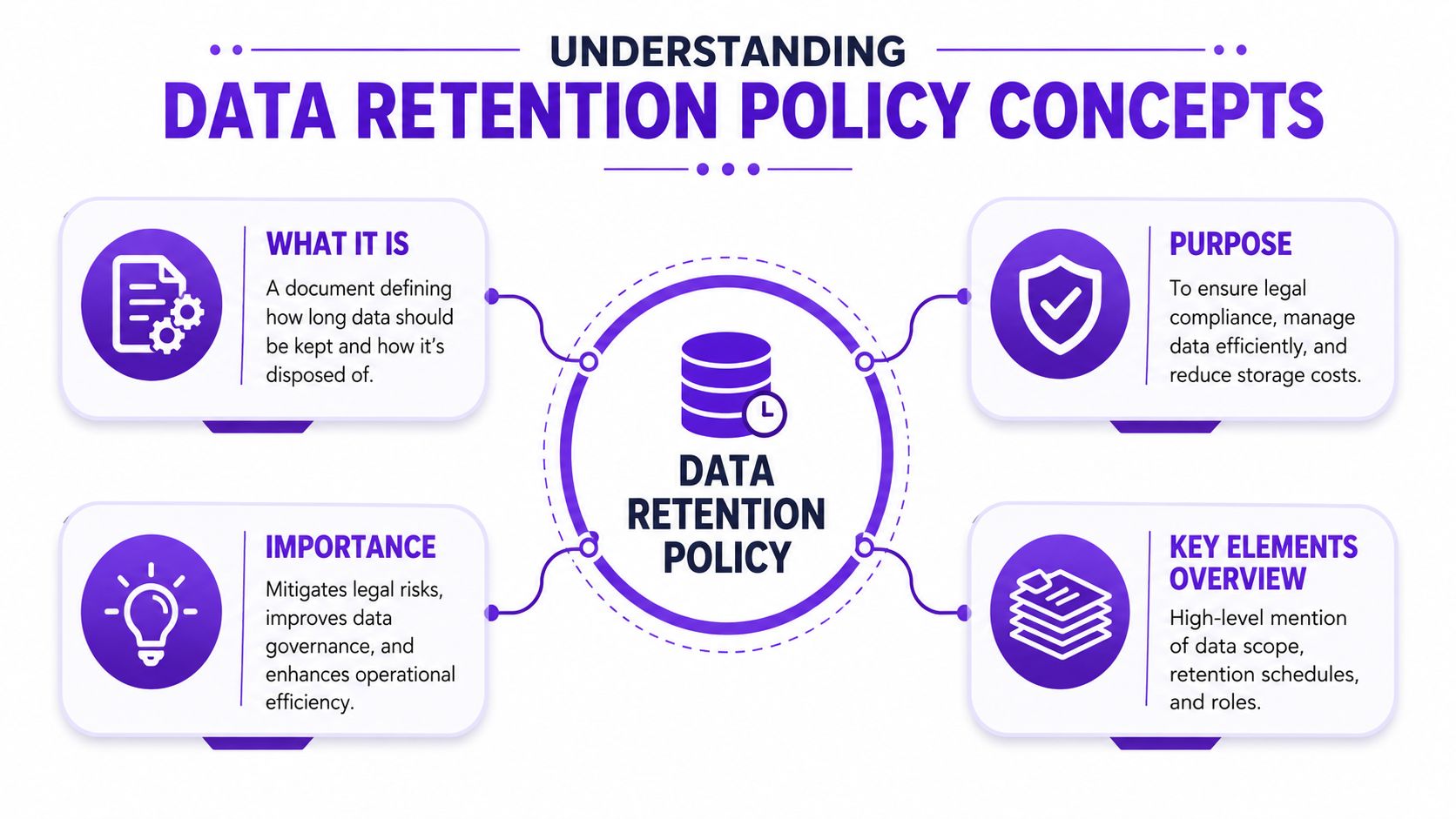
A data retention policy is a written set of rules that answers four practical questions:
For creative platforms, those answers often vary by category. User selfies may need short retention. Generated outputs may need longer retention if users save them or use them commercially. Logs may have separate security or audit value.
A lot of teams confuse retention with storage. They aren't the same. Storage is where data sits. Retention is the rule that decides whether it should still be there.
The legal backdrop also changes over time. In 2006, the EU adopted the Data Retention Directive requiring metadata retention for 6 to 24 months, but the CJEU repealed it in 2014, showing how retention rules can evolve and fragment across jurisdictions (EU data retention history).
Here are the phrases that tend to blur together:
| Term | Plain meaning | Creative platform example |
|---|---|---|
| Scope | What the policy covers | selfies, prompts, outputs, logs, support attachments |
| Retention schedule | How long each category stays | prompt text kept for one use case, deleted sooner for another |
| Archive | Kept, but moved out of active use | older commercial project records stored separately |
| Deletion | Removed at end of retention period | transient upload erased after its purpose is fulfilled |
| Owner | Person or team responsible | engineering runs deletion jobs, legal approves exceptions |
A common mistake is writing “delete user data when no longer needed” and stopping there. That sounds sensible, but it leaves everyone guessing. Needed for what. Needed by whom. Needed for how long.
A policy works only when a teammate can read it and take the same action every time.
For AI products, the most useful distinction is often input versus output. Input data includes the raw material a user supplies, such as a selfie or prompt. Output data includes the image the system creates. Those two categories may serve different purposes, carry different risks, and deserve different lifecycles.
A workable policy needs structure. Without it, teams write broad statements that sound responsible but can't be enforced.

Begin by listing the actual data objects your platform touches. Be literal. Don't write “user content” and move on. Break it apart.
For a creative app, that usually includes:
This step matters because retention gets messy when teams bundle different items into one bucket. A face upload is not the same as a generated fantasy scene. Treating both under one timer often leads to over-retention.
Policies fail when everyone assumes someone else owns deletion.
One team should decide classification rules. Another should configure cloud storage and automation. Support should know what users can delete themselves versus what requires backend action. Legal or compliance should approve exceptions such as litigation holds or dispute preservation.
A short responsibility map usually works better than a long narrative:
| Task | Primary owner | Why it matters |
|---|---|---|
| Data classification | Product and legal | sets the categories correctly |
| Retention enforcement | Engineering and security | turns rules into system behavior |
| Exception approval | Legal or compliance | prevents ad hoc overrides |
| User communication | Support and product | keeps deletion promises clear |
If your team needs examples of end-of-life handling, this guide to secure data destruction policies is useful because it frames disposal as a documented process, not a casual delete button.
Deletion should be part of system design, not a calendar reminder.
For AI platforms, best practice is to use AES-256 encryption at rest and automated lifecycle policies such as AWS S3 Lifecycle, because manual deletion can have error rates up to 40% higher than automated scripts (cloud retention controls and deletion automation). That matters for creative teams because manual cleanup usually breaks first in the busiest pipelines.
A clean policy usually includes these disposal rules:
For platforms that also moderate user-created content, your retention policy should align with broader platform rules such as a content policy framework. If moderation records live longer than the underlying asset, write that exception explicitly.
Operational advice: If a deletion rule can't be automated, treat it as unstable until proven otherwise.
A creative team launches an AI avatar feature across several countries. One user uploads a selfie, another enters a text prompt for a product mockup, and a third downloads generated art for a paid campaign. Those three records may look similar in your database. Under retention rules, they are not the same problem.
Compliance gets difficult because laws ask different questions. Some ask, “Why are you still keeping this?” Others ask, “Have you kept this for the required period?” A usable policy has to answer both.
Under GDPR Article 5, retention is tied to purpose. You need a defensible reason for keeping personal data, and you should stop once that reason ends. Australia's 2015 mandatory data retention law works differently. It requires telecommunications providers and ISPs to keep certain metadata for exactly two years (retention rules under GDPR and Australia).
That distinction matters for AI creative platforms because “data” is really a stack of different objects with different legal meanings. A user selfie can carry face-related sensitivity. A generated image may be a delivered product. Prompt text may later matter for a billing dispute, an IP complaint, or an abuse review. One retention clock for all three is easy to write and hard to defend.
Fixed deadlines appear in other regimes too. HIPAA requires certain administrative compliance documentation to be retained for at least six years. Germany's Commercial Code requires 10 years for many financial documents. Spain sets 4 years for employee tax records and 6 years for accounting details. The pattern is simple. Business records often have mandatory minimums. Creative inputs and outputs often need a purpose test first.
| Regulation | Scope | Retention Period |
|---|---|---|
| GDPR Article 5 | Personal data | No fixed deadline. Retention must be justified by purpose |
| Australia 2015 data retention law | Telecom and ISP metadata | Exactly two years |
| HIPAA | Administrative compliance documentation | At least six years |
| Germany Commercial Code | Most financial documents | 10 years |
| Spain tax and accounting rules | Employee tax records and accounting details | 4 years for employee tax records, 6 years for accounting details |
A public privacy notice should show how those legal ideas translate into product behavior. A useful example is starryai's privacy policy for AI image and account data, especially because it distinguishes between data types instead of treating every file as interchangeable.
The overlooked issue is the gap between user-provided inputs and AI-generated outputs.
For a trainer, the easiest analogy is a photo studio. The selfie a customer hands over is the raw source material. The generated portrait is the finished print. The service logs around that transaction are the receipt book. You would not keep all three for the same reason or for the same length of time.
That is where policies break down.
A weak policy says “images are retained for X months” and stops there. A stronger policy names the category, the purpose, and the trigger that starts the retention clock. For example, a user selfie may need short, tightly limited retention because it is sensitive and purpose-bound. A generated visual may justify a different window if the user needs redownload access, dispute handling, or proof of commercial rights. Prompt text may need its own rule again, because it can contain personal details, copyrighted material, or instructions later reviewed during moderation.
Common compliance mistakes include:
The safer approach is category-based retention with narrow purposes. If your policy says “user selfie uploaded for avatar generation,” the team can set a shorter rule than it would for “generated campaign visual purchased under a commercial plan.” That level of separation makes the policy easier to apply, easier to explain to users, and easier to defend during review.
A policy becomes useful when people can fill in a schedule and apply it.
For creative platforms, start with one distinction that clears up most confusion:
That sounds obvious, but many teams write schedules as if they're the same object. They aren't. A selfie used to generate an avatar usually deserves stricter handling than the avatar itself. A personal-use image shared for fun may not need long retention after delivery. A commercial-use output may need a longer record trail.
That commercial distinction matters. Experts recommend retaining prompts and outputs used in book covers or merch for 3 to 7 years, while purely personal assets may justify immediate deletion after the original purpose is fulfilled (commercial-use retention guidance).
Keep the shortest retention period on the most sensitive input that still allows the product to function.
Use a table like this as a starting point:
| Data category | Example | Use case | Retention rule | Reason |
|---|---|---|---|---|
| User selfie input | face photo uploaded for style transfer | personal creation | short, purpose-limited retention | high sensitivity, limited purpose |
| Prompt text | “turn me into a retro game character” | personal creation | retain only as needed for generation and support | low long-term value in many cases |
| Generated output | final portrait image | personal creation | user-controlled retention if saved, otherwise short retention | asset value depends on user action |
| Prompt text plus output | book cover concept and final art | commercial creation | longer retention within the 3 to 7 years range when justified | authorship and dispute defense |
| Moderation record | flagged project metadata | trust and safety | retain according to enforcement need | separate operational purpose |
You can also turn that into a fillable template for internal policy drafting:
The key is consistency. If one team calls something a temporary upload and another team stores it as a reusable training asset, your schedule won't match your actual system.
A designer uploads a selfie to generate a fantasy portrait. Minutes later, the artwork is ready. A month later, the team gets a support ticket asking whether the original face photo still exists, whether the generated image is stored differently, and whether either file was used for another purpose. That is the moment a retention policy stops being a document and becomes a product behavior test.
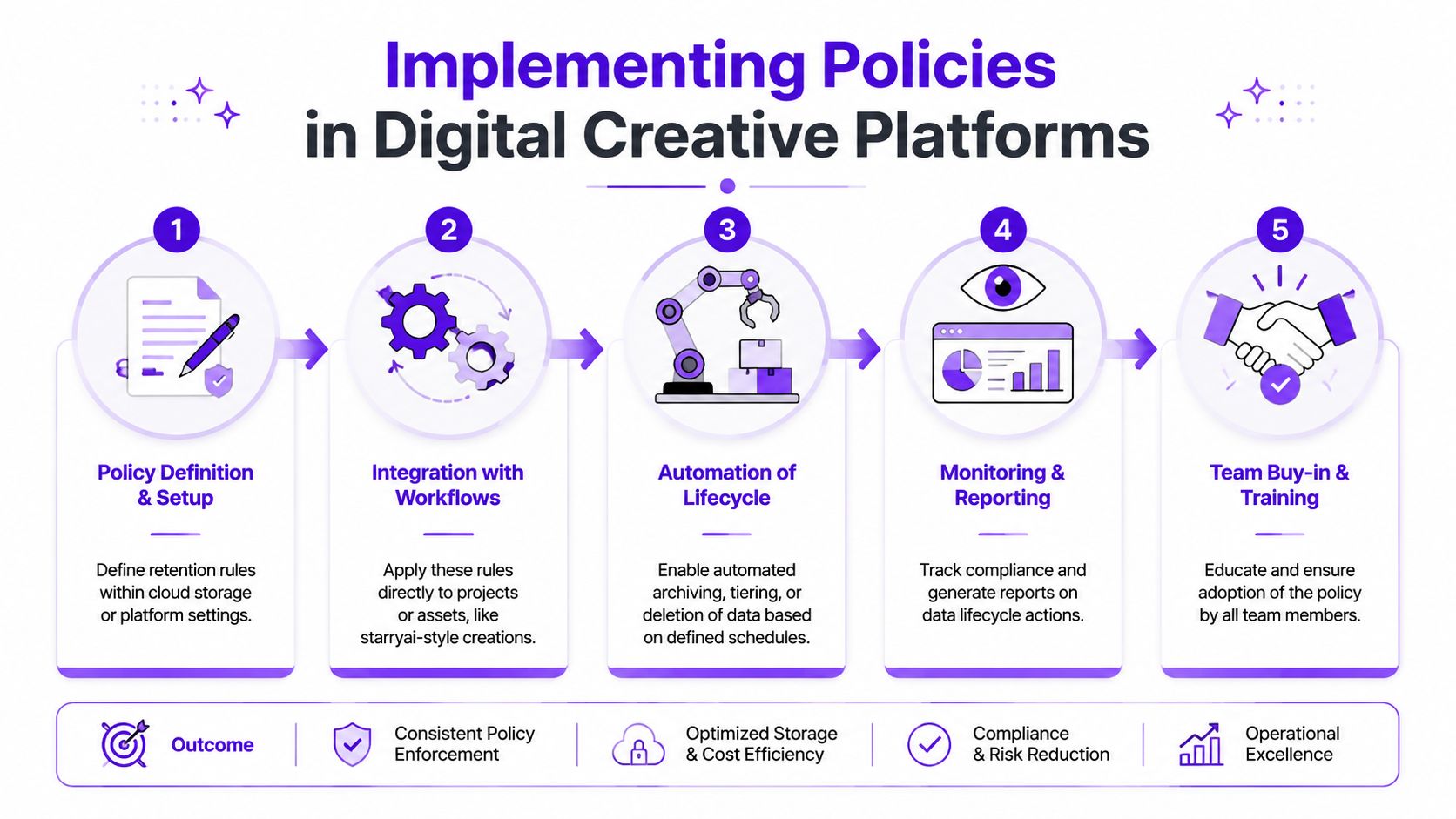
Implementation starts with a simple translation exercise. For each data type, your team needs to answer four questions: where it lands, why it exists, what event starts the retention clock, and what system deletes or preserves it.
That sounds abstract until you split creative platform data into the right buckets. A user selfie is not the same as a generated visual. A prompt is not the same as a moderation record. Treating them all as "images" creates confusion fast, because each one has a different sensitivity level and a different business purpose.
A practical model looks like this:
The comparison matters. A selfie works like a visitor badge. It may be needed to get through one door, but that does not justify keeping it in circulation once the visit is over. A generated image is closer to the finished poster. The user may want to keep it, organize it, download it, or rely on it later.
Useful implementation controls include:
Teams that build these controls well usually test them the same way they test any other important workflow. Repeatable checks matter. Documented quality assurance processes for creative apps give engineering and security teams a way to confirm that deletion rules work in production, not just in policy docs.
Face uploads are a good example because they create immediate confusion. The user may see one creative action, "make art from my selfie," while the system handles several different data objects behind the scenes.
For a platform such as starryai, a clear implementation rule can separate the uploaded face image from the generated result. As noted earlier in the article, face-image inputs can be handled with a short, event-based retention period tied to delivery of the output, while saved account content follows a different rule. That distinction is what makes the policy understandable to both engineers and users.
Here's a simple implementation flow:
Before rollout, show the workflow visually.
Implementation also depends on staff behavior. Support, trust and safety, and product marketing need the same plain-language explanation for each retention rule, especially on AI creative platforms where users often ask about both what they uploaded and what the model produced.
The easiest way to prevent mixed answers is to give teams response guidance that mirrors the actual system logic.
| User question | Team answer should cover |
|---|---|
| “Did you delete my upload?” | whether the temporary source file was deleted, what event triggered deletion, and whether any separate record remains for safety or support |
| “Why is my generated image still in my account?” | the difference between temporary processing inputs and user-saved outputs |
| “Can you keep my commercial project history?” | whether business or account settings allow longer retention for saved outputs and related records |
| “Did you use my selfie the same way you store generated art?” | that uploaded source images and generated visuals can have different retention paths because they serve different purposes |
If teams improvise, users hear conflicting stories. One person says the file is gone. Another says the project is still stored. A third mixes up the selfie with the generated image. Training closes that gap by teaching the workflow, not just the rule text.
A data retention policy ages faster than most internal documents.
New features create new data types. New markets create new rules. Old storage paths linger after product changes. If nobody reviews the policy, the written version slowly stops matching the system you run.
Review the policy on a regular cadence and whenever a major workflow changes. Look for three things: categories that no longer exist, data stores the policy forgot, and deletion rules that are written but not automated. Also check exceptions. Teams often add special handling during incidents or disputes, then forget to remove it.
A retention policy isn't healthy because it exists. It's healthy when the document, the product, and the storage behavior still match.
The best review habit is simple. Give one owner responsibility for updates, require cross-team signoff, and document every change so support, engineering, and legal stay aligned.
If your team creates, stores, or transforms user images, starryai is one example of how an AI creative platform can pair image generation workflows with documented handling rules for sensitive uploads and saved assets.


.svg)