

Written by Mo Kahn on
August 25, 2026


You generate a hero portrait that feels finished. The jawline is right, the green eyes are unmistakable, and the scar sits exactly where it should. Then you ask for the same adventurer in a rain-soaked alley, and the face softens, the hair changes color, the costume mutates, and the scar disappears. The next image looks good on its own, but it no longer belongs to the same character.
That's problem with consistent character generation AI. The first image is rarely the difficult part. The production challenge begins when a character has to survive new poses, outfits, lighting setups, camera angles, panels, product formats, and eventually video. Prompting matters, but a reliable result comes from references, controlled generation, editing, and measurement working together.
A beautiful first image can create false confidence. You see a convincing face and assume the model has learned your character. In most ordinary text-to-image workflows, it hasn't. It has interpreted a prompt and sampled one visually coherent result from a huge possibility space.
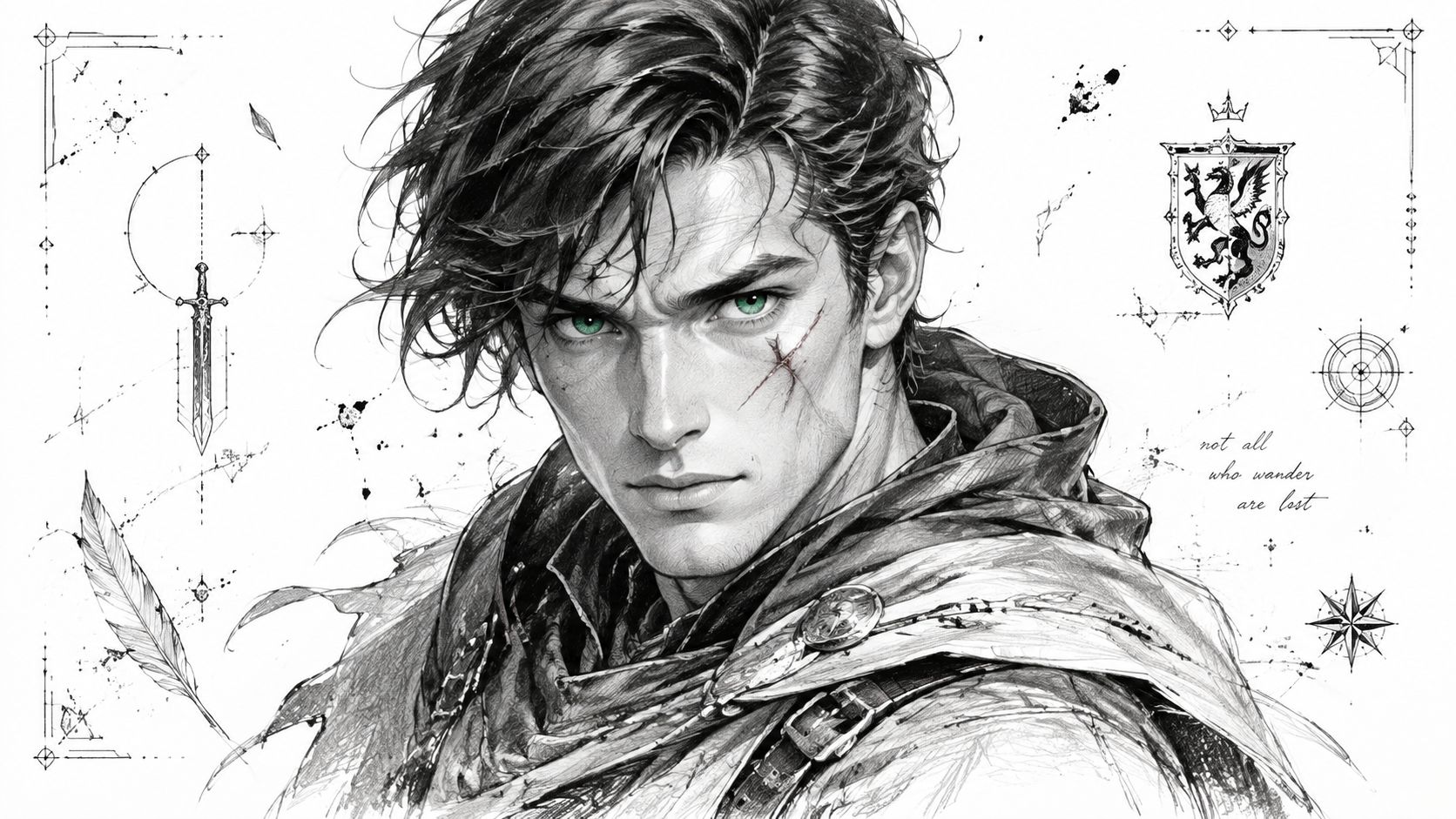
The second prompt adds a pose, location, weather, lens, clothing adjustment, and mood. Those new instructions compete with the identity descriptors. The model doesn't possess a dependable memory of the previous portrait, so it reconstructs the character again. Similar concepts can interpolate in latent space, but interpolation isn't the same as preserving a specific person. A “rugged fantasy adventurer” can remain stylistically correct while losing the exact nose, eye spacing, or scar that made the original recognizable.
Creators often respond by adding more description. That helps until it doesn't. Once a prompt becomes crowded with scene information, identity tokens can lose influence. The face may be technically described, but the model gives more visual weight to the dramatic lighting, action pose, cloak, fog, or environment.
This is token dilution in practical terms. The prompt still contains “green eyes” and “facial scar,” yet those details may not survive a new composition. A scar is especially vulnerable because it occupies a small region, while lighting and hair affect large visual areas.
Practical rule: Treat every new generation as a fresh casting decision unless your workflow supplies an identity anchor.
Research published in 2023 identified this limitation directly. The work on consistent characters in text-to-image diffusion models described a fully automated, text-only approach for generating the same specific character without reference images. It also framed identity preservation across scenes, outfits, and prompts as a core problem rather than a minor prompt-tuning issue.
That distinction changes how you work. Instead of asking why one prompt failed, ask which part of the pipeline is responsible for identity. Your reference set, model customization, seed strategy, pose control, and post-production each need a defined job. A useful overview of consistent character workflows in Midjourney can help you compare platform behavior, but no single prompt can create persistent memory where the generation system doesn't have it.
A reference image set should describe the character more reliably than prose alone. Start by collecting 8 to 15 images that show one identity from useful angles, as outlined in the supplied workflow brief. Don't fill the set with fifteen nearly identical beauty portraits. Variation helps the system separate facial structure from one particular lighting setup, crop, or expression.
Your strongest starting group includes:
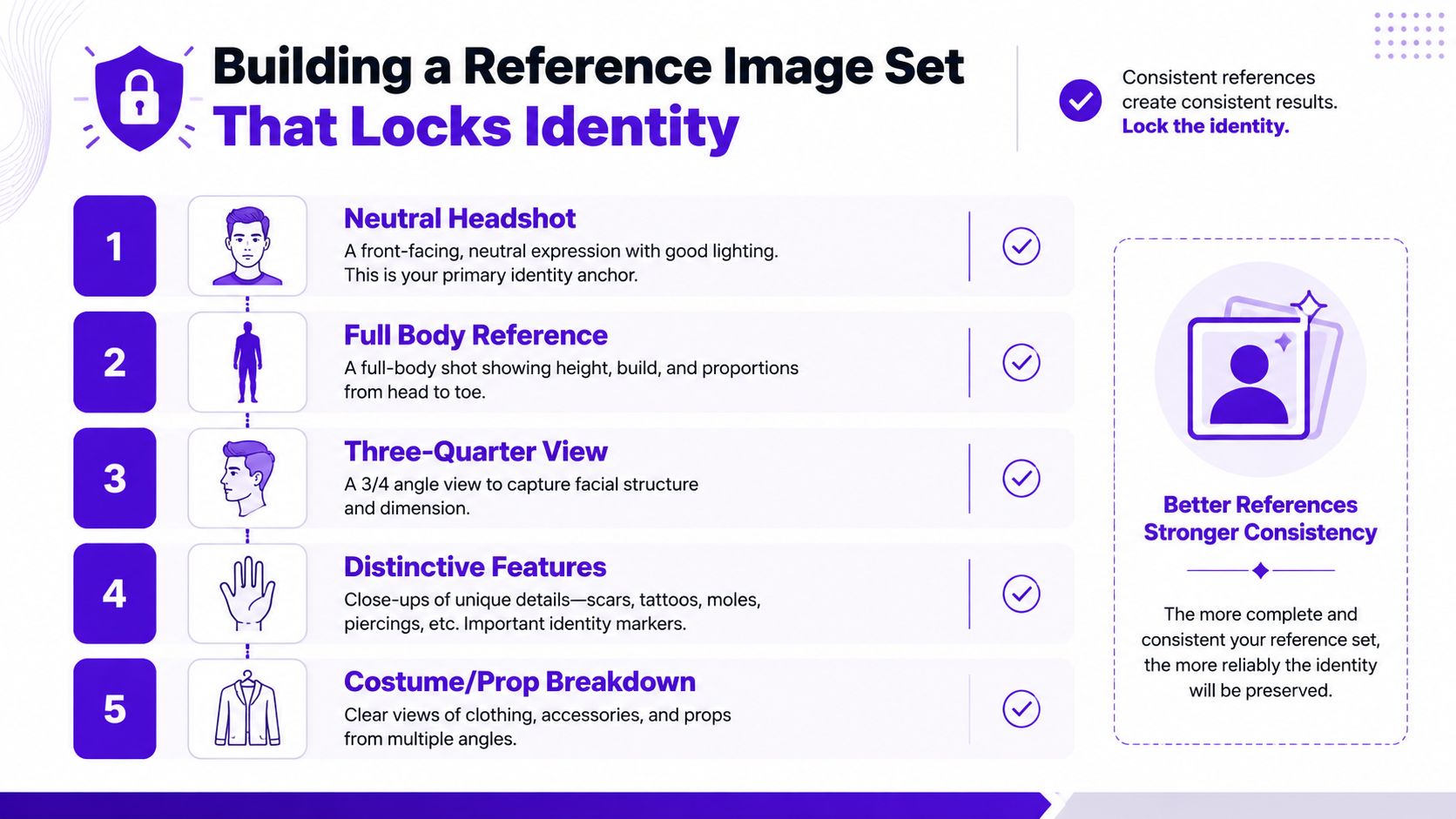
Create a trait checklist before you generate downstream scenes. Write “narrow almond-shaped green eyes” only if that is what you can defend across the approved references. Record the jaw as broad, tapered, angular, or soft. Note the bridge and tip of the nose, the mouth shape, hairline, facial hair, scar position, and any asymmetry. For clothing, separate identity traits from optional wardrobe. A copper pendant may be a signature prop, while a brown jacket may be one costume.
Crop images so the face and body receive more attention than irrelevant scenery. Keep the character large enough for facial features to remain legible, but don't crop every image identically. Background noise, dramatic color grading, and conflicting costume designs can teach the model the wrong lesson.
Fixed seeds are useful when producing a controlled base set because they reduce unnecessary variation while you refine the design. For broader coverage, transplanting the approved face onto different poses can help, but face swaps often leave mismatched skin texture, hair edges, ears, or lighting. Clean those errors manually in Photoshop or Krita before treating the image as a reference.
Use a collection system that preserves the approved originals, rejected drafts, prompt text, seed, model name, and editing history. Collection management for AI assets is especially useful when a character grows from one portrait into a library of panels, covers, avatars, and merchandise.
The reference set shouldn't be a random folder of attractive outputs. It's a controlled identity library. If two images disagree about the eye color or scar placement, remove one or repair it before the contradiction spreads into later generations.
Prompt engineering works best when it separates identity, action, environment, and rendering style. Put the character's defining description first, then describe the pose and scene. This ordering doesn't force the model to obey every detail, but it gives identity a clearer position in the prompt hierarchy.
A stable base might read: “handsome fantasy adventurer, angular jaw, narrow green eyes, dark wavy hair, diagonal scar through the left eyebrow, weathered leather coat.” Add “three-quarter portrait, standing in a rain-soaked alley” afterward. If the face begins drifting, remove the environment and style modifiers first. Don't immediately add more adjectives.
Weighted syntax can reinforce a weak feature, such as (sharp jawline:1.3), when the model or interface supports it. Use weights carefully. Overemphasizing one feature can produce a caricature, and a face is a relationship among landmarks, not a stack of isolated labels. Negative prompts can suppress obvious mutations, but they won't replace a reference image or trained identity representation.
The same character prompt can behave differently depending on the scene. A neutral portrait gives the model room to allocate attention to facial structure. A full-body action shot asks it to solve anatomy, hands, clothing, perspective, lighting, environment, and identity at once.
| Prompt Pattern | Identity Stability | Scene Flexibility | Best Use Case |
|---|---|---|---|
| Identity description only | High | Low | Building the master reference |
| Identity plus simple pose | High | Moderate | Turnarounds and expression sheets |
| Identity plus controlled environment | Moderate | High | Story panels and cover concepts |
| Dense cinematic scene prompt | Low to moderate | Very high | Exploratory images, not final continuity |
| Reference image plus concise prompt | Highest among ordinary workflows | High | Reusing an approved character in new scenes |
Seeds help, but they're often misunderstood. Lock a seed when you're exploring nearby pose or composition changes and want some structural continuity. Rotate seeds when you need genuine diversity. A seed can preserve aspects of a composition while still allowing facial geometry to shift, so it isn't a character ID by itself.
Keep a generation log with the full prompt, negative prompt, seed, sampler or equivalent settings, model version, reference image, and any adapter weight. A practical prompt engineering guide for beginners is useful for learning syntax, but production consistency depends more on disciplined comparison than on increasingly elaborate wording.
The 2023 research milestone also documented a meaningful trade-off between identity consistency and prompt similarity. LoRA-based approaches achieved stronger identity consistency while giving up some prompt alignment, whereas text-inversion and BLIP-diffusion-like approaches tended to preserve prompt semantics better but held identity less reliably. That trade-off is still visible in day-to-day work. More creative freedom usually gives the model more opportunities to reinterpret the face.
Model customization changes the identity problem from “describe this person again” to “give the model a reusable representation of this person.” The three common options have different costs and failure modes. Their practical requirements vary by base model and training setup, so the figures below should be treated as the supplied workflow's operating ranges, not universal guarantees.
| Method | File Size | VRAM Needed | Training Images | Best For | Key Limitation |
|---|---|---|---|---|---|
| Embeddings, or textual inversion | 4 to 8KB | Not specified in the verified data | 3 to 5 | Simple style traits and compact concepts | Often weak with complex faces and clothing |
| LoRA | 50 to 300MB | 8 to 12GB | 10 to 20 | Full character identity across varied scenes | Can trade prompt flexibility for identity strength |
| DreamBooth | Not specified in the verified data | 24GB or more | 20 to 50 | High-fidelity commercial IP reproduction | Longer training and overfitting risk |
An embedding, often called textual inversion, trains a token vector that you insert into prompts. Its compact size makes it convenient to share and version. It can work well for a recognizable style cue, color treatment, or simple visual concept.
It's less dependable when the target includes complex facial geometry, distinctive clothing, props, and changing poses. The token may evoke the general idea without preserving the complete character. It also inherits the base model's weaknesses, so an embedding trained for one model family may not transfer cleanly to another.
LoRA, or Low-Rank Adaptation, modifies attention behavior through a lightweight adapter rather than replacing the entire base model. For indie comics and merch, that balance is often useful. A dataset of 10 to 20 images and a stated 8 to 12GB of VRAM can fit many creator workflows, although results depend heavily on captions, image quality, and training settings.
The main failure mode is overlocking. A LoRA trained too aggressively may reproduce the same expression, camera angle, costume, or background instead of learning the identity underneath. Undertraining creates the opposite problem, a vague resemblance that collapses as soon as the scene changes.
DreamBooth fine-tunes the broader model around the subject. The supplied workflow specifies 20 to 50 training images and 24GB or more of VRAM, with longer training demands than the lighter approaches. It can be appropriate when commercial IP needs very close reproduction across a controlled pipeline.
Overfitting is the danger. The character can bleed into unrelated prompts, repeat the training wardrobe, or become difficult to separate from the background and style. Use it when fidelity justifies the operational burden, not because a larger training method automatically produces better storytelling assets.
The 2024 Character-Adapter study reported a 24.8% improvement over prior methods on CLIP-I and DINO character-consistency scores, along with over 70x greater computational efficiency than fine-tuning-based approaches because it required no additional training, according to the published Character-Adapter paper. That result reinforces the broader decision rule: a specialized adapter can be more efficient than retraining everything, but benchmark gains don't remove the need to inspect faces, clothing, hands, and scene behavior yourself.
The most dependable production pipeline treats generation as a layered process. Start with a neutral base image, not an ambitious final scene. A three-quarter view or neutral T-pose gives you a master plate with readable facial structure, costume boundaries, hands, and silhouette.
Save that master plate with its prompt, seed, model, reference set, and customization version. Every later shot should be able to trace back to it. If the master plate has a crooked earring or inconsistent scar, fix that before building more assets.
For outfit changes, mask the clothing regions and leave the face, hands, hairline, jewelry, and other identity-critical areas untouched. Inpainting the entire figure may produce a more polished result, but it also gives the model permission to recast the character. Small masks are slower and safer.
ControlNet-style pose transfer can move a character into a new stance using an OpenPose skeleton extracted from a photograph or 3D mannequin. Keep the identity description and reference image stable while the pose changes. If the face degrades, generate a simpler pose first and repair the body afterward rather than asking one pass to solve every problem.
Generate the background, character, and foreground elements separately when the scene includes complicated perspective, props, or atmospheric effects. Composite them in Photoshop or Krita, then paint over seams, contact shadows, hair edges, and hands. This approach gives you control over the parts that models commonly merge or distort.
Wardrobe continuity deserves its own reference sheet. Record garment names, material, pattern, accessory placement, and key color values. Hex codes won't guarantee perfect rendering, but they give you a concrete correction target when a jacket gradually shifts from navy to teal.
Batch variation is useful while the setup is working. Generate 20 to 30 images with slight changes to angle, lighting, or expression in one session, as specified in the production workflow. Save the strongest results immediately. Recreating a successful combination days later can fail because the model, settings, or reference context has changed.
Keep the face protected, change one variable at a time, and make the editor responsible for continuity instead of asking the generator to solve the whole shot.
“It looks right to me” is a poor approval system. A single image can feel convincing while a grid reveals that the jaw, eye spacing, hairline, and scar are moving from image to image. Consistency needs a repeatable test, especially when an asset will appear in a comic, sticker sheet, shirt, or sequence.
Arrange 10 to 15 generated images in a grid and view them rapidly, following the supplied flipbook workflow. Static inspection encourages you to forgive each image separately. Fast sequencing reveals the character changing identity between frames.
Then compare facial landmarks. Use a facial-recognition tool or manual guides in Photoshop to inspect interpupillary distance, face-width-to-height ratio, and nose-to-chin proportions. The supplied workflow treats variation beyond 5 to 8% as a consistency failure, but landmark measurement should remain a screening tool rather than a substitute for artistic judgment.
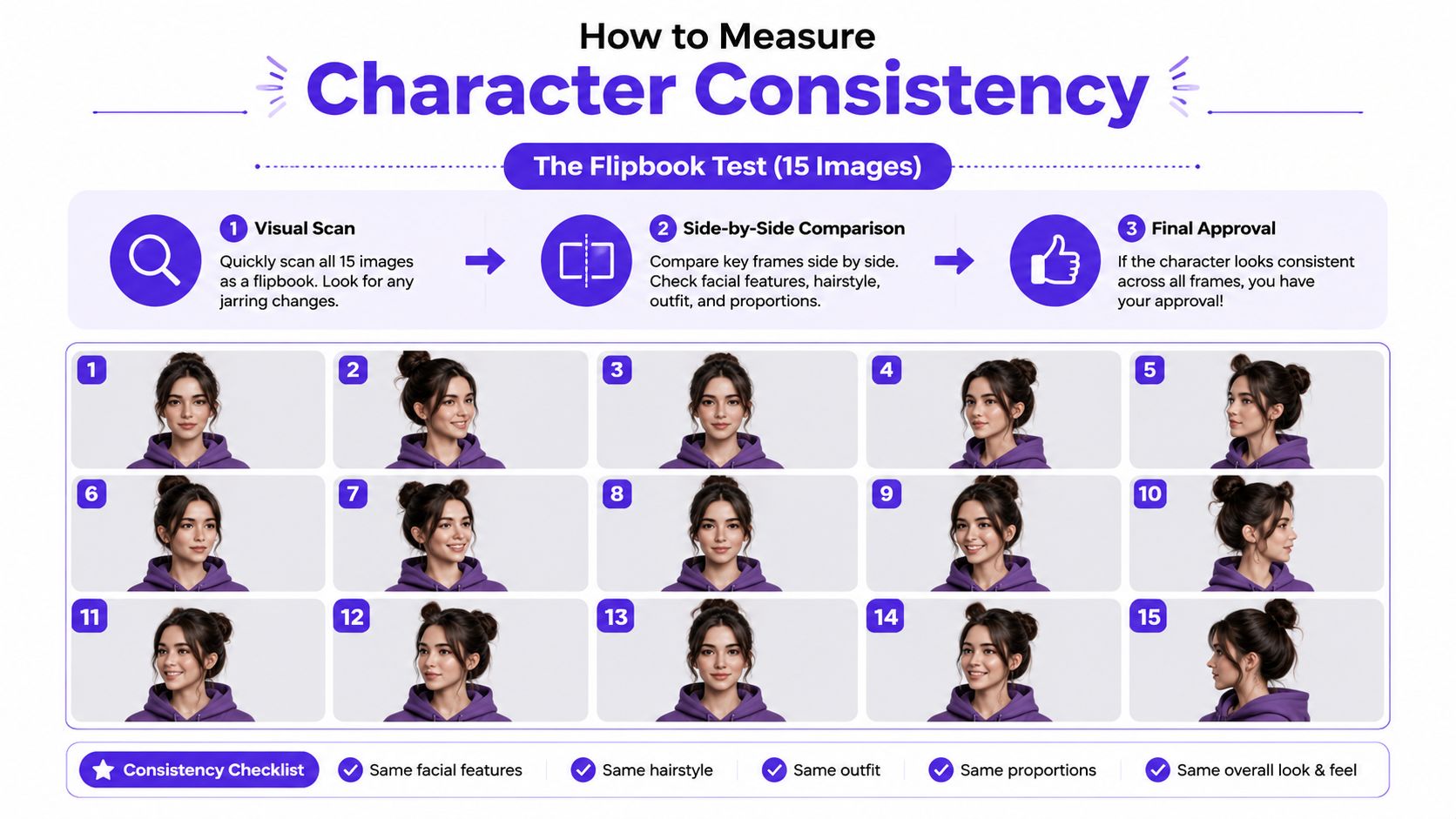
Ask someone unfamiliar with the project to identify which images show the same person. If they hesitate on more than 20% of the images, the identity lock needs work, according to the supplied evaluation method. This test catches drift you've learned to ignore because you've stared at the character for too long.
Print and scale the character in realistic contexts. Place the images on shirt templates, sticker sheets, and comic panels. Thumbnail viewing may hide small differences, while print resolution exposes a disappearing scar, mismatched eye color, or unstable ear placement.
Score each approved image from 1 to 5 for facial structure, color palette adherence, distinctive-feature preservation, and pose-to-pose recognizability. Average the categories, and hold anything below 3.5 back from production until you retrain, replace the reference, or repair the weak area. The principle behind this kind of evaluation is supported by CharacterBench, which uses 22,859 human-annotated samples, 3,956 characters, and 25 detailed character categories to evaluate consistency across broader character types rather than one preferred face style.
A separate Flux character-consistency thesis proposed using DeepFace, CLIP, and LPIPS in a formal evaluation framework. That's a useful corrective to prompt-only thinking. Better wording can help, but measurable identity requires references, controls, and review.
A production-ready character system starts with naming, not rendering. Use filenames that record the character, scene, shot, seed, model, LoRA version, and revision status. Store the prompt and reference path in metadata or a companion log so you can reopen a project months later without guessing which combination created the approved face.
Keep separate folders for master references, training images, generated candidates, approved plates, edits, and final exports. Version your LoRAs and character descriptions instead of overwriting them. When a sequel or merch drop exposes a weakness, you'll know whether the cause was a new model, a changed prompt, a different adapter, or a bad reference.
For webcomics, export compressed PNG files with an embedded ICC profile when your publishing workflow supports it. For print-on-demand merchandise, prepare 300 DPI TIFFs with bleed margins when the vendor requires those specifications. Game developers should create sprite-ready crops with alpha channels, while social creators may need lighter files and consistent aspect ratios for platform templates.
The format doesn't repair identity drift. It preserves or exposes the decisions you already made, so review the character at the size and context where the audience will encounter it.
Indie comic artists can benefit from batch-generation scripts that hold seeds and prompt blocks steady across panels. Merch designers should maintain turnaround sheets with consistent lighting, front, back, and three-quarter views. Game teams need clean alpha-channel crops and naming conventions that survive handoff between concept, UI, and implementation.
For creators turning a character library into a wider business, these operational habits sit alongside broader indie hacker resources that can help with the non-art side of shipping. The creative principle remains simple: consistency is a system, not a single prompt. The artists who finish complete projects build the scaffolding before they need it.
starryai offers text-based character generation and workflows that can use uploaded reference photos to create personalized avatars and repeated character visuals. If you're building a reference library for comics, merch, or social content, visit starryai to test character concepts and develop a repeatable image pipeline.


.svg)