

Written by Mo Kahn on
August 4, 2026


You've probably done this already, or watched someone else do it, upload a selfie, tap a vibe, and get back a version that looks like it belongs in a trend post, a profile banner, or a merch mockup. That simple moment feels almost too easy, but an AI selfie image generator is doing a lot more than swapping a background or slapping on a preset. It's reading your face, the prompt, and the input photo together, then building a new image that tries to keep enough of you intact for the result to still feel personal.
A creator opens an app, uploads a selfie, chooses a neon-pop, studio portrait, or fantasy look, and waits a few seconds for the result. That's the surface behavior, but the category underneath is broader than a filter and narrower than a full art engine. An AI selfie image generator takes a human face, preserves the identity cues it can hold onto, and redraws the image in a new style, setting, or composition.
That makes it different from a basic beauty filter, which usually smooths, brightens, or reshapes what's already there. It's also different from generic text-to-image tools, because the face upload changes the job from “invent a person” to “recreate this person convincingly in a new scene.” In the wider AI image market, that matters because image generation is already part of a large ecosystem estimated at $12.4 billion in 2026, with 150 million+ people using AI image generators at least once a month and about 80 million images generated per day across platforms, while text-to-image still accounts for 68% of sessions according to AI image generation statistics for 2026.
For creators, the practical use cases are usually obvious once the tool is named correctly. A TikTok trend hop needs speed, a social avatar needs recognizability, an indie book cover needs a character concept, and an Etsy listing needs a visual that looks polished enough to sell. The generator sits in the middle of that workflow as a shortcut, not as a replacement for taste.
A useful shorthand is this, the tool is a face-guided image editor with generative style control. That's the version to keep in your head when you're deciding whether a result is good enough to post, print, or hand off to a client.
A selfie generator is a face-guided image system. It studies patterns in faces, lighting, and backgrounds from large image datasets, then rebuilds a new image that keeps the person recognizable while changing the scene around them. The workflow behind this is explained in how AI selfie generators work, and the same idea also shows up in broader AI art systems, where the model learns how visual patterns combine before it starts generating on demand. For a wider technical overview, see how AI artwork works.
The uploaded selfie gives the system identity cues. The prompt gives it direction. Together, they tell the model what to keep and what to invent. If the prompt asks for “editorial lighting” or “retro summer color,” the model does more than recolor the image, it reshapes how light, skin tone, background blur, and pose should read in the new scene.
That is why selfie generators can look photorealistic from a single upload. The model is not building a person from zero. It uses the face as an anchor, then generates the rest of the image around it.
Practical rule: the better the input photo helps the model read your face, the less the prompt has to do.
The technology starts behaving less like a style toy and more like a controlled portrait pipeline. Identity-preservation controls limit how far the model can drift from your real features. If those controls are weak, the result may look polished but not really like you. If they are strong, the system stays closer to your face while still changing mood, wardrobe, or setting.
That tradeoff sits at the center of selfie generation. You are asking for transformation without losing recognition, and that is a harder task than making a purely fictional image. Different tools can still feel inconsistent even with similar prompts, because identity handling does so much of the visible work.
Most weak AI selfies start with weak inputs. A model can only preserve what it can clearly read, so file format, size, framing, and the number of reference images all shape the result before style enters the picture. One representative tool profile, AISelfie, accepts JPG, PNG, and WebP uploads up to 20 MB, allows 1 image per generation, supports 5 aspect ratios, and outputs up to 2000 px, which means the clarity and crop of the source selfie directly affect facial fidelity and final render resolution according to the tool docs at AISelfie documentation.
The uploaded photo serves as the model's evidence file. If the face is shadowed, partially covered, or cropped too tightly, the system has less to work with when it tries to preserve your likeness. If the image is sharp, well lit, and framed cleanly, the generator has a better chance of keeping the eyes, jawline, and expression coherent through the transformation.
That is why a sharper source selfie usually beats a longer prompt. A detailed prompt can steer style, but it cannot rescue missing facial data. The model still has to infer details, and that is where identity drift begins.
Format matters because compression and compatibility affect how cleanly the system reads edges and skin detail. Aspect ratio matters because a portrait crop supports different framing decisions than a square or wide layout. Output size matters because a visual that looks fine on a phone may break down when someone zooms in for a cover, avatar, or print mockup.
A few practical habits help here:
The pattern is simple. Good input quality gives the model more room to style the image, while weak input pushes it to spend its effort guessing your face instead of shaping the result.
A trend-hopper, an author, and an Etsy seller all use the same kind of tool for different reasons. The difference is the job they want the image to do afterward. An AI selfie generator can serve a TikTok creator chasing a transformation trend, a freelancer who needs a better avatar, a self-publisher who wants a believable character concept, or a side-hustler who needs visuals for listings and merch.
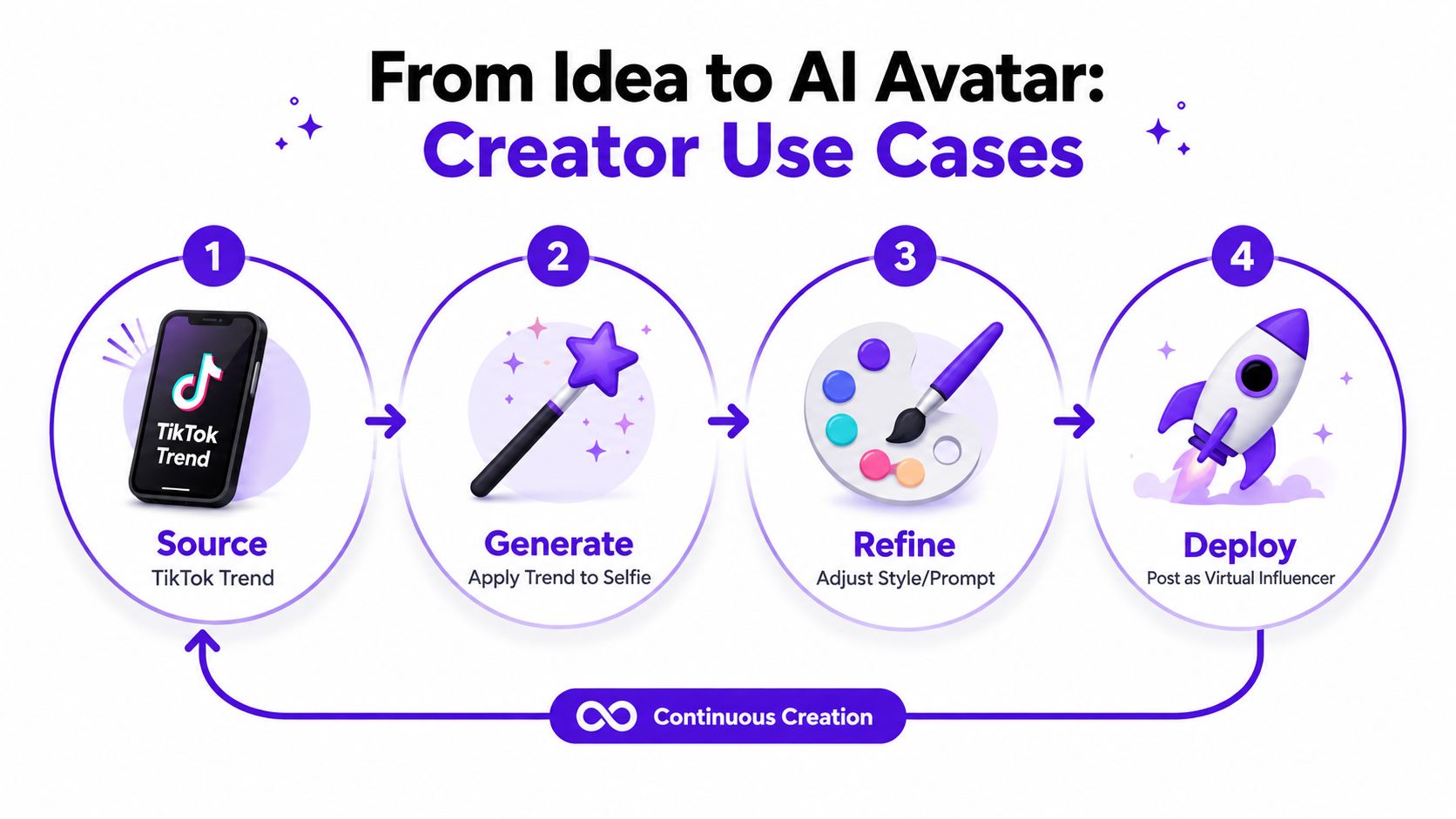
A creator sees a viral aesthetic, uploads a selfie, and asks for the same mood with their own face. The value here is speed. The creator can react to a trend without learning a full design workflow, which is why these tools fit social-first habits so well.
The result doesn't need to be perfect art. It just needs to feel current, recognizable, and postable.
For profile photos, the job changes. The image needs to read quickly in a feed, a comment thread, or a Discord header. That means the generator has to keep facial structure stable enough that viewers still recognize the person, even after style changes.
A polished avatar can give a creator a more consistent visual identity across platforms. It's especially useful when the source selfie is casual, but the brand wants something cleaner.
Indie authors and self-publishers use these tools differently. They're not always trying to make a literal portrait. They want a visual reference, a mood board, or a cover-ready character likeness that can guide later design decisions.
That can save time in the early concept stage, especially when a story needs a face, costume, or vibe before anyone commits to a final illustrated cover.
An Etsy seller or side-hustler usually cares about whether the visual can be used across products and listings. A selfie transformation can turn into a poster concept, a print asset, or a branded mockup. For a project like moon phase prints for anniversaries, the image might not be the product itself, but it can become the centerpiece of the marketing visual or the personalization theme.
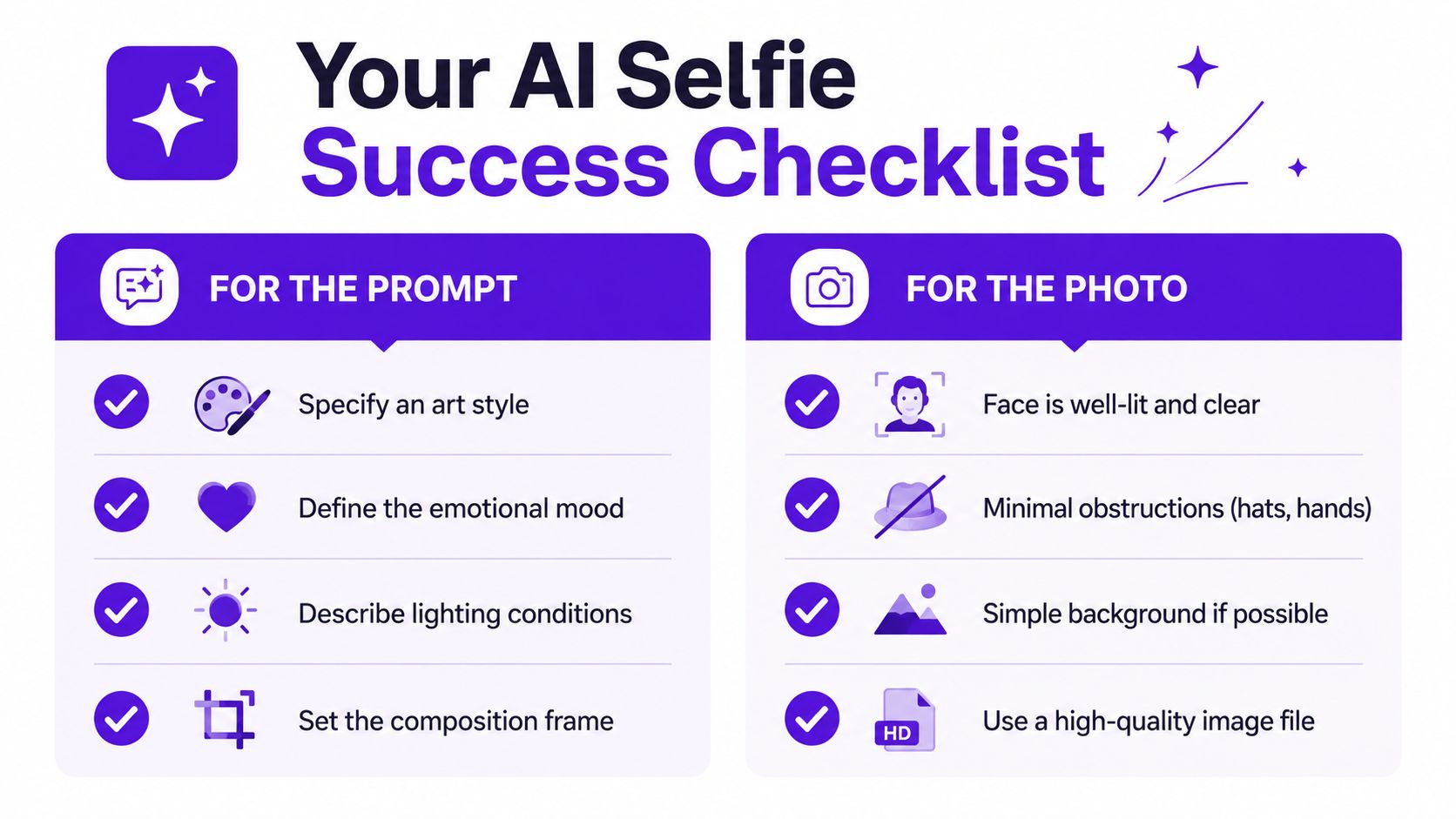
A strong result usually comes from two things working together, a clear prompt and a clean selfie. If one is weak, the other has to carry too much weight. The model understands style direction better when the prompt names mood, lighting, and composition, and it understands identity better when the source photo gives it a clear face to work from.
Start with the visual decisions you care about. Style, mood, lighting, and framing all give the system more useful direction than vague praise like “make it better.” A prompt that says editorial portrait, soft window light, clean background, centered composition tells the generator far more than “make it professional.”
If you want a trending look, describe the visual pattern instead of the platform buzzword. A prompt can reference chrome tones, dreamy glow, street flash, retro grain, or fantasy light without becoming cluttered. For general prompt structure, the guide on prompt engineering for beginners is a useful companion.
Short version: style words shape the look, but scene words shape the composition.
The photo should make the model's job easier, not harder. Good light helps the system read the face. A simple background reduces noise. A clear expression gives the output a stable anchor, especially when the model is changing the clothes or the setting.
A few small fixes matter more than people expect:
The best prompt and the best photo should work like a handshake. A clean selfie plus a style-specific prompt gives the model a stable subject and a clear destination. If the source image is messy, even a clever prompt can't fully fix the output. If the prompt is bland, a great selfie may still come back looking generic.
That's why many creators test the same face with two or three prompt directions before posting. They're not hunting for magic. They're finding the combination where likeness, style, and intent line up.
People often treat AI selfie tools as if they all work the same way, and that leads to bad decisions. A generator can look like a filter on the surface while behaving much more like a face-conditioned image system underneath. That distinction matters because it changes what you can expect from the output and where the limits show up.
A filter nudges an existing image. An AI selfie generator reconstructs the image. That difference explains why these tools can shift lighting, wardrobe, background, and mood at the same time. It also explains why the same upload can produce results that feel surprisingly new instead of merely polished.
Cost and quality don't map cleanly onto each other. The commercial portrait market shows that AI headshots and portrait tools have become mainstream enough that the segment exceeded $420 million in 2025, professional adoption rose from 8% in 2021 to 58% in 2025, and typical AI headshots cost $25 to $35 versus $150 to $650 for a traditional photographer, according to AI headshot statistics. That doesn't tell you every free tool is excellent, but it does show that low cost and serious utility can coexist.
A single source photo can be enough for some transformation tools, but it won't always hold up across every angle or use case. Multi-angle generation is an active trend, yet the hard part is still identity fidelity, especially when the pose changes away from a front-facing source. Better inputs usually mean better outputs, and one flattering image doesn't automatically make the generator reliable for every format.
A polished image can still be wrong for the channel. A portrait that works as a profile photo may look too synthetic on a product page. A result that feels personal may not be consistent enough for a brand kit. Treat the output as a draft until it passes your own quality check for that specific use case.
Before a creator posts or sells an AI selfie, three separate questions need attention. First, does the image look good enough at the size and context you need. Second, does the platform or audience accept this kind of synthetic-looking visual. Third, do the rights and disclosure rules around the output make sense for how you want to use it.
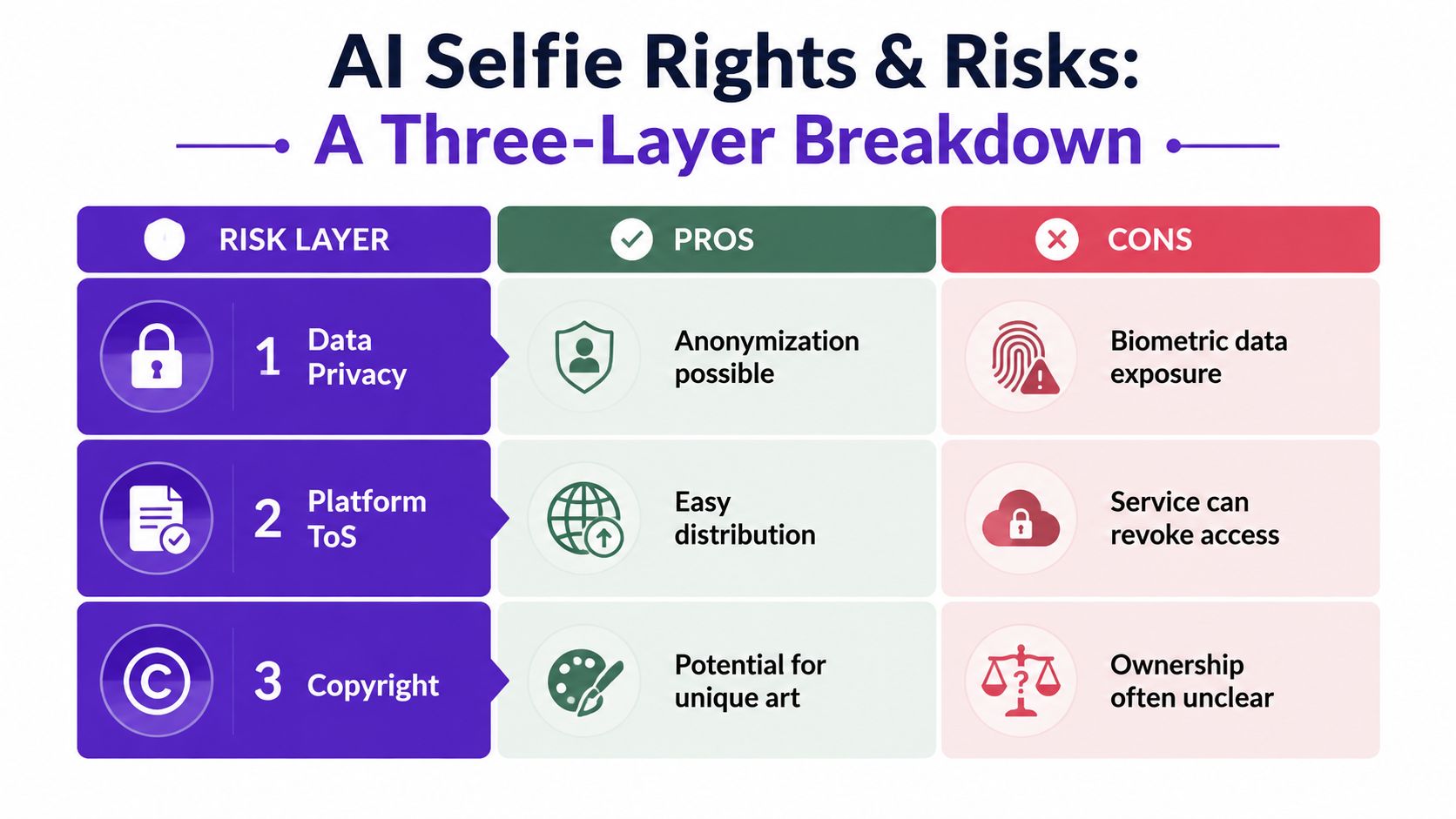
A technically acceptable image can still fail in real use if the resolution is too soft, the face looks off, or the crop doesn't suit the channel. A result may be fine for a story post and weak for a print file. That's a practical issue, not a legal one, but it's usually the first place creators trip.
The same selfie can read differently depending on where it appears. A stylized avatar might fit a social bio, while the same image could feel out of place on a storefront or an author website. The distribution context matters because audiences react not only to the image itself, but also to the setting it appears in.
The safer habit is to check the tool's own license and usage terms before you build a workflow around it. For details on how a specific product frames usage, review the license page directly. If you're making visuals where identity, likeness, or brand trust matters, the question isn't only whether you can use the output, but whether you should use it in that exact context.
A practical test helps here, would this image still feel credible if a customer, follower, or client saw it out of context.
That test keeps the focus on the risk, not just ownership. A selfie that feels fine in one channel can look too synthetic, too vague, or too off-brand in another, and that's often where the problem starts.
A social-first tool has to be quick, simple, and flexible enough for trend use, avatars, character art, and product visuals without making the user learn a heavy design stack. That's where starryai fits naturally. It's built as an AI image generator and creative suite that turns selfies, text prompts, and emojis into visuals, so the workflow lines up with the kind of fast, visual experimentation creators do.
The useful part is the match between the tool and the job. A TikTok trend call, a profile makeover, a book concept, or a merch mockup all start with the same question, can this photo become something more useful without a lot of friction. starryai works in that lane because it's oriented around uploaded photos and prompt-driven transformation rather than a full manual editing workflow.
That also makes the earlier cautions easier to apply. If the source photo is clean, the output usually has a better shot at keeping likeness. If the prompt is specific, the style tends to land more predictably. If the use case is public-facing, the creator can judge whether the image feels fit for that platform before posting it.
For people who want a simple place to test selfie-based transformations without jumping between tools, starryai is one practical option in the category. It can be a fit when the goal is fast social content, a quick avatar refresh, or a visual concept you want to prototype before you invest more time elsewhere.
If you want a fast way to turn a selfie into something you can use, visit starryai and try a few styles against the same photo. The easiest way to learn this workflow is to compare outputs side by side, then keep the one that still looks like you while fitting the post, cover, or product you had in mind.


.svg)