

Written by Mo Kahn on
September 20, 2026


AI selfie filters are real-time face-editing tools powered by machine learning models that map your facial landmarks to apply style and beautification effects instantly. They're already mainstream: 46% of Instagram's 1.28 billion users had accessed a filter effect at least once, and over 700 million users across Meta's apps engaged with AR every month according to a widely cited review summarized by AMRA & Elma.
You've probably seen the result today already. A friend posts a normal front-camera shot, then suddenly they're rendered as anime, clay, pixel art, or a polished portrait with cleaner lighting and smoother skin. It feels instant, almost casual. But under that one-tap effect is a stack of computer vision steps trying to answer a hard question very quickly: where is your face, what parts define it, and how far can the app change the image without losing you?
That last part matters more than many realize. A good AI selfie filter doesn't just make a photo look different. It keeps your eyes, proportions, expression cues, and face geometry coherent enough that the output still reads as you.
You open your camera, tap an “anime” or “glam” effect, and the result still looks like you. The hair color may change. The skin texture may soften. The lighting may look studio-clean. But your face does not turn into a generic template. That is the part an AI selfie filter is trying to solve.
A plain filter usually behaves like a preset laid over the image. It adjusts color, blur, contrast, or texture in broadly the same way no matter who is in the frame. An AI selfie filter goes further. It first estimates where your facial features are, how they relate to each other, and which details need to stay stable so the edited image remains recognizable.
That difference matters because faces are not flat stickers. Your eyes shift with expression. Your jawline changes shape as you turn. A useful AI selfie filter has to keep track of that structure, then apply edits that follow it. In practical terms, the system is trying to preserve identity while still changing style.
You can treat it like the difference between painting on glass and painting on a moving 3D mask. A basic filter paints on glass. An AI filter tries to fit the effect to the face underneath, so the result stays attached to your features instead of sliding around or warping oddly.
Older beauty effects mostly handled surface-level changes. Smoother skin, brighter tone, larger-looking eyes, stronger highlights. Those edits can be fast and visually pleasing, but they often work with limited awareness of face geometry.
A modern AI selfie filter usually starts with face-aware analysis. It identifies regions such as the eyes, lips, nose, brows, cheeks, and jaw contour, then modifies those areas in relation to their position and proportions. That is why the result often holds together better when the head tilts, the mouth opens, or the face turns slightly off-center.
The key idea is simple. The app is not only asking, “What style should I apply?” It is also asking, “What must stay consistent so this still reads as the same person?”
Earlier in the article, the Meta and Instagram usage numbers showed how common face effects have become. The larger point is less about one platform's counts and more about user expectation. People now assume a filter should track facial movement cleanly, adapt to lighting changes, and produce an edited result in seconds.
That shift changed the meaning of the word “filter.” For many users, it no longer means a color wash or a novelty overlay. It means a face-aware transformation system that can retouch, stylize, or re-render a portrait while keeping identity cues intact.
Practical rule: If an effect keeps matching the eyes, mouth, and face outline as expression and pose change, the app is probably using landmark-based face analysis before it edits the image.
The use cases are broader than simple beautification. Some people want quick cleanup for a profile photo. Others want identity play, such as aging effects, fantasy character versions, or stylized portraits that still preserve their core facial structure. A lot of social posts sit in the middle, where the goal is not realism or vanity but a version of the face that is recognizable and shareable.
Research collected in this survey summary PDF shows that frequent filter use is common, especially among younger users, and that many people use beauty filters specifically to change how their face appears before posting. That pattern helps explain why identity preservation matters so much. If the result stops looking like the person in the photo, the effect often stops being useful.
So the short definition is this. An AI selfie filter is a face-aware image editing system that maps facial structure, preserves key identity signals, and then applies retouching or style changes in a way that stays aligned to the person in the frame.
The easiest way to understand the pipeline is to think like the app. Before it stylizes anything, it has to find your face, map its structure, isolate the editable regions, then rebuild or modify the image without breaking recognizability.
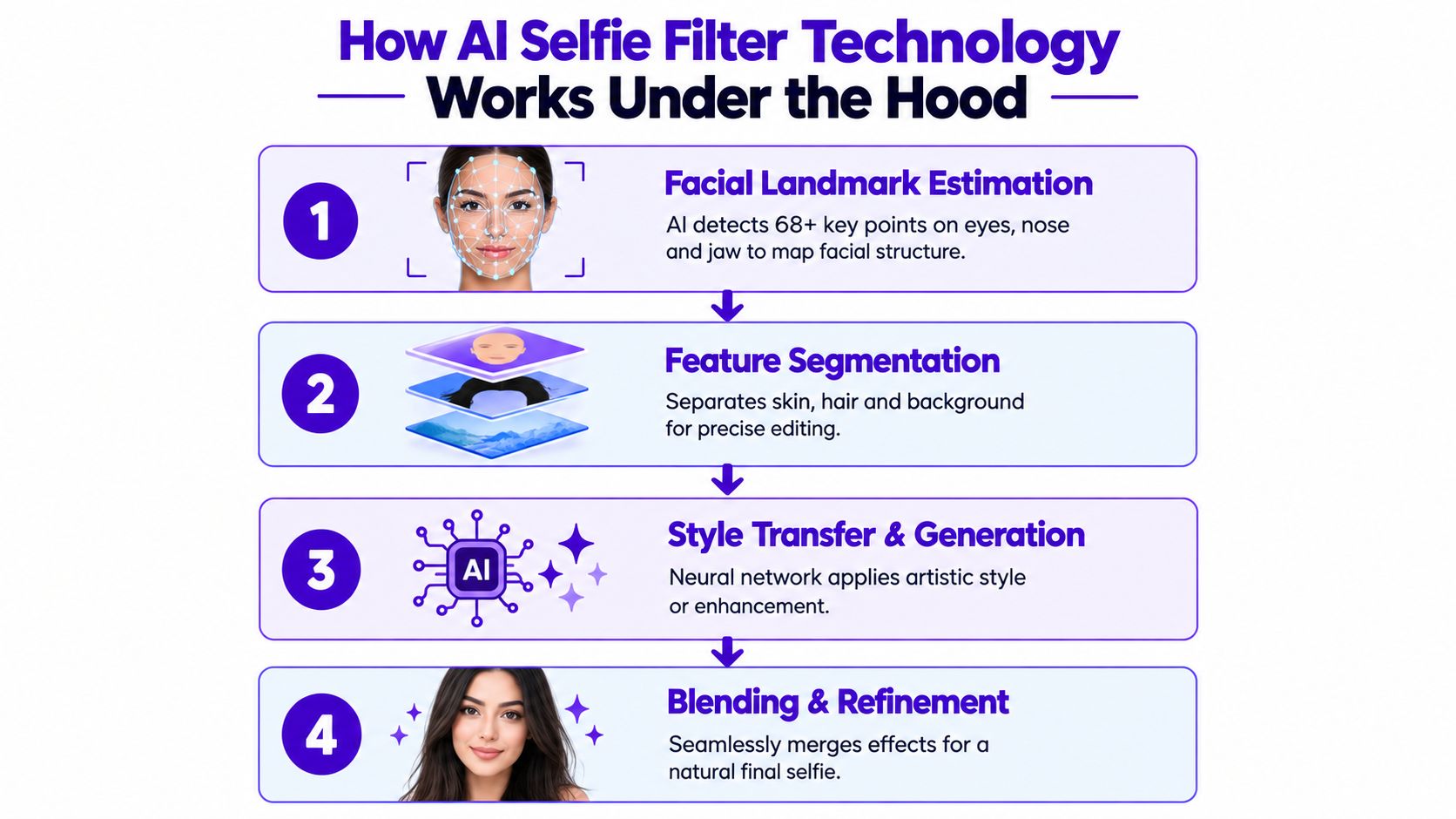
The first task is face detection. The system locates the face in the frame so it knows where to operate. Then it estimates facial landmarks, which are anchor points around the eyes, brows, nose bridge, nostrils, lips, chin, and jawline.
If you want a simple backgrounder on how machines recognize visual patterns before they edit them, this AI image recognition overview is a useful companion.
Why are landmarks so important? Because filters don't just need to know that a face exists. They need to know exactly where each feature is. Research discussed in this paper on selfie beautification and recognition explains that modern selfie filters typically rely on face detection plus facial landmark estimation before beautification or transformation. It also notes that if landmark localization is off, warping becomes visibly unstable, especially around regions like the mouth and nose.
That's the source of the weird failures you've seen. A lip effect drifts off the mouth. The nose narrows in one frame and widens in the next. An eye enlargement effect grabs the eyelid but misses the iris. Those aren't random glitches. They're mapping problems.
After landmarks, many systems perform segmentation. That means separating the image into regions such as skin, hair, and background.
This is what keeps an app from applying skin smoothing to your shirt collar or anime-style eye detail to the wall behind you. Segmentation also helps with cleaner edges around hair, glasses, and jawlines.
A strong pipeline uses both geometry and region awareness. Geometry says where features are. Segmentation says what pixels belong to which part.
Once the app has a structured map of the face, it can apply transformations. In simpler tools, that may be localized retouching. In more advanced ones, it can involve generative editing, including diffusion-based methods.
A recent facial editing paper on diffusion-based identity-preserving editing describes how single-image inference can produce realistic edits while preserving identity. That matters because viral transformations only work if people can still recognize the subject. The same source also notes that stronger augmented-reality-style edits are perceived more differently than traditional beautification edits.
If a filter changes texture, color, and style, users often accept it. When it changes facial structure too aggressively, recognizability drops fast.
This is why the best outputs usually don't rewrite your face from scratch. They constrain the generation with facial conditions such as landmarks, identity cues, and post-edit validation. If you want a non-technical read on model types behind these tools, generative AI models is a helpful reference.
Not every AI selfie filter is trying to do the same job. Some aim for “better camera roll photo.” Others aim for “turn me into a collectible toy box character.”
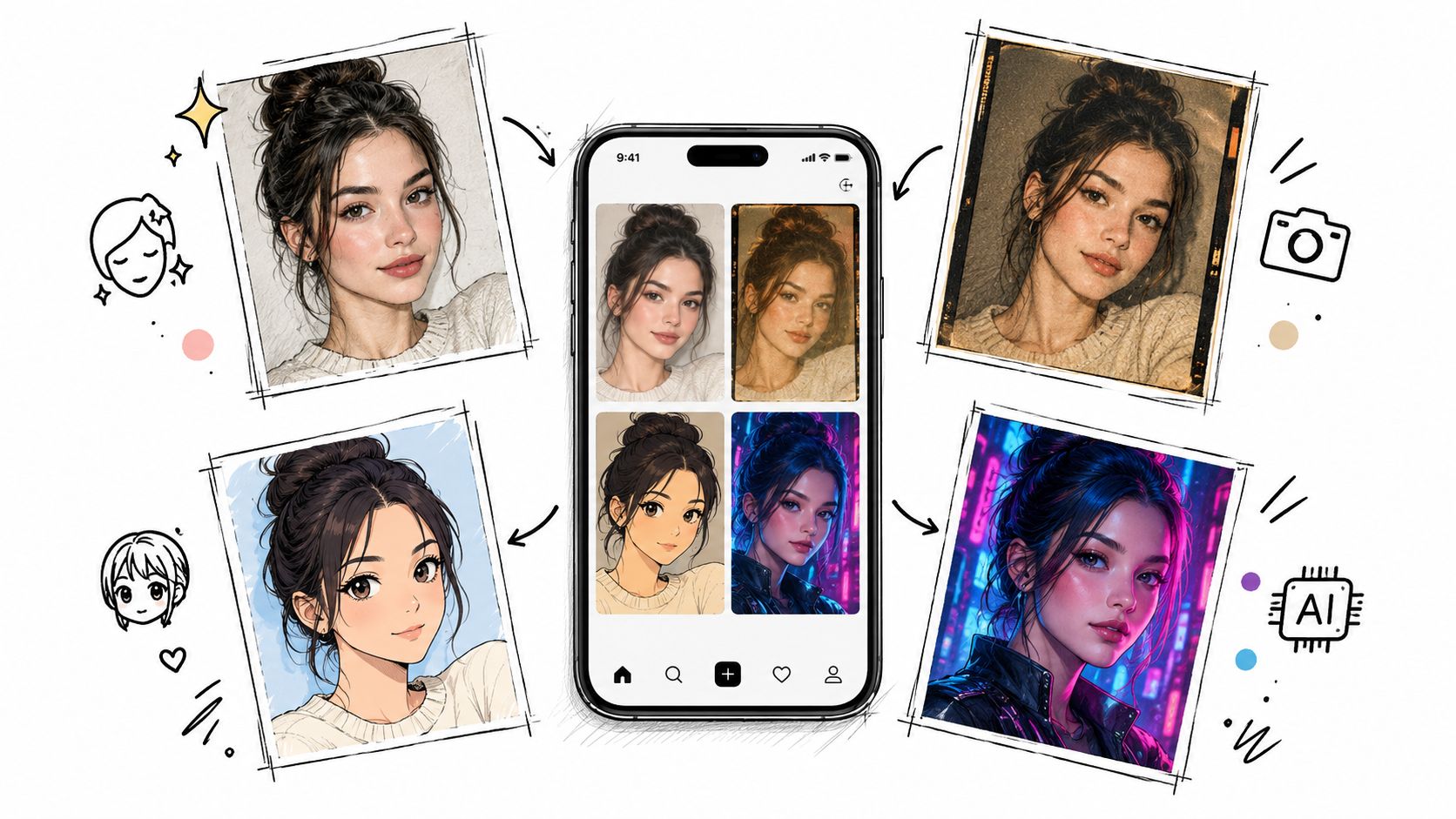
A simple way to compare outputs is by how much they move away from the original photo.
| Filter style | What it changes | What users usually want |
|---|---|---|
| Beauty enhancement | Skin texture, lighting, small facial refinements | A cleaner version of the same selfie |
| Portrait restyling | Background mood, color palette, artistic finish | A profile-ready or theme-based image |
| Full transformation | Face rendering style, materials, character format | A postable trend look |
Independent reporting summarized by Editee points to strong interest in stylized transformations such as anime, chibi, clay, pixel-art, and action-figure packaging looks. The same source says beauty-focused filters still dominate usage and account for 31.2% of application share in 2025, which it presents as a 2025 market finding rather than a current universal fact.
That split makes sense. Some days you want polish. Other days you want something people will instantly share.
Highly stylized filters spread because they give people two things at once. They preserve enough identity to feel personal, and they add enough novelty to feel worth posting.
That's also why adjacent creative fields have picked up similar aesthetics. If you're curious how stylization translates into more deliberate visual production, this guide to ai fashion photography shows the same visual logic in a different format.
A practical way to explore what tends to travel well on social platforms is this walkthrough on viral AI photo ideas.
Here's a visual example of the kind of transformation culture people are chasing now:
If you want to try an AI selfie filter without hand-editing layers or masks, the workflow is usually short. You upload a selfie, choose or describe a look, generate versions, then keep the one that holds your face shape and expression best.
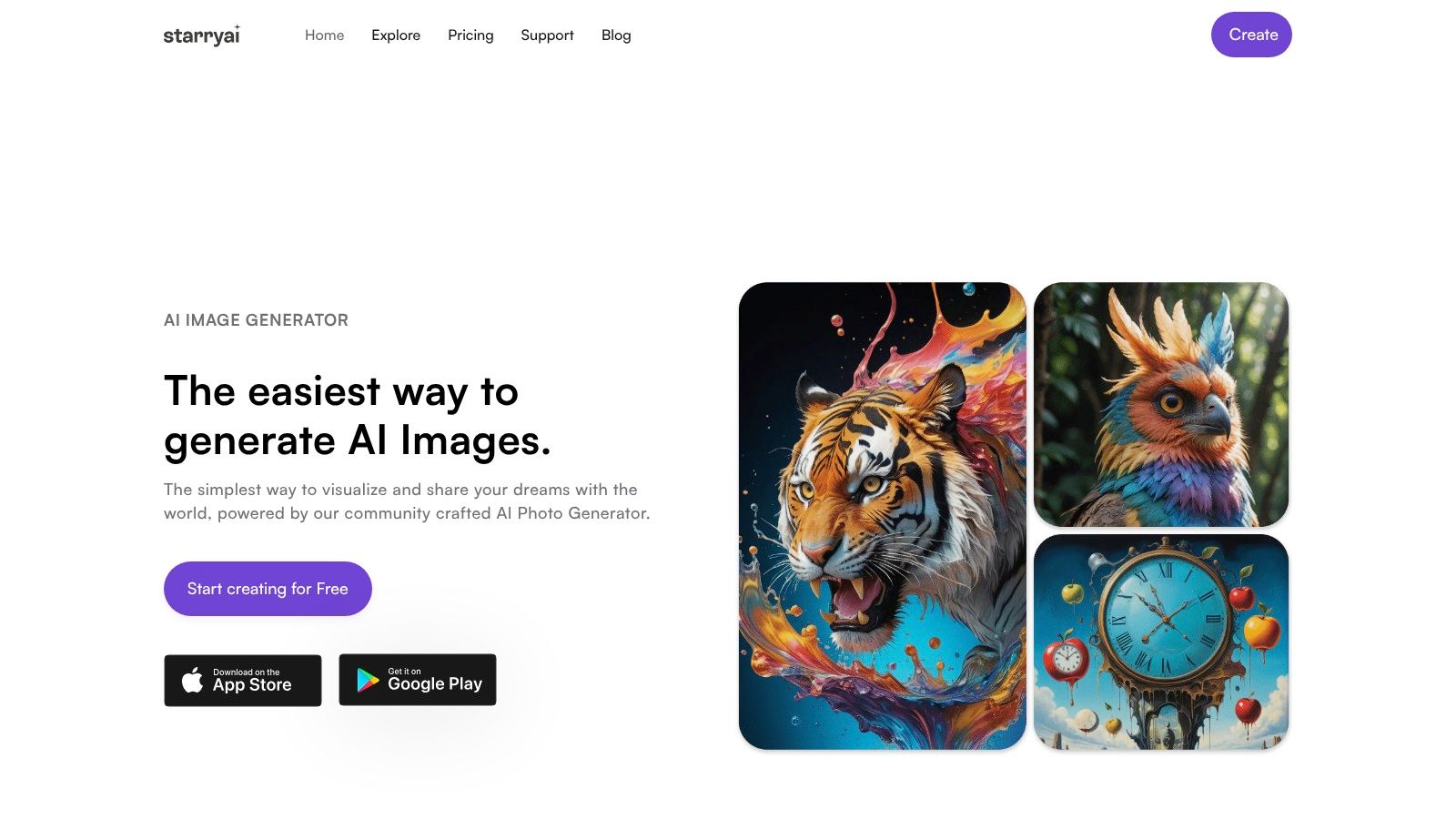
With starryai, you can use the Edit flow to start from an existing portrait instead of generating from zero. That matters for selfies because your original image gives the model a stronger identity reference.
A clean process looks like this:
Start with a straightforward selfie. Use one with visible eyes, even lighting, and a natural angle. Heavy shadows and face-obscuring accessories make identity preservation harder.
Decide whether you want polish or transformation. If you ask for both at once, results can fight each other. “Clean skin and soft studio light” pushes one way. “Clay figurine character in retail box” pushes another.
Keep one feature stable. Hair silhouette, eye shape, or face angle can act like an anchor. When every variable changes, the output can drift into generic-face territory.
Generate several options and compare the eyes first. Eyes are usually the quickest signal for whether the portrait still feels like you.
Working rule: If the output has your hairstyle but not your gaze or proportions, the model preserved style cues more than identity cues.
A useful prompt is specific about aesthetic direction but modest about facial change. For example, ask for material, lighting, or mood before asking for anatomy changes.
Try this pattern:
If you also create short promo clips or social posts from the finished images, a tool like the ShortGenius AI ad generator can help turn still visuals into video creative.
For more hands-on examples of transforming your own portrait into different looks, this guide on an AI image generator of me is a good next step.
AI selfie filters are fun because they collapse a lot of creative work into a few taps. You don't need portrait-retouching skills, masking, or manual compositing to produce something polished or stylized.
But the same pipeline that makes transformation easy also raises two harder questions. What happens to your uploaded face data, and how much editing can a system do before the result stops being you?
The biggest upside is access. You can test visual identities quickly, build profile images, generate character-like portraits, and experiment with aesthetics you'd never set up in a real photoshoot.
That's useful beyond casual posting:
Most privacy conversations stop at “does the app store my selfie?” That's too shallow. More useful questions are whether uploaded selfies are reused for shared model training, how deletion works, how long retention lasts, and whether third parties receive the files.
A recent guide from LoverSnap's AI photo app privacy comparison argues that these are the important consumer questions in 2026 and notes that many apps still don't clearly explain training, retention, encryption, and deletion paths.
That lack of clarity changes behavior. Research on AR face filters found that privacy concerns indirectly lower both use intentions and word-of-mouth by reducing perceived usefulness and flow, according to the Wiley study on facial-filter privacy concerns.
The same ecosystem also includes tools with much riskier capabilities than simple beautification. An audit of face-swap apps reported in this 2026 paper found that 109 of 155 apps, or 70%, had no technical safeguards against nude-image generation, while 30 apps, or 19.4%, blocked every test attempt. The paper also reports that 80% of iOS apps were classified as unsafe versus 58.6% of Android apps.
A related summary notes that 68.3% of apps bundled other deepfake-enabling features, including AI filters, face morphing, AI animation, and voice cloning, as covered by Emergent Mind's overview of the same audit.
That's why “selfie filter app” can be a misleading label. Some products are lightweight editors. Others are broader synthetic-media tools.
The legal environment is catching up. The UK Online Safety Act 2023 overview notes that sharing or threatening to share intimate deepfakes is treated as a priority offence and that platforms and AI services have duties to prevent and remove illegal content.
An AI selfie filter looks simple from the outside because good software hides the hard parts. Under the hood, the app is solving alignment, segmentation, and identity-preservation problems fast enough that the result feels instant.
That's why some edits look polished and natural while others feel off. The difference usually isn't magic. It's whether the system mapped the face well, constrained the transformation, and preserved the cues your brain uses to recognize a person.
If you're trying one for the first time, keep your test narrow. Use a clear selfie. Pick one style direction. Compare results based on whether your eyes, proportions, and expression still feel like you. When the app gets those right, even a dramatic style shift can still feel personal.
The other half of being smart with these tools is reading the privacy policy with the same care you use on the output. If an app can't tell you what happens to your upload, how deletion works, or whether images feed later training, that's not a small detail. It's part of the product.
AI selfie filters aren't just novelty anymore. They've become a practical layer between the camera and the final image. Once you understand landmark mapping and identity preservation, the results stop feeling random. You can look at an output and tell why it worked, or why it didn't.
If you want to try this workflow yourself, starryai lets you turn selfies into edited portraits and stylized variations using simple prompts and image-based editing. It's a practical way to test how far you can push a look while still keeping the face recognizable.


.svg)