


Written by Mo Kahn on
September 11, 2026


You pause on TikTok because a friend's new profile picture looks like a cinematic character portrait, not a phone snapshot. The face is familiar, but the lighting, clothing, background, and entire mood have changed. You try the same trend and quickly discover that an AI selfie app can produce striking results, but the quality and privacy experience vary more than the polished previews suggest.
The category has moved beyond novelty. App-intelligence data recorded a peak of more than 4.3 million daily downloads and about $1.8 million in daily in-app spending around mid-December during the late-2022 AI photo-app surge, before the category fell to roughly 952,000 combined downloads and about $507,000 in consumer spending by February 2023, according to app-intelligence coverage of the AI avatar app market. That pattern matters. AI selfies can spread globally at remarkable speed, yet trend-driven demand can cool just as quickly.
This guide treats the AI selfie app as a real consumer product category. You'll learn what happens between upload and finished portrait, which features deserve attention, and how to evaluate consent, biometric data, retention, and misuse before you hand an app your face.
A conventional photo filter changes pixels that already exist. An AI selfie app usually does something more ambitious. You upload one or more selfies, choose a visual style or write a prompt, and the app generates a new portrait, avatar, or scene from those inputs.
That distinction explains why the result may look painted, cinematic, fantastical, or like an alternate version of you. The software isn't placing sunglasses over your original image. It's rendering a fresh image while trying to preserve recognizable traits such as face shape, hair, eyes, and expression.
Suppose you upload a well-lit head-and-shoulders photo and select a fantasy preset. The model interprets the face, estimates important visual relationships, and then creates a portrait that combines those facial cues with the selected costume, lighting, setting, and artistic direction.
A useful starting point is this explanation of AI selfie image generators, which frames the experience around turning personal photos into newly generated visuals rather than applying a simple overlay.
Practical rule: Treat every upload as source material for generation, not as a guaranteed copy of your original photograph.
The promise is simple, but the results depend on several variables:
That last point deserves equal billing with image quality. The prettiest output isn't automatically the best choice if you don't understand what happens to the selfie afterward.
Most apps hide a complicated pipeline behind a few buttons. The visible experience feels effortless, but the underlying process usually follows a recognizable sequence.
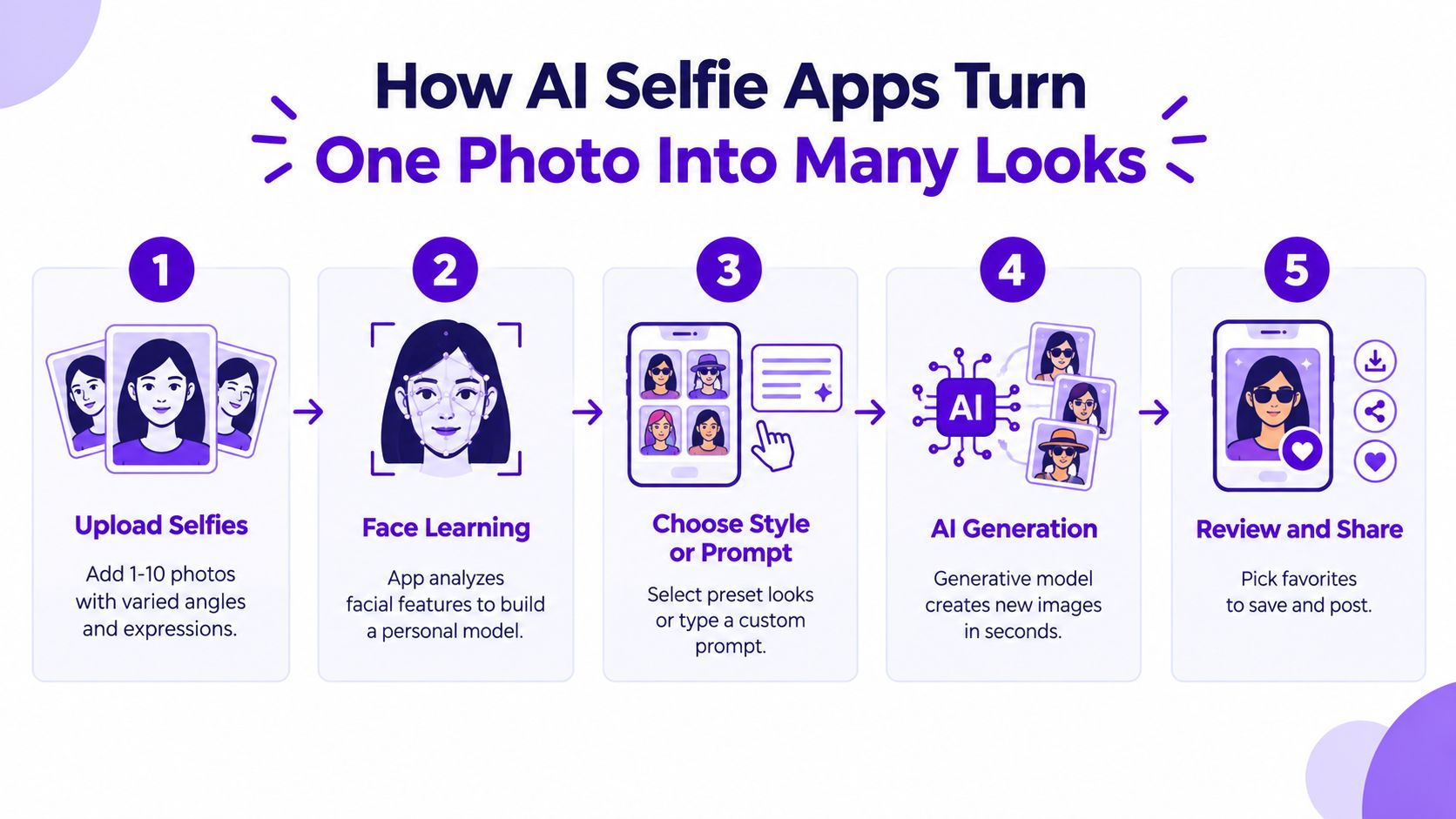
First, capture. You provide one or several selfies. Some services ask for varied angles and expressions because multiple views give the system a stronger sense of your facial structure. A single image can work, but it leaves more room for the model to guess.
Second, condition. The app extracts visual information from the photos and connects it to a style preset, prompt, or reference image. The system isn't learning your identity in the human sense. It's using image features to guide generation, though the privacy policy should explain exactly what it stores and for what purpose.
Third, generate. A generative model creates pixels that satisfy both instructions and identity cues. Diffusion-based portrait systems increasingly use identity-oriented cross-attention and structural anchoring from self-attention maps to reduce identity drift during edits, as described in recent research on identity-preserving portrait editing.
Think of your selfie as a clay bust and the AI as a sculptor. The sculptor tries to keep the underlying bone structure recognizable while repainting the surface, changing the wardrobe, lighting, setting, and artistic treatment. If the identity signal is weak, the sculptor may produce a beautiful person who only vaguely resembles you.
The model's internal latent space works like a map where facial features and visual styles can be combined. A request such as “cyberpunk portrait, neon lighting” moves the image toward that aesthetic while identity conditioning attempts to keep the subject recognizable.
Speed has become part of the product experience. Recent portrait-editing work explores one-step and few-step generation through diffusion distillation, with specialized identity, adversarial, and facial-style objectives designed to preserve likeness while making editing feel nearly immediate on a mobile device. The research framework shows why fast generation still involves trade-offs. Fewer generation steps can improve responsiveness, but the model needs careful training to avoid losing instruction compliance or facial similarity.
Preset buttons make the workflow approachable, but capture, conditioning, and generation drive the experience whether you use a one-tap style or write a detailed prompt.
App listings often use the same feature language, yet the practical meaning differs. A style library, for example, may contain polished presets that make experimentation easy, while another app may offer deeper prompt control for users who want to direct every visual choice.
Style presets are ready-made instructions. “Renaissance painting,” “90s yearbook,” and “cinematic noir” typically bundle choices about color, texture, lighting, clothing, and composition. They lower the skill floor because you don't need to know how to write an effective prompt.
Prompt input gives you more control over mood, wardrobe, background, pose, and lighting. It also creates more ways to get inconsistent results. A short prompt may be easier to manage, while a crowded instruction can make the model prioritize some details and ignore others.
Avatar packs usually aim to create a related collection of portraits. Multiple selfies can provide more identity information than a single image, which may help the faces look more consistent across the set. Consistency still depends on the model and the quality of your inputs.
Look beyond the sample gallery. Resolution and upscaling determine whether an image remains usable outside a phone screen. Aspect-ratio controls matter if you need a square profile image, a vertical social post, or a wider banner. Batch generation helps when you want alternatives rather than one carefully selected result.
Editing tools can be more valuable than another style category:
Casual users may care most about presets, speed, and easy sharing. Creators, sellers, and social media managers need repeatability, export quality, editing control, and clear commercial-use terms. A feature only matters if it matches the job you're asking the app to perform.
The most common user isn't trying to build a digital identity system. They want a new profile picture before the current trend disappears. A social media user might upload a familiar selfie, test a seasonal glow-up, and choose a version that feels more polished without arranging a photoshoot.
Creators have a different need. They may want a consistent set of avatars for thumbnails, channel art, or short-form posts. Instead of commissioning separate portraits, they use one identity reference and explore several visual directions. The quality bar is higher because a face that changes from image to image can make a personal brand feel accidental.
A small business owner may turn a headshot into several stylized brand portraits for a website, pitch deck, or product page. That can help fill a visual content gap, but the owner still needs to check whether the generated clothing, logos, hands, and background details look credible.
Someone building a dating profile may use an AI portrait as a creative extra rather than a replacement for honest photos. That distinction matters. A heavily transformed image can set expectations the person won't meet in real life.
Gamers and tabletop role-playing players often want the opposite of realism. A selfie can become a fantasy hero, space pilot, villain, or Discord avatar. Writers and designers may use the same approach for mood boards, character concepts, or early campaign ideas.
For practical ideas around profile imagery, this guide to AI profile pictures shows why the use case depends on the audience and the job. A playful avatar, an author character reference, and a professional headshot shouldn't be judged by the same standard.
The strongest fit is usually a task where variation has value. If you need a legally accurate record photo, identity verification image, or exact corporate headshot, a social-first generator may be the wrong tool. If you need creative options quickly, the category becomes much more useful.
Not every AI selfie app treats a face the same way. A clear facial image may count as biometric data under applicable laws, and uploading it can involve permission to process, store, or otherwise use the image. The app's privacy policy matters more than the filter preview.
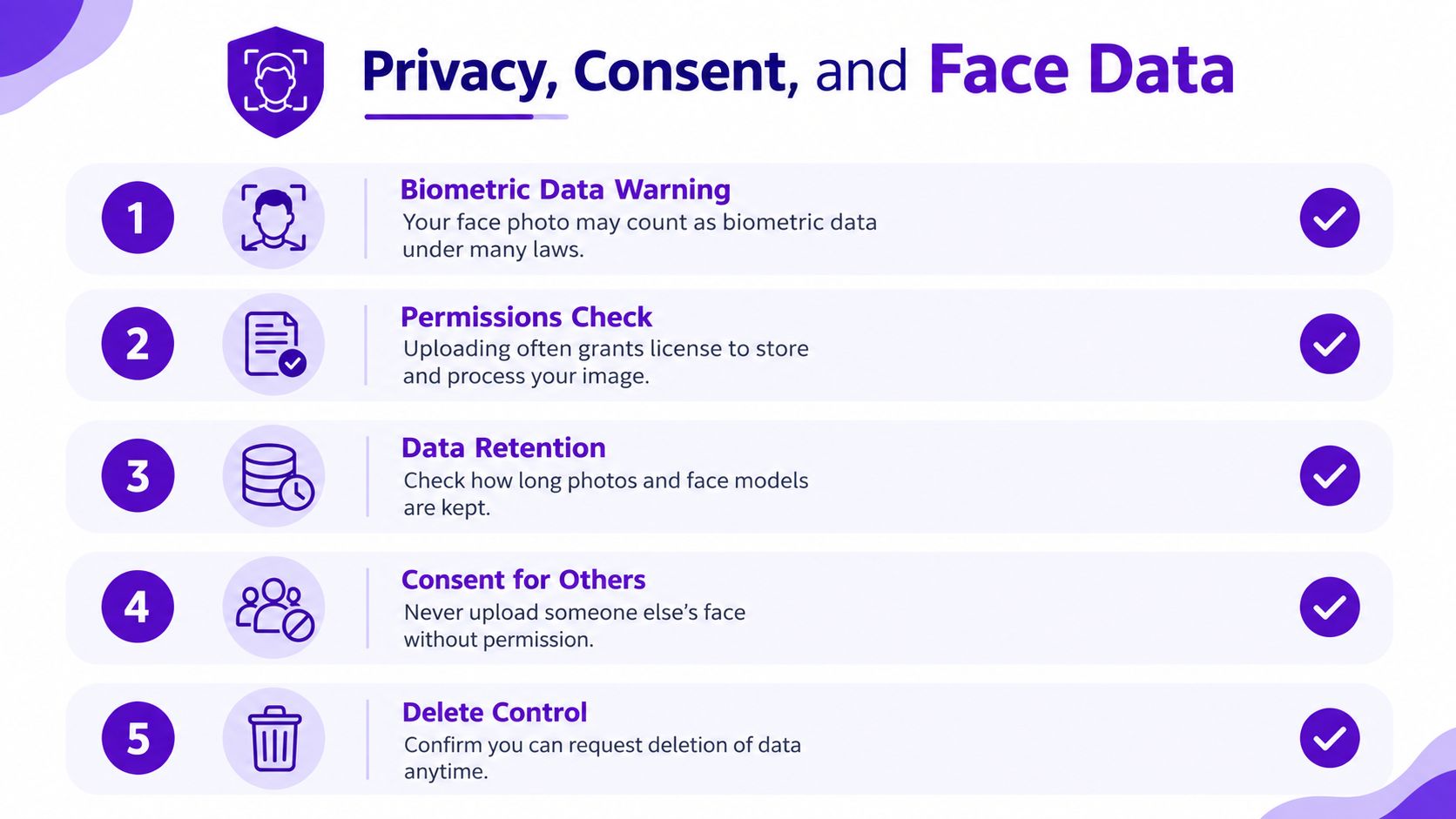
Read the sections covering facial images, biometric information, model training, retention, deletion, marketing, and third-party processors. You want plain answers to questions such as:
A concrete example shows why policies can differ. KaCha's privacy policy says uploaded face images are scanned to extract facial position, orientation, and topology. It also says that this biometric data supports the service and its improvement, while stating that the company doesn't use it for identification or authentication. Read the KaCha privacy policy to see the kind of detail users should look for.
Before you share: “Delete my account” and “delete every facial representation” aren't automatically the same promise. Look for both.
Misuse deserves attention too. A 2026 evaluation found that 70% of apps with face-swap functionality had no technical safeguards against generating nude images, according to the published arXiv evaluation. The same source discusses stronger synthetic-media duties emerging across the EU, UK, India, and the U.S., but legal coverage doesn't remove the need for personal consent.
In the U.S., the TAKE IT DOWN Act establishes a notice-and-removal regime for covered platforms involving intimate visual depictions shared without consent, including certain deepfakes. The legal analysis of the Act explains the platform duties and removal process. Dutch guidance also draws a practical audience boundary: deepfakes shared only within a limited personal circle may fall outside GDPR, while wider sharing triggers compliance requirements, according to the Netherlands data protection authority.
A useful comparison doesn't begin with the biggest style gallery. It begins with the outcome you need and then tests each app against the same questions.
| Dimension | What to check | Why it matters |
|---|---|---|
| Speed and reliability | How long generation takes, whether renders fail, and whether results arrive consistently | A creative tool loses its appeal when the workflow keeps breaking |
| Style range | Realistic portraits, anime, fantasy, editorial, corporate, and custom prompts | The right range prevents you from forcing one app into every visual job |
| Face-data handling | Training choices, storage terms, deletion controls, and third-party sharing | Your likeness deserves a clearer privacy decision than a casual filter purchase |
| Free tier and paywalls | Generation limits, watermarks, export quality, credits, and subscription gates | The apparent price may not match the workflow you actually want |
Start with speed and reliability. A fast preview is useful, but only if the likeness survives generation and the app doesn't repeatedly fail on ordinary selfies.
Then test style range with the same source photo. Compare a realistic portrait, a stylized transformation, and a custom prompt. You'll quickly see whether the product's marketing gallery reflects what you can create yourself.
Privacy comes before convenience. Check training opt-outs and deletion language before uploading a large batch of photos. Finally, inspect the free tier. Some products reserve high-resolution downloads, watermark-free exports, or broader style access for paid plans.
For a broader comparison process, this guide to the best AI selfie generators can help you organize alternatives around the same practical criteria. The point isn't to crown one universal winner. It's to identify which compromises fit your use case.
For someone who wants a quick, shareable transformation rather than a complex identity workflow, starryai occupies a straightforward position. You can upload a selfie, choose a style or use a plain-language prompt, generate variations, and prepare the result for social sharing. Its broader creative suite also supports turning selfies, text prompts, and emojis into visual outputs.
The appeal is simplicity. A user who wants to test a TikTok aesthetic, create a seasonal profile picture, or explore a dream-like portrait doesn't need to learn a professional editing workflow first. A free tier supports casual experimentation, while more advanced or higher-volume use may involve credits.

The product is a reasonable match for:
That positioning has limits. A social-first generator isn't automatically the right choice for hyper-realistic executive portraits, regulated identity workflows, or enterprise avatar systems that require strict governance and repeatable production controls. Power features may also sit behind credit-based access, so check the current plan details before building a high-volume workflow.
The sensible comparison is functional, not promotional. If your goal is a fast creative on-ramp, starryai may fit the job. If your goal is tightly controlled corporate identity production, look for tools designed specifically around that requirement.
The right choice depends on the job, not the app's most dramatic sample image. Casual fun, a brand avatar, and a professional headshot each require a different balance of likeness, editing control, export quality, and privacy assurance.
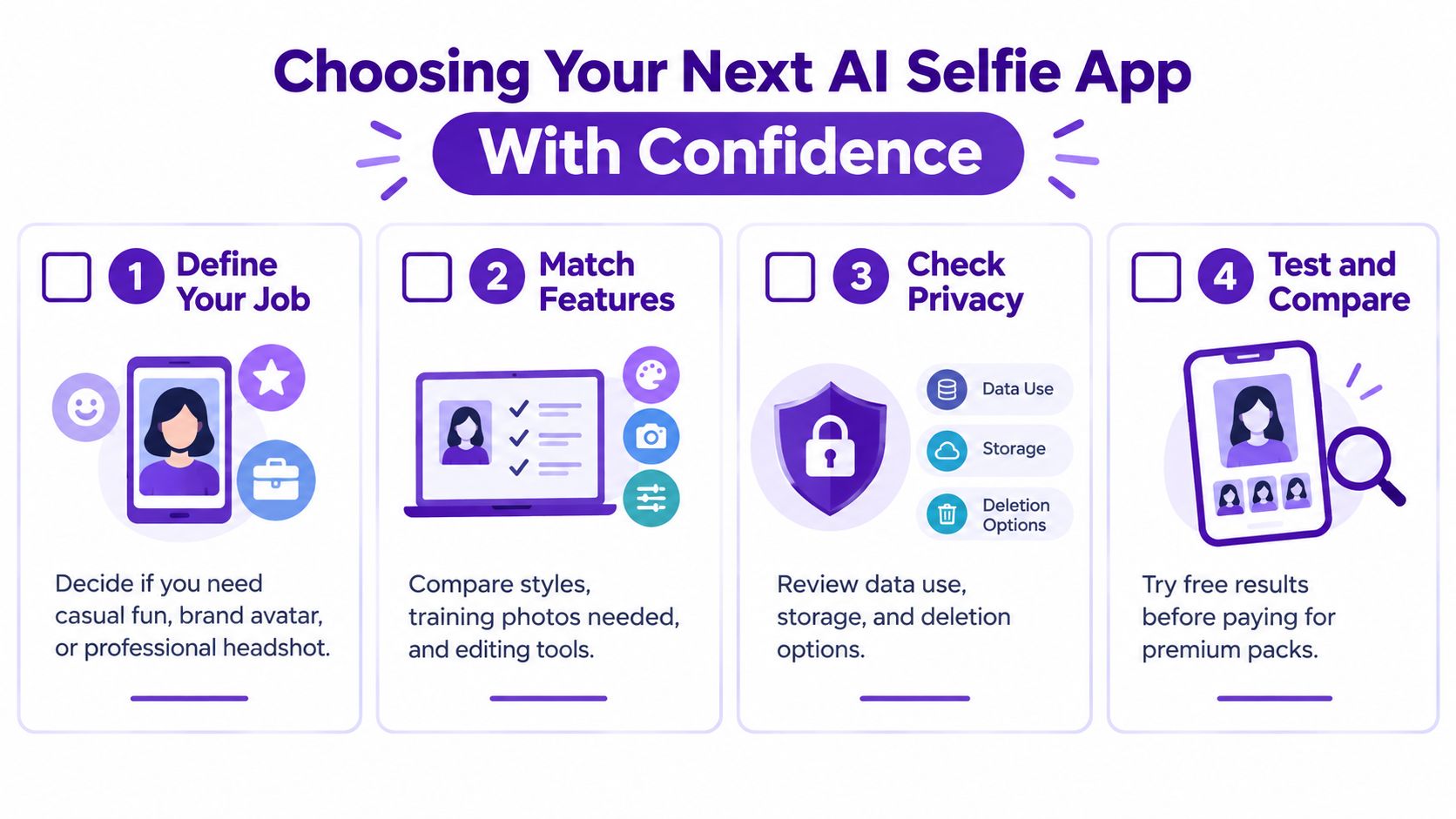
Use a short decision sequence:
The best AI selfie app is the one whose trade-offs you understand and can live with.
Don't judge an app only by its most flattering output. Check whether it keeps your face recognizable, follows the prompt, gives you usable files, and explains what happens to the original upload and any derived face data.
starryai lets you turn a selfie, prompt, or emoji into shareable AI visuals through a simple creative workflow, making it suitable for casual style experiments and social-first transformations. Visit starryai to try the experience, then compare its results and privacy terms with the other options you're considering.


.svg)