

Written by Mo Kahn on
September 23, 2026


The best AI image generator ideas don't start with a visual style. They start with a specific audience, a publishing format, and a job the image must do. A TikTok transformation needs a recognizable face and a strong reveal. A book cover needs negative space for typography. A merchandise graphic needs clean edges, deliberate placement, and a design that still works when printed.
That distinction matters because AI image generation has moved beyond a research novelty. Grand View Research estimates the global AI image generator market at USD 555.1 million in 2026, up from USD 349.6 million in 2023, with a projection of USD 1,081.2 million by 2030 and a 17.7% CAGR from 2024 to 2030 (Grand View Research market analysis). Modern creation also has a clear history, from DALL·E in January 2021 to Stable Diffusion's open-weight release on August 22, 2022, followed by DALL·E 3 in ChatGPT and native image generation in GPT-4o (AI image and video generation timeline).
The following 10 AI image generator ideas are organized around real workflows, including TikTok creation, personal transformations, merchandise, publishing, gaming, seasonal campaigns, and niche communities. Use this prompt formula as a starting point: subject, setting, mood, palette, composition, and output purpose. starryai makes that process accessible through text prompts, selfies, and emojis, but generated artwork may still need review, typography fixes, cropping, or post-processing before commercial or publishing use.
A strong mood board gives your audience a visual reason to recognize your work before they read your username. Instead of asking for “pretty aesthetic art,” define the palette, atmosphere, lighting, emotional tone, and intended use. A TikTok creator might build a dreamy lavender and gold feed, while an Etsy seller could create matching product scenes for a candle collection.
Try a prompt such as:
“Dreamy lavender and antique gold interior, soft window light, ethereal vintage mood, subtle film grain, dried flowers, centered composition, vertical social media artwork.”
For more control, reference specific Pantone colors or hex codes when the tool handles them reliably. Use two or three mood adjectives, such as “ethereal, vintage, moody,” rather than stacking a long list of loosely related styles. The goal is a repeatable visual system, not a single impressive image.
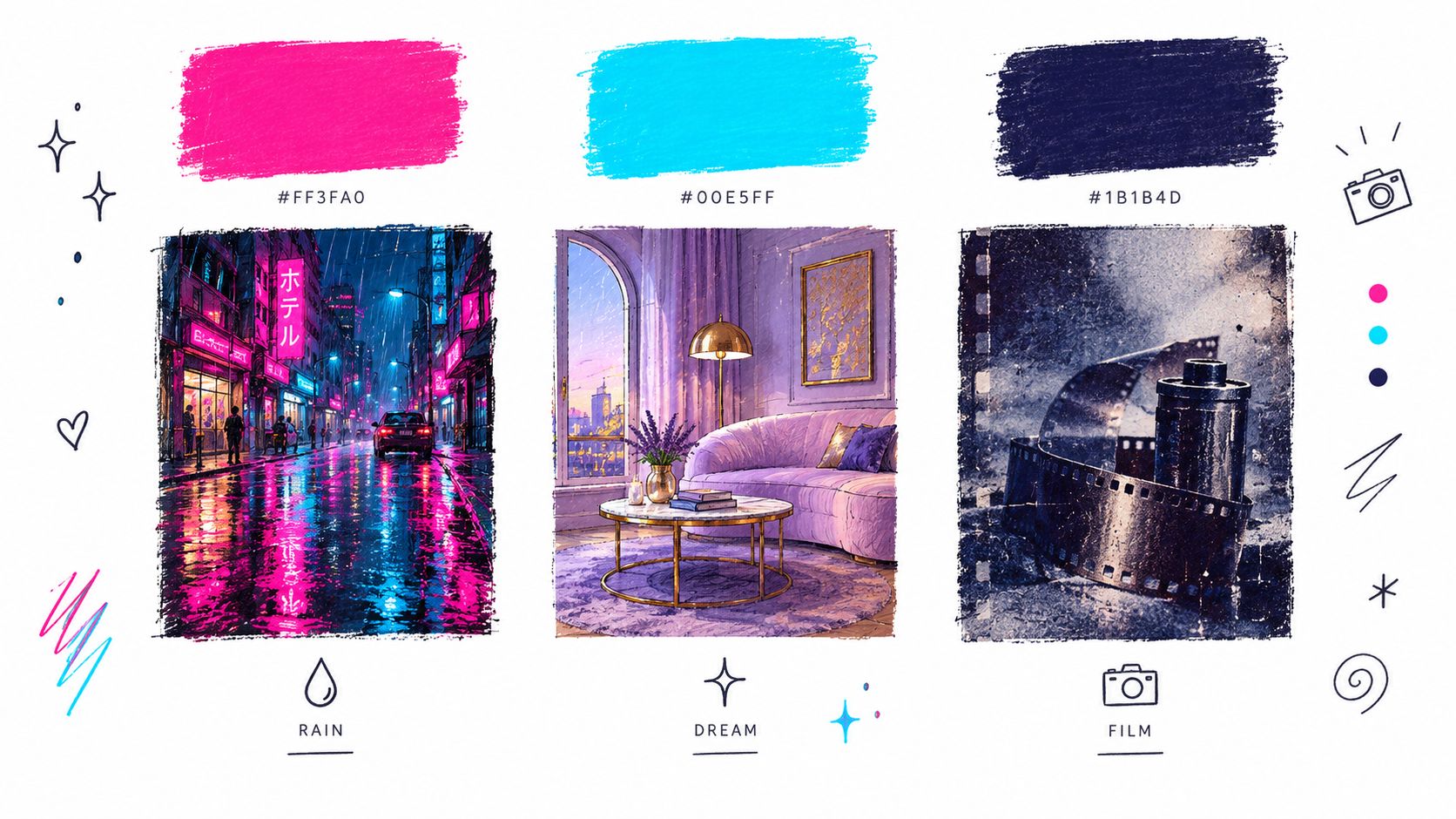
Keep the aesthetic ingredients fixed while changing the subject. Generate a portrait, a desk scene, a product flat lay, and a quote background using the same palette and lighting. In starryai, save the prompt combination that produces the right atmosphere, then reuse it with a new subject and canvas size.
The trade-off is consistency versus flexibility. A strict palette can make a feed look professional, but it can also make every post feel interchangeable. Change one variable at a time, such as the subject, camera angle, or weather, so you know which ingredient created the improvement.
Character development works best as an iterative process. Start with a detailed base description, then create controlled variations for clothing, expression, equipment, and setting. This gives an indie author a visual reference for a protagonist, a game developer a starting point for NPC concepts, and an RPG player a useful character sheet direction.
Begin with a prompt like:
“A thirty-year-old South Asian woman with an athletic build, shoulder-length black curls, a crescent scar over her left eyebrow, calm observant expression, practical charcoal jacket, full-body character concept, neutral studio background.”
Then create variations using precise changes:
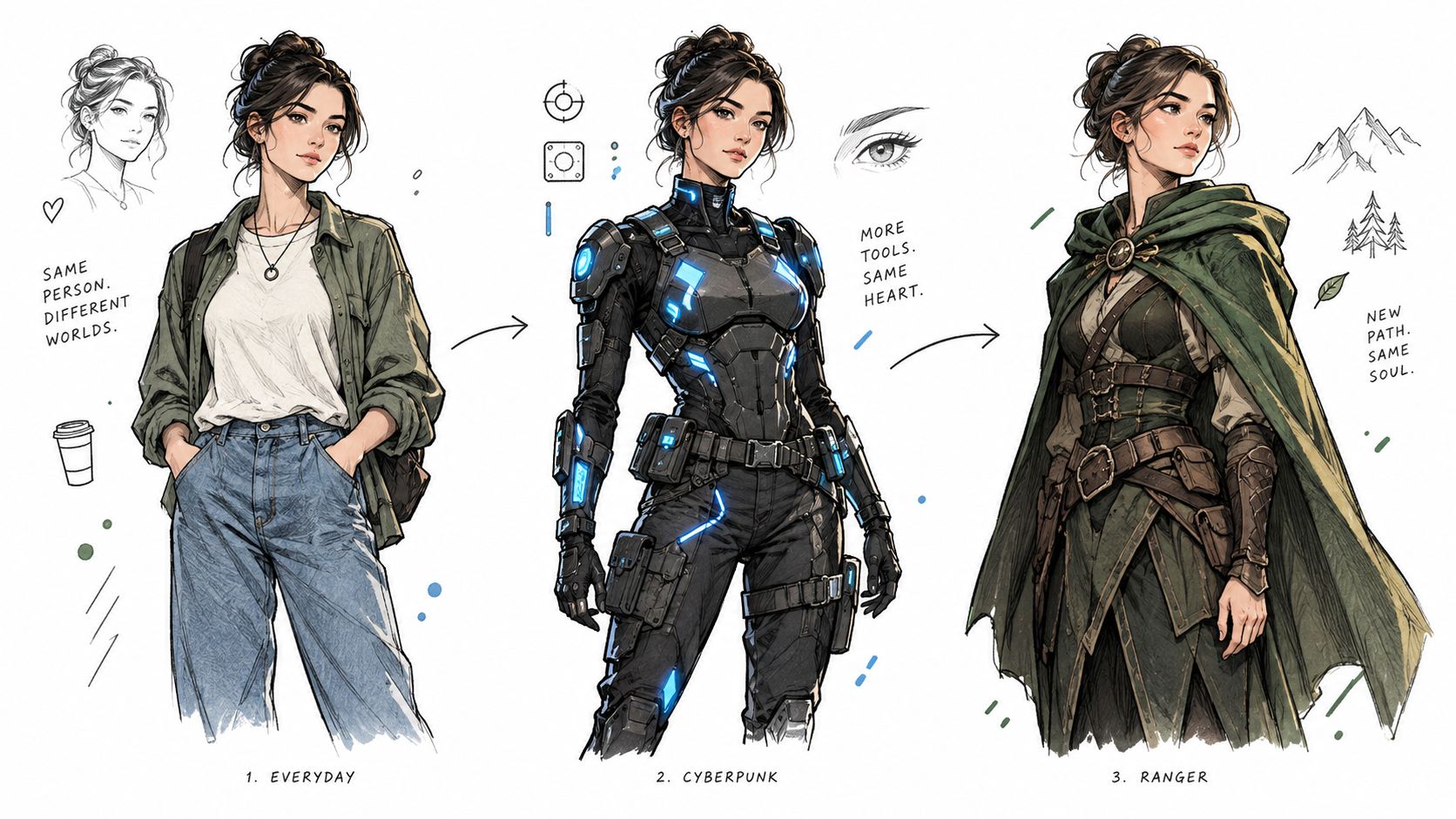
“Same character” language can help, but it won't guarantee perfect identity consistency. Repeat distinctive details in every prompt and compare generations side by side. In starryai, keep successful prompt wording available while you test costumes, expressions, and compositions.
Practical rule: Treat each generation as a design exploration, not a final model sheet.
Character references are useful for planning, but publishers and game teams should check likeness, visual continuity, and rights before using them publicly. A generated face can drift between scenes, and small details such as age, body shape, or ethnicity may change unless you state them clearly.
Trend-based visuals work when they combine a familiar aesthetic with a personal angle. “Cottagecore” alone is broad. “Cottagecore indie music video, moss-green kitchen, handmade lace dress, custom acoustic guitar, soft morning haze” gives the generator a subject, setting, and narrative.
Useful mashups include grandmillennial interiors with a creator's selfie, Barbiecore with witchy academia, or dark academia with Y2K fashion. Add one personal detail, such as a favorite instrument, hairstyle, pet, hobby, or recognizable accessory. That detail helps the image feel like a creator's interpretation rather than a generic trend board.
A single post can attract attention, but a repeatable series gives viewers a reason to return. Keep the concept constant and vary the transformation:
Use trending sounds as creative prompts, but don't assume the sound itself will make an image perform. TikTok trends change quickly, so the visual concept needs to be understandable without context. For platform-specific planning, this guide to AI image generators for TikTok can help connect prompt ideas to short-form content.
The trade-off is speed versus originality. Posting promptly can help you participate in a live trend, but copying its surface appearance won't build a distinct creator identity. Add a recurring visual signature, such as a framing device, color accent, or character detail.
Selfie transformations have an immediate advantage: the audience can compare the source image with the result. That before-and-after structure creates a clear story for TikTok, Instagram, or a personal creative experiment. A well-lit selfie can become a fantasy elf warrior, a glamorous 1920s film star, a cyberpunk hacker, or a character from an alternate reality.
Use a prompt that describes both the identity and the transformation:
“Transform this selfie into a confident fantasy elf warrior, silver braided hair, forest-green leather armor, moonlit ancient forest, cinematic rim lighting, determined expression, detailed portrait.”
For better results, use a clear selfie with visible facial features and minimal obstruction. Describe the era, clothing, mood, lighting, and camera framing. “Make me look cool” gives the generator too much freedom. “1920s movie star, satin evening gown, art deco hotel, soft studio lighting, elegant three-quarter portrait” gives it a usable brief.
Generate several versions of one concept rather than jumping between unrelated transformations. Try a villain-era portrait, a heroic version, and a relaxed behind-the-scenes interpretation. Keep the face and central theme stable while changing the setting or costume.
starryai's selfie workflow is especially relevant for this format, and its AI image generator for creating images of yourself offers a natural starting point for transformation concepts. Review each result for facial distortions, unwanted accessories, and changes that could misrepresent the person.
The trade-off is spectacle versus authenticity. Fantastical edits are fun, but a transformation that preserves a recognizable expression or personal detail often feels more engaging than a completely generic character portrait.
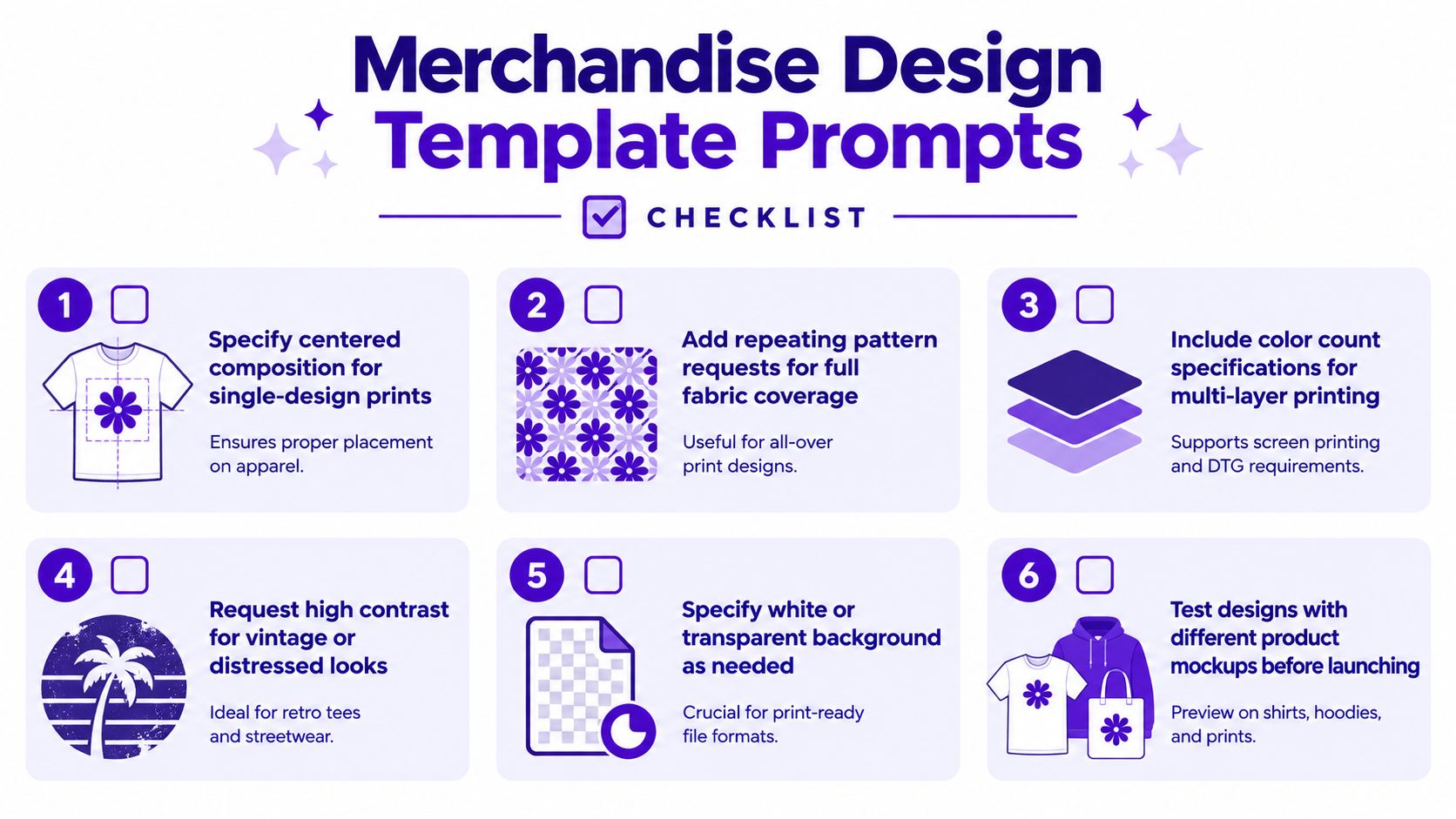
Merchandise prompts should describe a print layout, not just an illustration. Tell the generator where the artwork belongs, how much visual space it needs, and whether it should become a centered graphic, a repeating pattern, or a product mockup.
For a shirt design, try:
“Crescent moon floral wreath with moths and small stars, centered composition for a dark cotton T-shirt, bold high-contrast shapes, limited color palette, clean outline, no text, white background.”
For fabric, change the purpose:
“Seamless repeating pattern of crescent moons, wildflowers, and moths, balanced spacing, midnight blue and muted gold palette, flat textile design.”
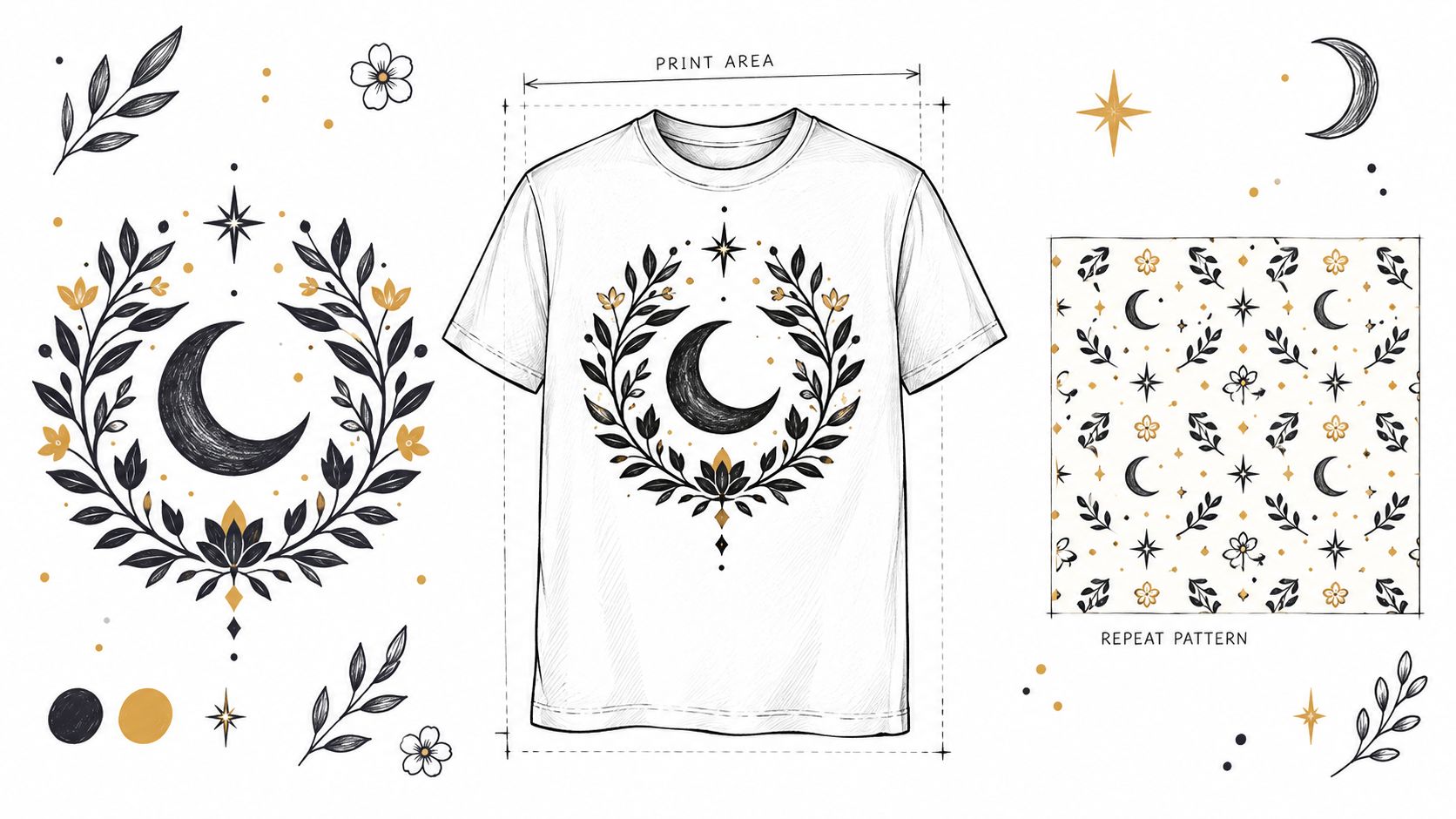
Ask for a white or transparent background when appropriate, but inspect the actual file before uploading it to a print-on-demand platform. AI tools may create attractive mockups that aren't production-ready artwork. Text, intricate edges, thin lines, and small decorative details often need manual cleanup.
A practical prompt brief can include:
starryai can help Etsy sellers and side-hustlers explore a collection quickly. Its merchandise design ideas provide additional directions for turning a broad niche into a coordinated set of products.
The trade-off is creative detail versus print clarity. A dense image may look rich on screen but muddy on fabric. Start with one hero design, test it in a realistic mockup, and only then expand the collection.
Emoji sequences work as compact creative briefs for creators who need a starting point quickly. 🌙✨🗡️👸 can suggest a moonlit warrior princess, while a short phrase defines the subject, setting, and visual treatment.
Try:
“🌙✨🗡️👸, a moonlit warrior princess standing on a cliff above a glowing kingdom, celestial fantasy, indigo and silver palette, dramatic clouds, heroic full-body composition.”
Build the prompt in layers: emojis for story ingredients, a subject phrase for interpretation, a mood for emotional direction, and composition details for framing. The same sequence can produce distinct outputs when you change the order. Lead with the crown for a regal portrait, the sword for an action scene, or the moon for a quiet atmospheric image. Four to six emojis generally provide enough material for a narrative without overcrowding the concept.
Emoji prompts suit audience challenges, community posts, and rapid concept development. A creator can invite followers to submit four emojis, then interpret each submission in a shared visual style. A tabletop player can combine mood emojis with a character or setting phrase to explore a backstory or encounter scene.
starryai accepts emoji-based input, giving creators a practical starting point when writing a detailed prompt feels slow. Its text-prompt and editing tools can then refine the subject, mood, or composition. The trade-off is predictability. Emoji meanings vary, so add a clarifying phrase whenever consistent results matter.
Save successful emoji combinations with their style settings. That record becomes a reusable prompt library for recurring challenges, seasonal posts, and audience participation. Test one variation at a time so you can identify which emoji, order, or descriptive phrase changed the result.
A strong book-cover prompt has two jobs: signal the genre and leave a designer room to build the shelf-facing layout. Define the audience promise, focal subject, contrast, palette, mood, and negative space before naming a rendering style.
For an indie fantasy author, use:
“Atmospheric fantasy book cover artwork, lone female ranger holding a lantern at the edge of an ancient forest, distant ruined city, deep emerald and bronze palette, mysterious hopeful mood, uncluttered upper area for title typography, no words.”
For romance, describe the relationship and emotional promise rather than changing color alone:
“Contemporary romance cover artwork, two hands reaching across a rain-streaked café window, warm terracotta and cream palette, intimate optimistic mood, clean central focus, generous space for title and author name, no text.”
Series branding depends on repeatable visual decisions. Keep the palette family, framing, symbol treatment, and realism level consistent while changing the central subject. Generate left, center, and lower-third focal placements so a designer can test title and author-name positions.
Keep lettering out of the generation prompt. AI-generated type can be misspelled, distorted, or hard to edit. Create the artwork without words, then add typography in a layout tool with control over font choice, spacing, hierarchy, and accessibility. In starryai, use a detailed text prompt to test cover concepts, then refine composition with its editing tools before handing the artwork to a designer.
Save the winning prompt components as a series brief. The same visual language can guide author banners, social tiles, newsletter headers, and character introductions. Research comparable books to understand genre expectations, while avoiding recognizable cover designs or a living artist's signature style.
Treat every generated cover as a draft asset. Check identity consistency, cultural details, symbolism, and rights before publication. In the United States, purely machine-generated images generally are not protected by copyright, while meaningful human-authored editing, selection, arrangement, or modification may protect those human-created contributions. The CapCut copyright overview summarizes this distinction and notes that a prompt alone is not enough to establish ownership.
Gaming visuals need functional differentiation. A player avatar should remain recognizable at the intended display size, while an NPC library needs clear distinctions between roles, factions, and equipment. A tabletop character sheet benefits from a readable portrait, signature item, and pose that communicates personality.
For a fantasy RPG avatar, write:
“Tabletop RPG half-elf ranger avatar, lean athletic build, dark braided hair, weathered green cloak, recurved bow, fox companion, alert expression, painterly fantasy portrait, muted forest palette, circular profile composition.”
For a retro project, change the rendering requirements:
“Pixel art dungeon merchant sprite, short stature, oversized satchel, brass goggles, warm orange tunic, front-facing idle pose, limited palette, transparent background.”
Mention the intended visual language directly, such as pixel art, watercolor, anime-inspired illustration, low-poly 3D concept, or hand-painted indie game art. Include class, role, equipment, signature colors, and a pose. For 3D integration, request front, side, and back references, but expect a separate modeling and cleanup workflow.
Twitch streamers can create avatars, alert concepts, and channel backgrounds around the same character. Discord communities can give members related but distinct icons by keeping the art style fixed and varying symbols or color accents.
The main trade-off is expressive detail versus usability. A highly detailed portrait can look excellent in a profile banner but lose its identity when reduced to a small icon. Generate at the platform's intended shape, then test the result at the size viewers will see.
Avoid requesting copyrighted game characters when a new original character would serve the same purpose. “Armored frost mage with a cracked crystal staff” gives you a usable direction without depending on a recognizable franchise identity.
Seasonal images work because they connect visual mood with a timely activity. A useful prompt names the season, weather, objects, palette, lighting, and audience action. “Autumn” is broad. “Cozy autumn cottagecore reading nook, burnt orange blanket, sage green ceramic mug, pumpkins by a rain-streaked window, warm lamplight, vertical social post” gives the generator a complete scene.
Build variations around the same brand:
Seasonal content benefits from advance preparation because you can review the images, adapt them to different platforms, and replace weak generations before the peak posting period. Keep the core brand ingredients stable so a holiday post still looks like it belongs to your account.
A small business might use one seasonal prompt for a product backdrop, another for an email header, and a third for a social announcement. A creator might reuse the same character through autumn, winter, spring, and summer to turn isolated posts into a visual series.
The trade-off is familiarity versus freshness. Pumpkins, snow, blossoms, and beach scenes communicate quickly, but they can look interchangeable. Add a specific personal or community detail, such as a local tradition, favorite activity, distinctive product, or recurring mascot.
Check cultural context before publishing holiday imagery. Seasonal symbols aren't universal, and respectful specificity is stronger than mixing unrelated references into one decorative scene.
Niche communities respond to details that insiders recognize. A witchcraft community may connect with a carefully composed tarot table, lunar motifs, dried herbs, and handmade textures. A darkwave audience may prefer stark monochrome architecture, analog grain, dramatic silhouettes, and restrained neon rather than a generic “goth” image.
Start with the community's visual language, then add a clear purpose:
“Darkwave album-inspired portrait, solitary figure beneath brutalist concrete arches, black and charcoal clothing, restrained electric-blue light, analog film grain, introspective mood, square social artwork.”
For cottagecore, you might use:
“Maximalist cottagecore kitchen, overflowing herbs, mismatched ceramics, embroidered curtains, old recipe cards, warm afternoon light, lived-in handmade atmosphere, editorial interior photography.”
Spend time observing community spaces before writing prompts. Notice the objects, language, references, and values people use themselves. A witchy visual should not reduce a living practice to random crystals, and an anime-inspired image should not flatten a broad community into one costume.
Useful variations include:
The trade-off is specificity versus reach. A highly specialized image may mean less to a general audience, but it can create stronger recognition among the people you most want to reach. Avoid stereotypes, credit references where appropriate, and invite community feedback instead of treating a niche as a disposable trend.
The most useful AI image generator ideas are the ones you can repeat without producing the same image every time. Choose one audience, define one format, and decide what the image must achieve. A TikTok creator might choose personal transformation portraits in a vertical format. An indie author might choose character-led cover art with negative space for typography. An Etsy seller might choose centered, high-contrast graphics for apparel.
Write a base prompt with the six core components:
Then create three controlled variations. Keep five components fixed and change one. For example, preserve the character, palette, mood, and composition while testing a forest, city, and studio setting. Or preserve the product scene while changing the lighting from soft daylight to dramatic evening light.
Change one variable at a time. Otherwise, you won't know which prompt ingredient improved the result.
Save successful prompt ingredients, including distinctive subject descriptions, palette language, lighting terms, camera angles, and negative requirements such as “no text” or “uncluttered background.” A reusable prompt library helps you build collections, series covers, recurring characters, and seasonal campaigns without starting from a blank page.
Review every generation before publishing. Check whether the composition supports the platform, whether faces and hands look consistent, whether product details are accurate, and whether text remains readable. For book covers and merchandise, add typography separately whenever possible. For game assets, test the image at its real display size and confirm that the art style matches the rest of the project.
Commercial and publishing use also requires a rights review. In the United States, purely machine-generated images don't receive copyright protection, while meaningful human editing, selection, arrangement, or modification may protect the human-authored contributions (copyright guidance for AI-generated images). Your workflow should document the creative decisions you make, retain original files, and verify the terms that apply to the tool, platform, collaborators, and intended use.
starryai supports quick experimentation with text prompts, selfies, and emojis, which makes it useful for testing concepts before you commit to a larger design workflow. The final asset may still need cropping, cleanup, typography, color correction, identity review, or another editing pass. Fast generation is valuable, but a repeatable system is what turns an interesting image into useful creative production.
| Prompt Type | Implementation Complexity 🔄 | Resource Requirements ⚡ | Expected Outcomes ⭐ / 📊 | Ideal Use Cases | Key Advantages / Tip 💡 |
|---|---|---|---|---|---|
| Aesthetic Mood Board Prompts | 🔄🔄 (moderate, needs vision + iterations) | Moderate, color refs (hex/Pantone), sample images, batch setup | ⭐⭐⭐, cohesive visuals; 📊 strong brand/feed consistency | Social media feeds, seasonal campaigns, merchandise collections | Produces consistent branding; 💡 use hex/Pantone and save prompt combos |
| Character Design Evolution Prompts | 🔄🔄🔄 (high, iterative consistency work) | High, detailed base description, reference poses, iterations | ⭐⭐⭐, many design variants; 📊 aids character development & assets | Indie authors, game devs, tabletop RPGs | Generates multiple iterations; 💡 use "same character" phrasing |
| Viral TikTok Trend Mashup Prompts | 🔄🔄 (moderate, trend research required) | Low–Moderate, trend monitoring, sound/style refs; fast to produce | ⭐⭐⭐, high shareability; 📊 improved algorithm visibility (time-sensitive) | TikTok creators, content marketers, influencers | Boosts reach quickly; 💡 post promptly while trend peaks |
| Selfie Transformation Prompts | 🔄🔄 (low–moderate, single-prompt transforms) | Low, clear selfie, style descriptors; quick generation | ⭐⭐⭐, highly engaging/personal; 📊 drives social sharing and virality | Influencers, cosplay, transformation challenges | Very shareable personal content; 💡 use well-lit selfies & specific era/style |
| Merchandise Design Template Prompts | 🔄🔄🔄 (moderate–high, technical print needs) | High, print specs, color separability, mockups, possible post-edit | ⭐⭐⭐, production-ready art (may need tweaks); 📊 speeds productization | Etsy sellers, POD entrepreneurs, merch creators | Creates print-optimized designs; 💡 specify centered composition & color counts |
| Emoji-to-Artwork Expansion Prompts | 🔄 (low, simple input translation) | Low, emoji string + optional clarifier; minimal setup | ⭐⭐, playful concept art; 📊 quick idea-to-image conversion | Social challenges, non-writers, rapid concepting | Low barrier to entry; 💡 use 4–6 emojis + one clarifying phrase |
| Book Cover and Author Brand Prompts | 🔄🔄🔄 (moderate–high, market & composition needs) | Moderate, genre refs, composition notes, possible typography editing | ⭐⭐⭐, market-aligned covers (may need post-processing); 📊 speeds iterations | Indie authors, KDP publishers, small presses | Cost-effective cover concepts; 💡 keep composition simple for text overlay |
| Gaming Avatar and Asset Prompts | 🔄🔄🔄 (high, platform/style constraints) | High, style specs, multiple views, sprite/export prep, post-processing | ⭐⭐⭐, useful for prototyping; 📊 accelerates asset creation (may need conversion) | Indie game devs, streamers, RPG players | Fast custom assets; 💡 request front/side/back views and style references |
| Seasonal and Holiday Aesthetic Prompts | 🔄🔄 (low–moderate, timely planning) | Low, seasonal palettes, symbols, batch creation recommended | ⭐⭐⭐, timely engagement; 📊 algorithm boost during season windows | Content calendars, e‑commerce seasonal promos, influencers | Predictable calendar content; 💡 batch-create 4–6 weeks before peak |
| Niche Community and Subculture Prompts | 🔄🔄🔄 (high, cultural nuance required) | Moderate, community immersion, authentic references, careful language | ⭐⭐⭐, strong niche engagement; 📊 fosters community sharing and loyalty | Niche creators, community leaders, subculture brands | Deep resonance with niche audiences; 💡 research community norms, avoid stereotypes |
Use starryai to turn text prompts, selfies, and emojis into visual concepts for TikTok series, character references, merchandise, book projects, and community content. Start with one audience and one format, test three controlled variations, and visit starryai to begin building your next repeatable visual system.


.svg)